Ongoing Release Notes (1/1/20-12/5/22) | Projul

Build Notes 1.4.4924
Posted on Monday Nov 28th, 2022
Additions:
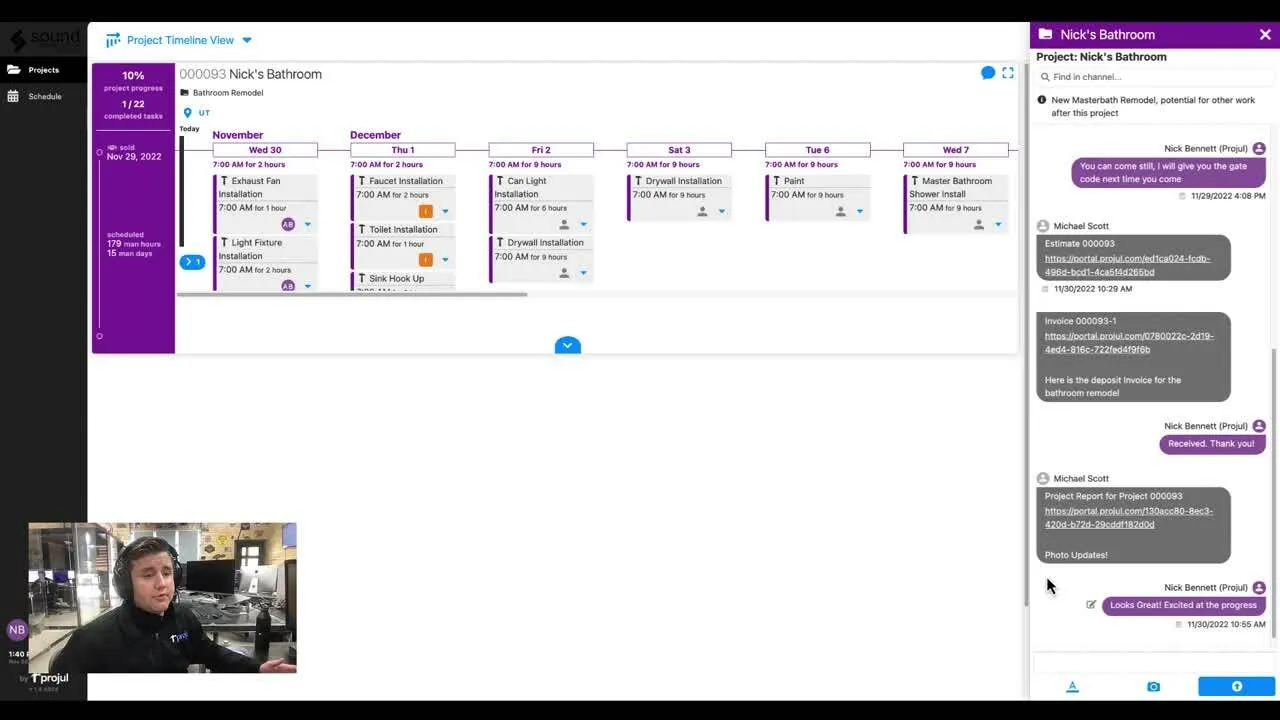
- We are excited to announce the release of Projul’s Customer Portal!!! As we all know, managing customer expectations is almost more important than managing the job itself. Juggling weekend texts and late night calls from customers is exhausting and often frustrating. Lacking effective customer communication can lead to misunderstandings, missed profits, and undocumented expectations. Use Projul’s customer access to share schedules and track all communications in one easy to access spot. Simplify customer communications, close and complete projects quickly, improve customer relationships, and receive more positive reviews from customers. All of these leads to increased revenue for your business! Check out this video to see how it works!
Build Notes 1.4.3629
Posted on Monday Oct 31st, 2022
Remodeled:
-
When using your mobile device, the speed at which your data loads has been remodeled. This will allow you to see and edit the most up to date information quicker than before. Making changes and seeing updates from your mobile device and the job site is now easier than it’s ever been!
Repaired:
-
Improvements to the geo-fencing for employee time tracking. If your location settings allow, you can now see out of bounds clock-in warnings on the time logs.
-
Rounding values for assembly style estimates function as expected.
-
When using an Android device, adding a negative markup functions as expected.
Build Notes 1.4.3145
Posted on Monday Oct 24th, 2022 Additions:
-
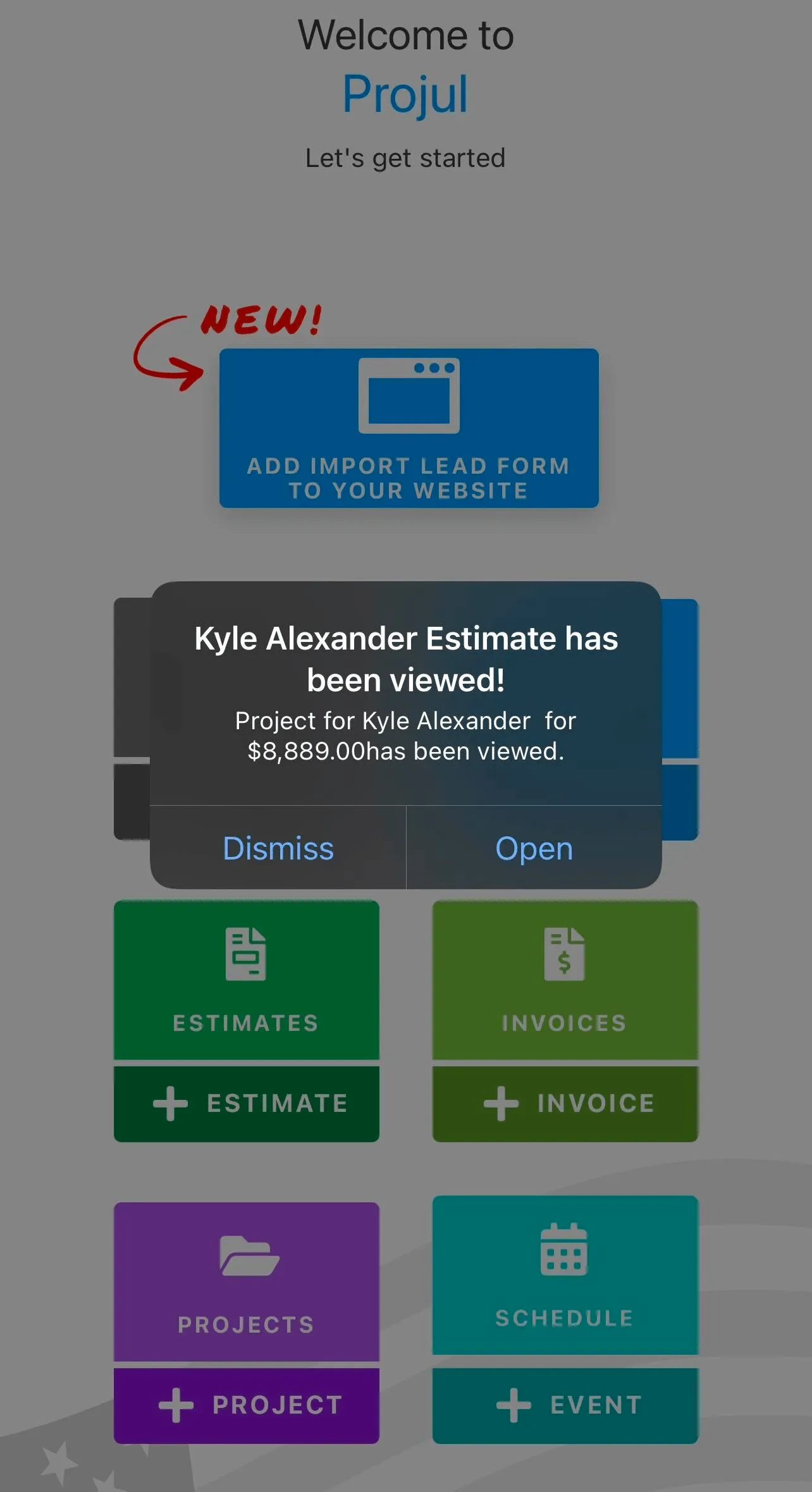
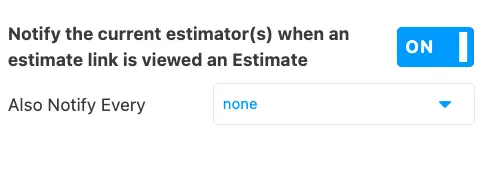
We are excited to announce a new sales tool! When a customer opens an estimate, you can now receive a push notification to your mobile device. This allows you to be tied in real time to how your customers are interacting with your estimates and can help you make timely follow ups. You can turn this setting on under the notification settings.
Remodeled:
-
When working with Project templates, unscheduled tasks will display in the order they were created. This will provide consistency and allow you to easily find and schedule these tasks once you apply a project template.
-
When Materials are removed from an estimate using a change order, they will no longer display on the materials breakdown pdf.
Repaired:
- Improved functionality when using filters in the lead pipe line.
- Negative tax values display as expected.
Build Notes 1.4.2449
Posted on Friday Oct 7th, 2022
Repaired:
- When a project is synced with Quickbooks, the icons displaying project status show as expected.
- When a Change order is deleted, the original estimate sections are now restored as expected.
Build Notes 1.4.1979
Posted on Friday Sep 30th, 2022 Additions:
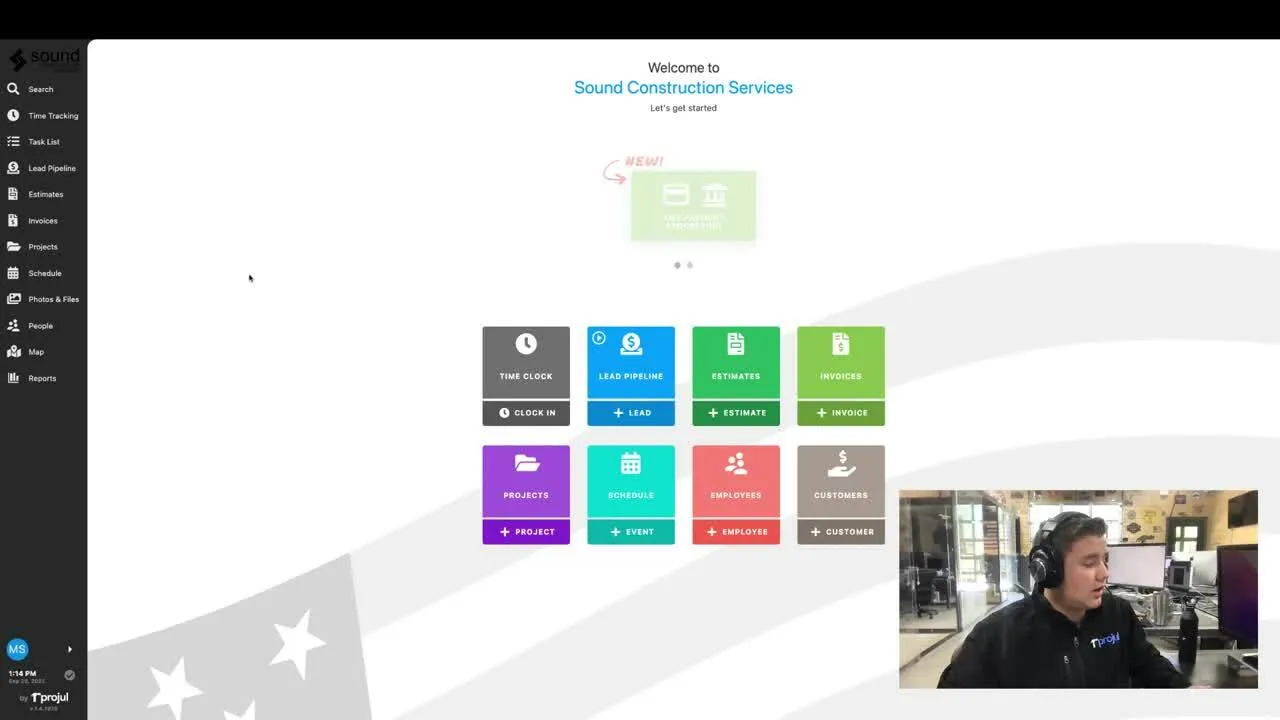
- We are excited to show you our new cost line editing page! This page is designed to give you a place to see and manage all of your cost lines that you have entered into your companies database, and update these costs across all of your estimate templates. This will greatly increase your ability to stay on top of changing market trends for both labor and material costs, and ensure your jobs hit the profit margins you are expecting! Check out this video to find out more!
Repaired:
- Selecting a project manager from the customer editing page functions as expected.
- Improvements made to the functionality of tax setting for Canadian customers.
Build Notes 1.4.1979
Posted on Friday Sep 9th, 2022
Additions:
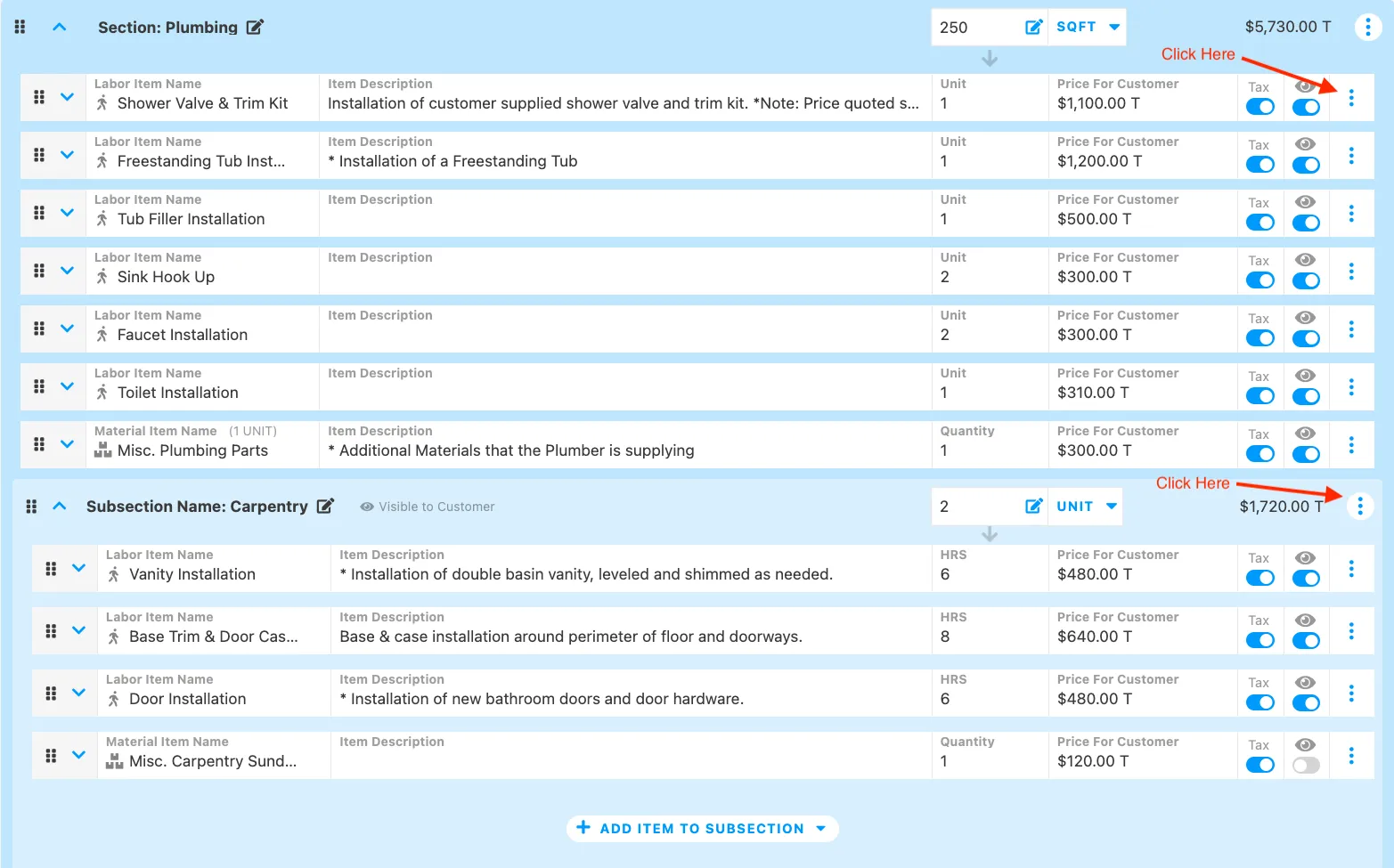
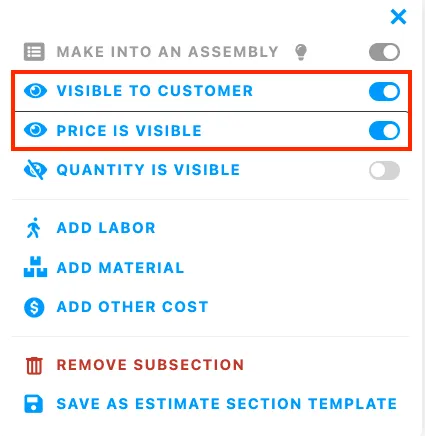
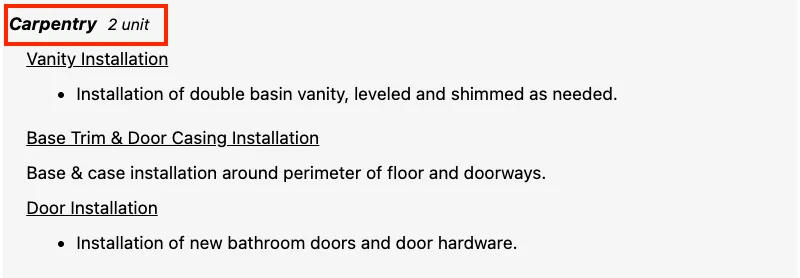
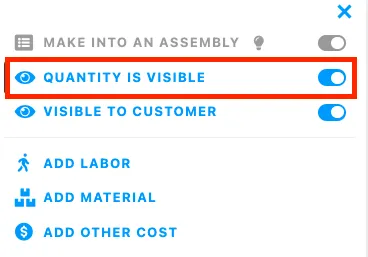
- We are excited to release new estimating display options! You can now show quantities of line items and subsections without showing the price to the customer. If you are using assemblies or wanting to show how many of a certain cost line will be on the job, this is a great way to improve communications with your customer and allow an additional option for transparency. You can access this by clicking on the 3 dot menu next to a line item or subsection, and using the new display toggles.
Repaired:
- Invoice totals display as expected and are updating the total vs subtotal when tax is applied.
- When a change order is deleted, the invoices and estimates screen are updated to reflect the change.
Build Notes 1.4.0551
Posted on Monday Aug 29th, 2022
Additions:
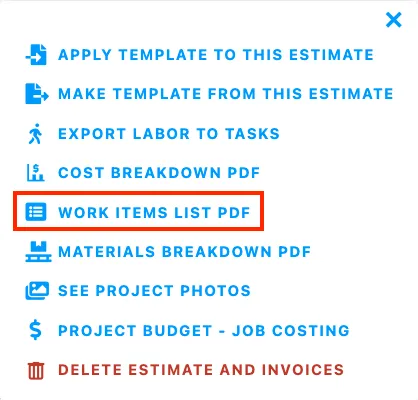
- Communicating important project details to your team is so important! You can now generate a “work items list” which will include quantities for the all estimated materials and labor items for every job. This can serve as a work order to your team in the field, and is a perfect compliment to scheduling your team tasks within the system! This new tool is found in the 3 dot menu of the estimate editor in the same space as the “project budget” and “materials breakdown”.
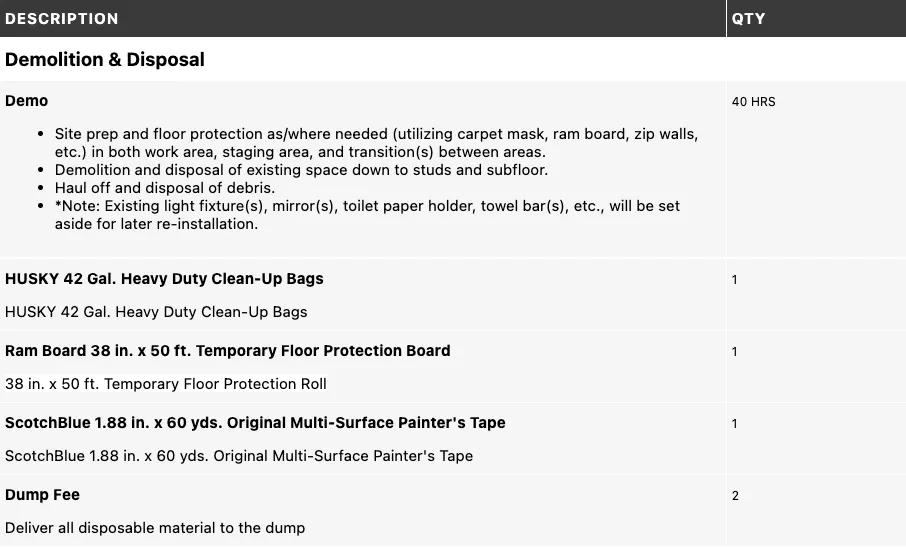
Remodeled:
- Updating estimate templates just became easier! You can now adjust the customer visibility toggle from within the template editor.
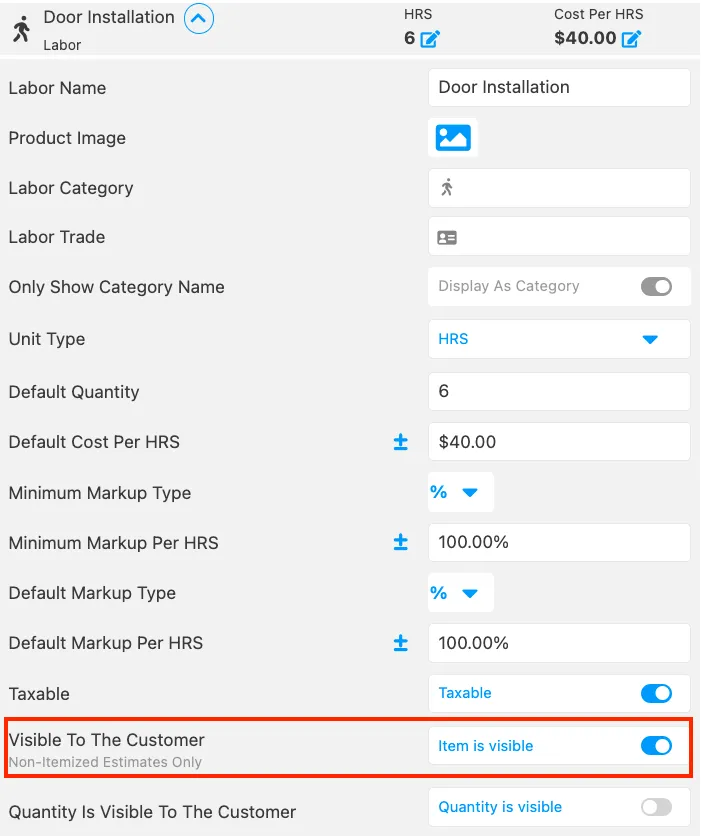
Repaired:
- When syncing an invoice with Quickbooks, the invoice date displays as expected.
- When creating an estimate before a project, the numbering system matches the project and estimate.
Build Notes 1.3.9998
Posted on Monday Aug 23rd, 2022
Remodeled:
- You now have additional control over your estimates! You can remove customer signatures and modify estimates after the signature has been added. This is part of the estimate configuration settings.
- To get a better understanding of your budgets, you can now view the total amount of both the company cost and markup in the cost breakdown pdf.
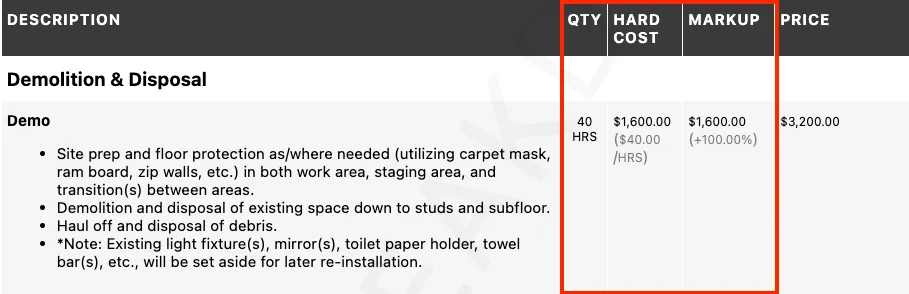
Repaired:
- The “Use Match” feature when adding a new project lead functions as expected.
- When you add a change order to a job, the invoice is updated as expected.
- Improvements to photo uploads in a comment channel.
Build Notes 1.3.9988
Posted on Monday Aug 8th, 2022
Repaired:
- Improvements made to the existing sync with Quickbooks Desktop.
Build Notes 1.3.8911
Posted on Monday Aug 1st, 2022
Repaired:
- Improved Performance of the exporting customers functionality. If you need to pull out customer information for any reason, the .csv file export works as expected.
- Clicking “save” on a time log repeatedly continues to save time logs and functions as expected.
Build Notes 1.3.8720
Posted on Wednesday July 27th, 2022
Repaired:
- Improvements to the expected functionality of both the time tracking page, and ability for users to clock-in and clock-out of tasks.
- Adding a customer from the estimate page works as expected.
Build Notes 1.3.8590
Posted on Wednesday, July 20th 2022
Remodeled:
- We have added a toggle to display subsection assembly quantities to the customer in the portal and print preview. This gives you even more control on what information is displayed in your estimates to your customers.
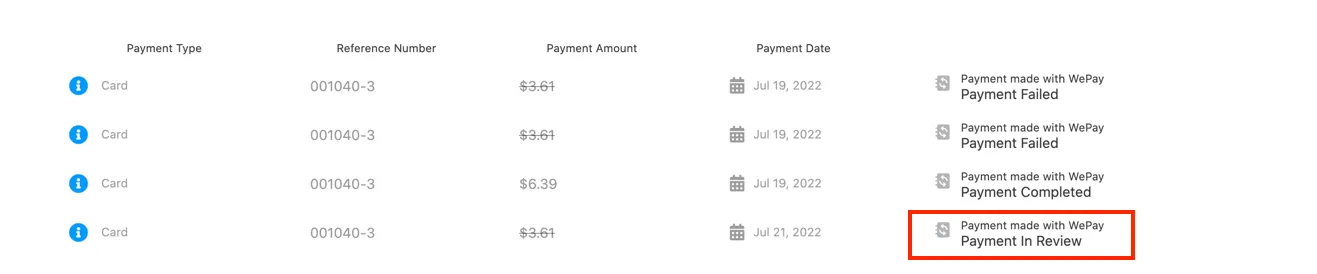
- When a WePay payment is in review, it will now be displayed on the payment. This will give you a deeper understanding of where you payments are in the process of being received.
Repaired:
- Pay rates on the time logs page display as expected
- Long decimal amounts for line items on an estimate function as expected
Build Notes 1.3.8107
Posted on Tuesday, July 12th 2022
Additions:
- We have released a new Custom Report! This report is called the “Profitability Analysis Report”. This report displays the same information as the WIP report, but for the completed Projects within your Projul account. Now you can access financial and profitability reports at any point during the lifecycle of a job!
Remodeled:
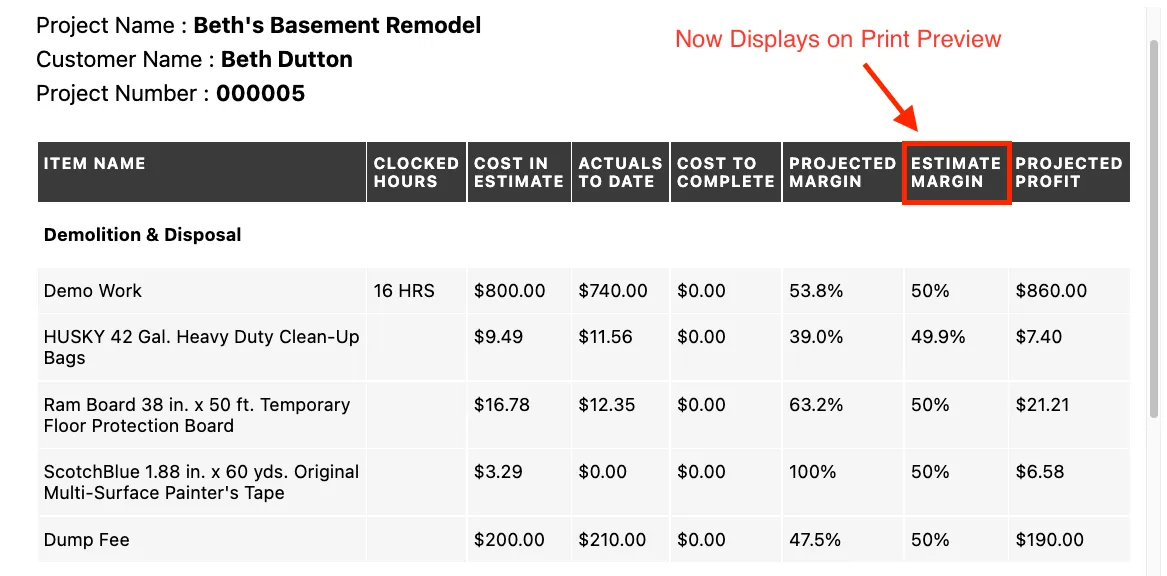
- We have updated the .pdf formatting of the job costing page. You can now see the estimated margin as a column on the printed report. This provides more consistency between your app and any files you want to print from within Projul.
Repaired:
- Scrolling in the sync drop down when having multiple change orders works as expected
- Displaying menu drop down for new leads and projects has been reformatted
- Converting time logs to overtime in certain scenarios will work as expected.
Build Notes 1.3.7956
Posted on Tuesday, July 5th 2022
Additions:
- We are excited to release a new scheduling view! In the scheduling month view, you now have two viewing options! In addition to the pre-existing heat map view, you can choose to display task names instead. This is a great view to capture a workers schedule for the whole month, and simultaneously compare it to other workers schedules. Click here to view instructions on how this new feature can help you!
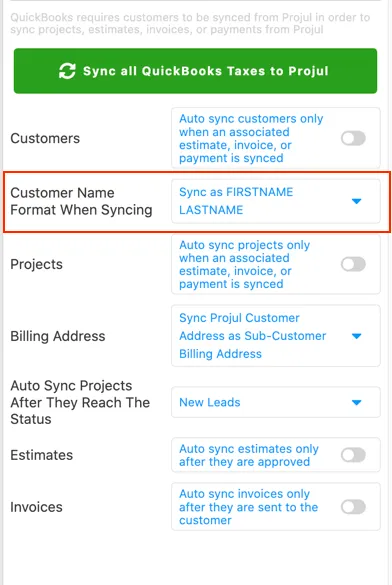
- To better fit your accounting needs, you can choose to sync customer names in a “Last name, First name” or “First name, Last name” format. No matter how your customers are displayed in Quickbooks, Projul’s sync can match your workflow.
Remodeled:
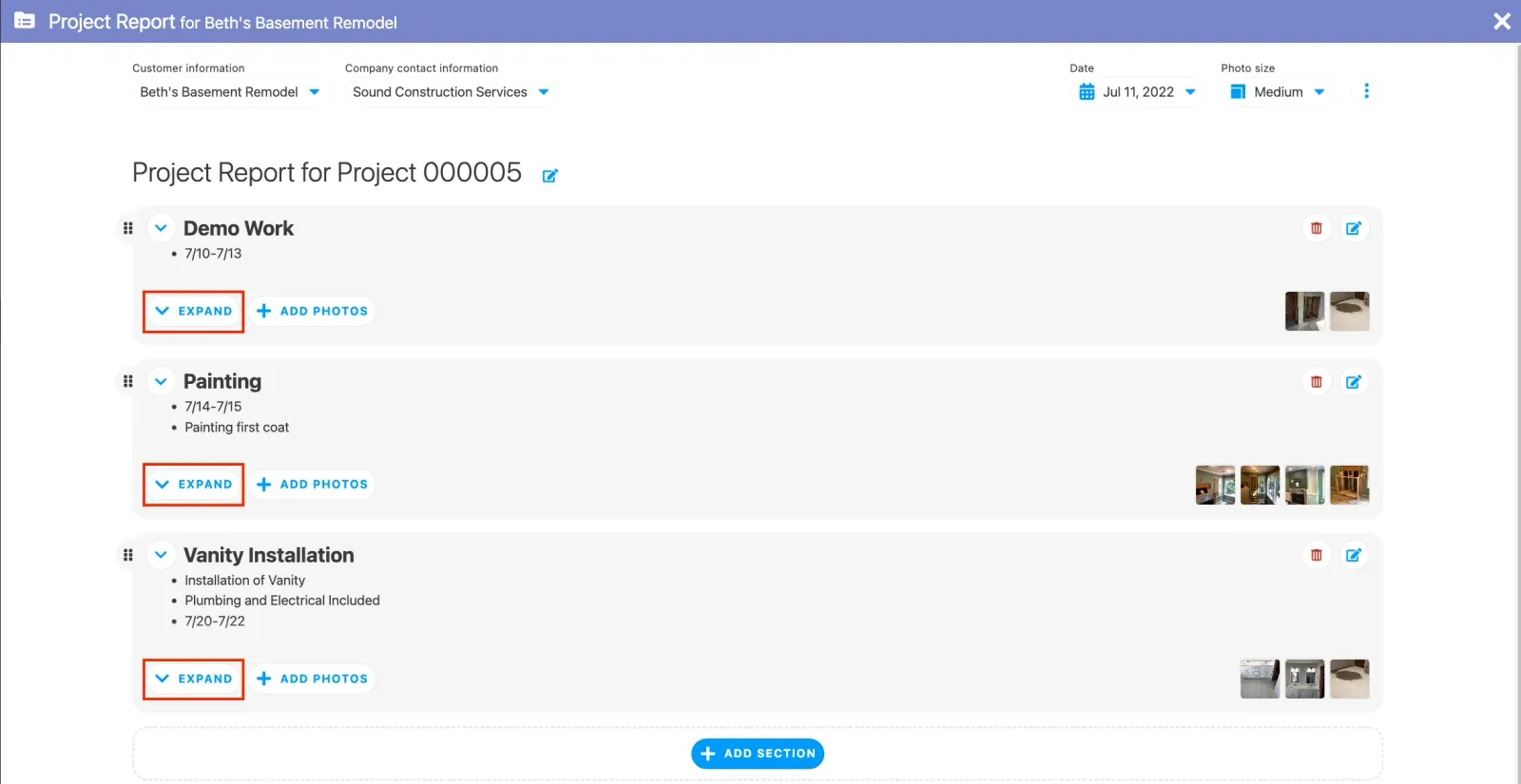
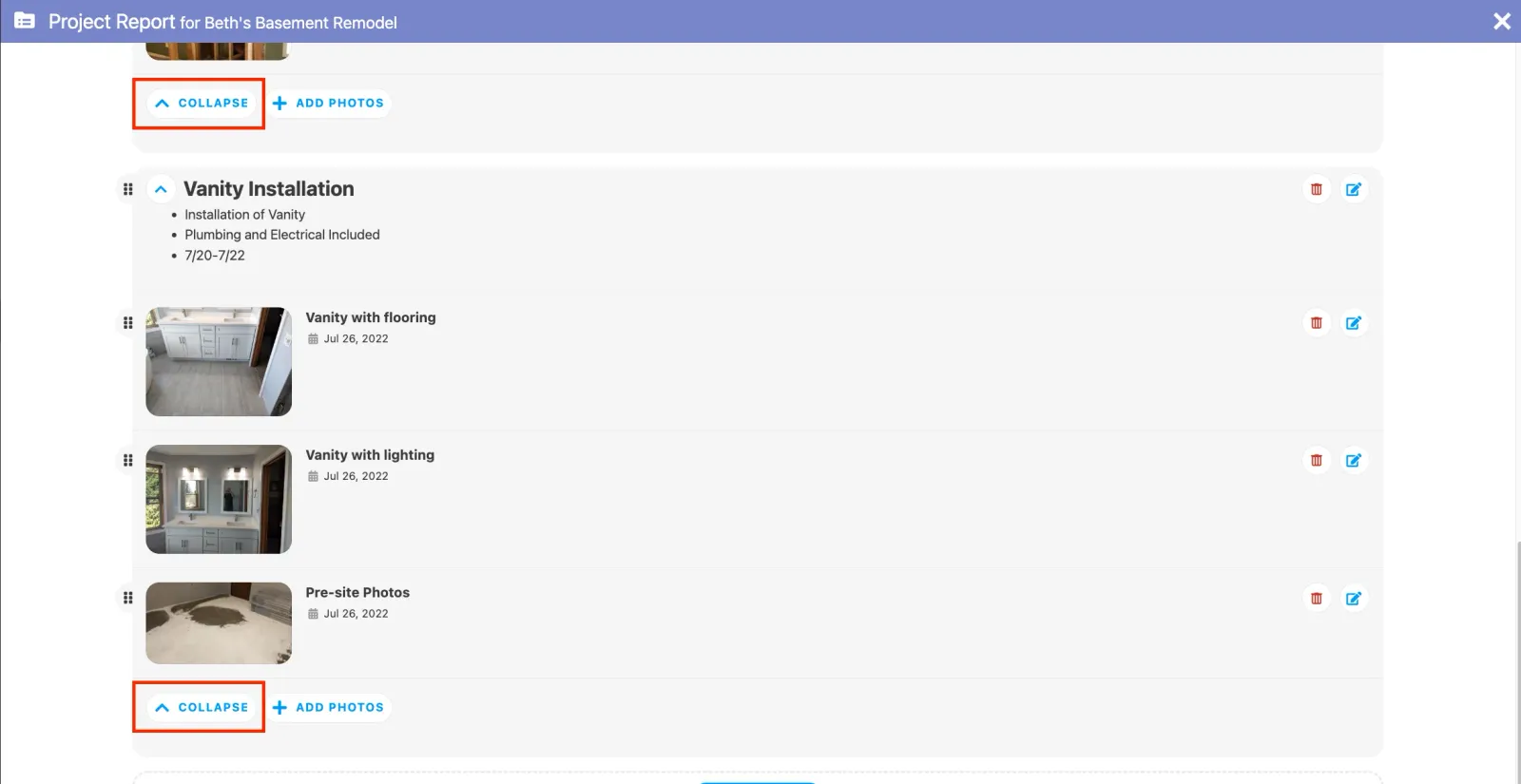
- In the Project Reports, you can now collapse or expand sections to speed up scrolling, or display more detail.
- There is now an indicator to notify you when a payment has been synced into Projul from your Quickbooks online account.

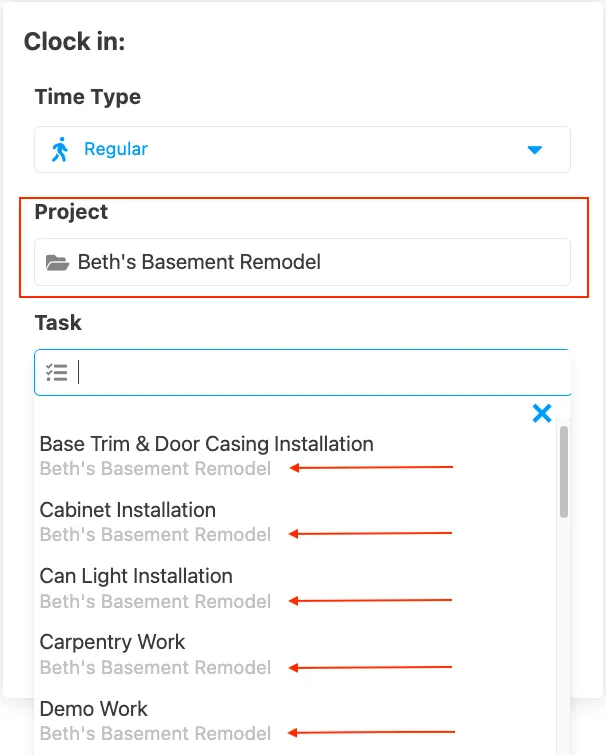
- When logging time, you can select a project, you can now filter the tasks by that project making it easier to find the correct task you want to apply time to.
Repaired:
- Document Title Headers and Company Logos will now display as expected.
- Invoice Documents now display estimate and change order totals that have been added to the invoice.
- Improved connectivity for Quickbooks Online Integration.
- “Labor” cost lines are being categorized as expected.
- Photo and file upload filters function as expected.
Build Notes 1.3.7005
Posted on Friday, June 24th 2022
Remodeled:
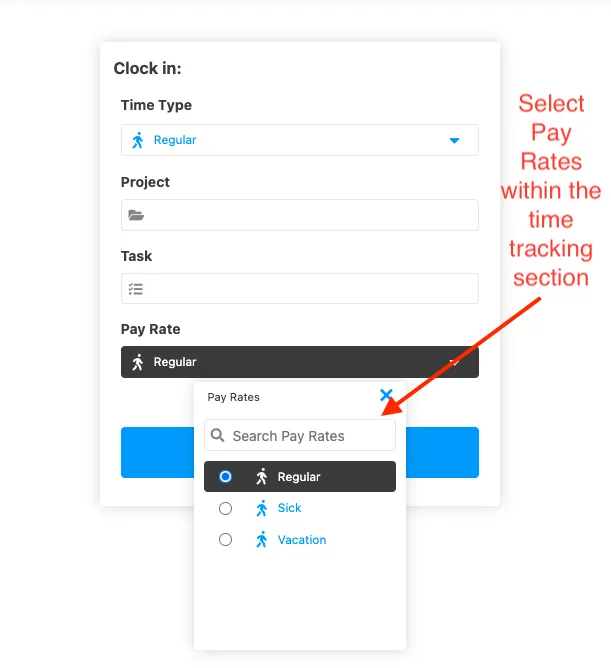
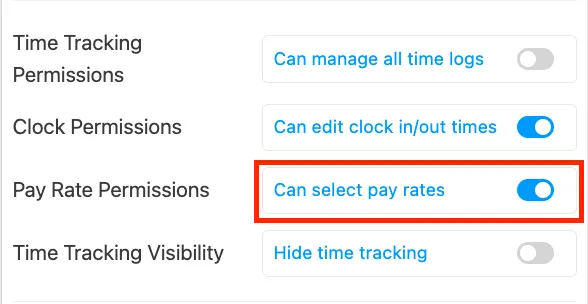
- Based on user permissions, a user can now choose their pay rate on a select task without having permission to access every time log. This provides more flexibility as you track time for your employees.
Repaired:
- Change orders stored in the cloud are visible in the change order sections of Projul.
- Improvements to tax calculations on estimates and invoices.
- Smoother process when adding a user to upgrade your plan.
- When an estimate status is updated, it displays that update on the project card.
- Based on user permissions, you can now view all schedules if permission is set to “view all user schedules”.
- Improvements to clock-in, clock-out process, as well as timelog management.
Build Notes 1.3.6756
Posted on Friday, June 17th 2022
Additions:
- A new user setting has been added! You can now give permission to have any user select the pay rates for the tasks. This can be accessed from the time tracking page and gives your users more control over the time being tracked for them, eliminating the need for you to make pay rate changes when reviewing time logs.
Repaired:
- Customer unit cost is now displayed after a Quickbooks Desktop sync on non-itemized estimates.
- Syncing cost lines in non-itemized estimates works as expected.
- Improvements to Time log reports loading.
Build Notes 1.3.6368
Posted on Friday, June 10th 2022
Remodeled:
- You can now import multiple customers into Projul who have the same phone number or email address. This is a great tool if you do work for multiple locations of the same company and want to store them as separate customers.
Repaired:
- The scheduling settings display as expected.
Build Notes 1.3.6002
Posted on Friday, June 3rd 2022
Additions:
- We are excited to release a new customer-facing tool! You can now create Project Reports which can be sent to customers via a portal link. You can find this new feature in the projects tab, under the 9 dot on any project card. You can annotate and attach photos and generate reports that can be sent to your customer. This is a great way to keep customers informed on the progress of a job, or provide them with a summary of your work upon completion!
Remodeled:
- More consistent verbiage has been applied to your projects page, eliminating confusion about tasks that are unassigned or projects that don’t have tasks created!

Repaired:
- Tax rates can be edited without removing the whole Estimate or Invoice field.
Build Notes 1.3.5586
Posted on Friday, May 27th 2022
Additions:
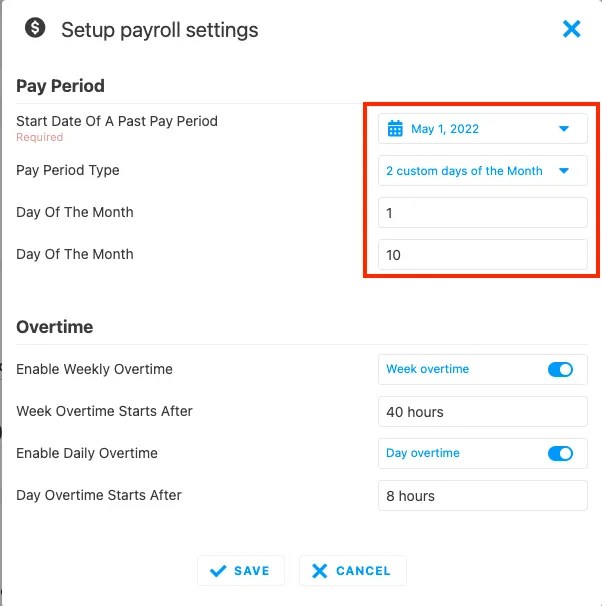
- A new update to time tracking has been added! You can now specify a custom pay period on the time tracking page. This can help you accommodate for your specific workflow and what pay periods look like for your company. This update is found on the time logs page when you set your payroll settings.
Remodeled:
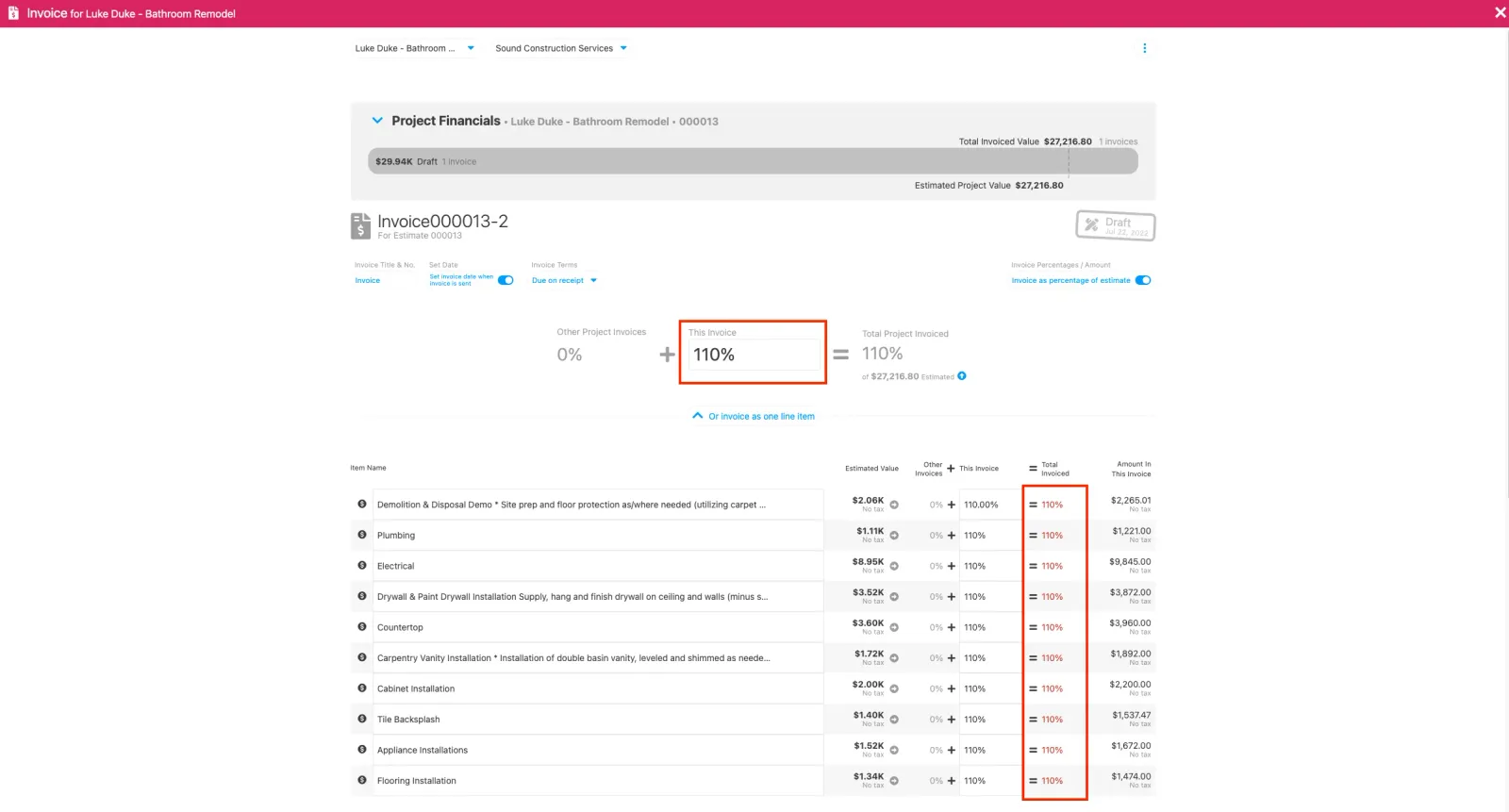
- An update to the invoicing page has been added! You can now bill over 100% of a line item. This gives you as the owner more flexibility and control over your invoicing.
Repaired:
- Non-Admins are able to view photos and files on tasks as expected.
- Data import improvements to allow for larger data sets.
- Time logs and time tracking improved to function as expected.
- Project managers have access to photos and files under the filter “projects managed by this person only”.
Build Notes 1.3.5269
Posted on Friday, May 20th 2022
Remodeled:
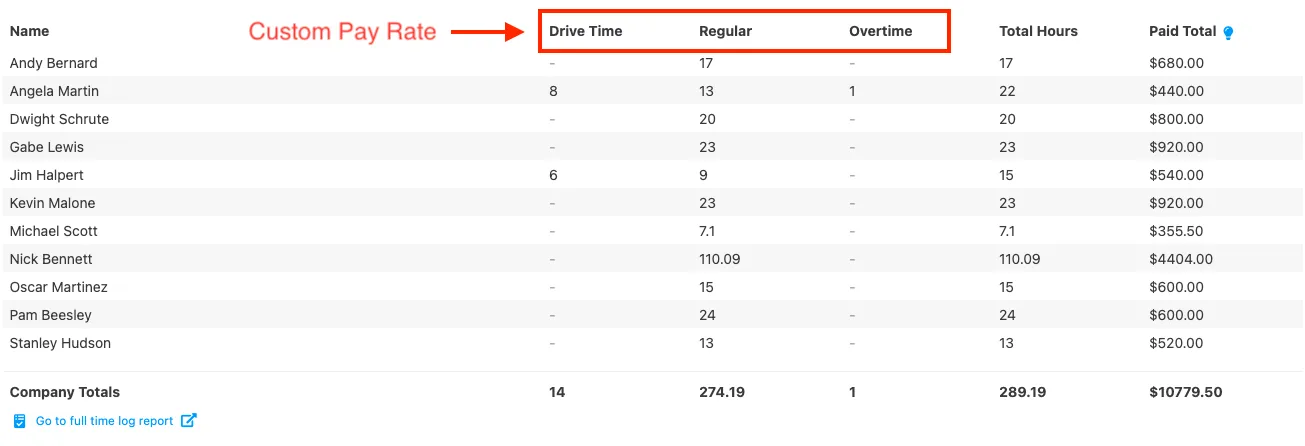
- Updated display to the pay period report now displays pay rates as a column. This makes pay rates even easier to locate and understand!
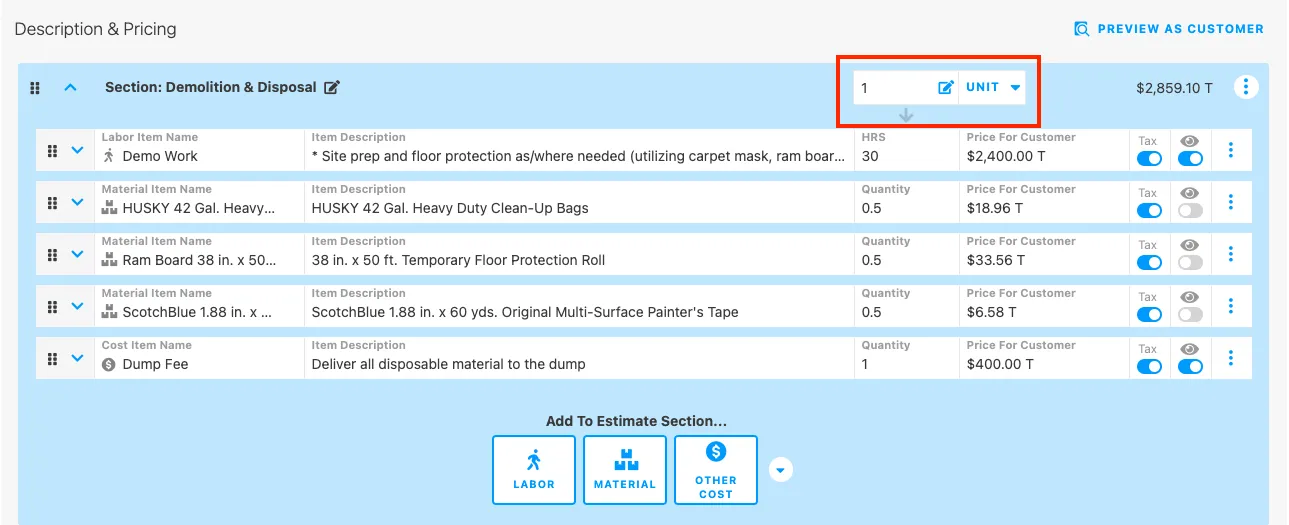
- In the assemblies section of an estimate, you can now create a template with an assembly value of “1” and it will save as a default value for your templates.
Repaired:
- Assembly section templates are now saving as expected.
Build Notes 1.3.5126
Posted on Friday, May 13th 2022
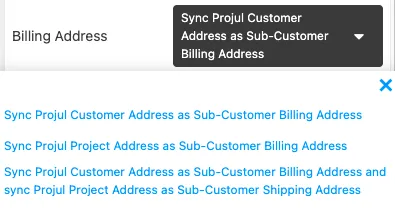
- New Quickbooks Online syncing functionality! You can now sync billing addresses for your projects into your Quickbooks Online account from Projul. This will eliminate any dual entry when bringing project information over from Projul account.
Remodeled:
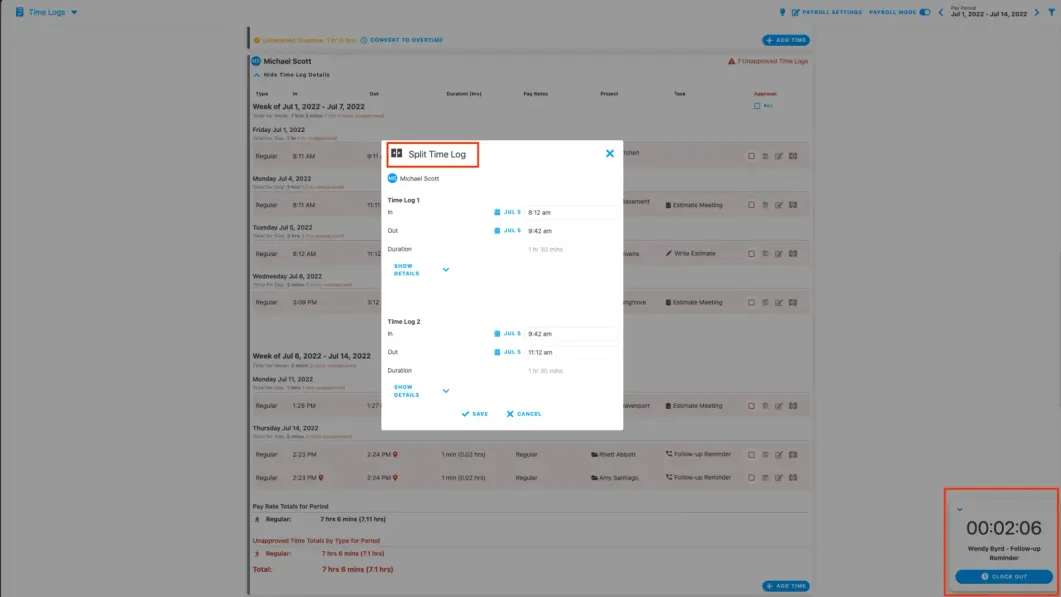
- When you are clocked in, you can now split time logs and they will update on your time log reports.
Repaired:
- ACH payment processing through WePay is working as expected.
Build Notes 1.3.5012
Posted on Friday, May 6th 2022
Additions:
- A new permission has been added! You can now give non-admins permission to view and edit everyone’s schedules. This is a great tool if you have people in the office who need more access to your team’s schedules and tasks. This permission can be updated in the people page when you edit an employee’s info.
Remodeled:
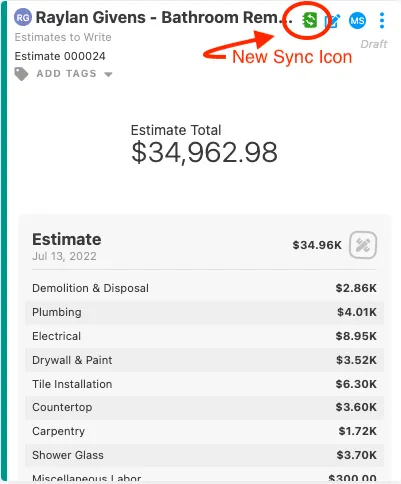
- When an item has been synced to Quickbooks, an Icon will be added to whatever item you are syncing over. This will provide you with updates of successful syncs, or if any errors occur.
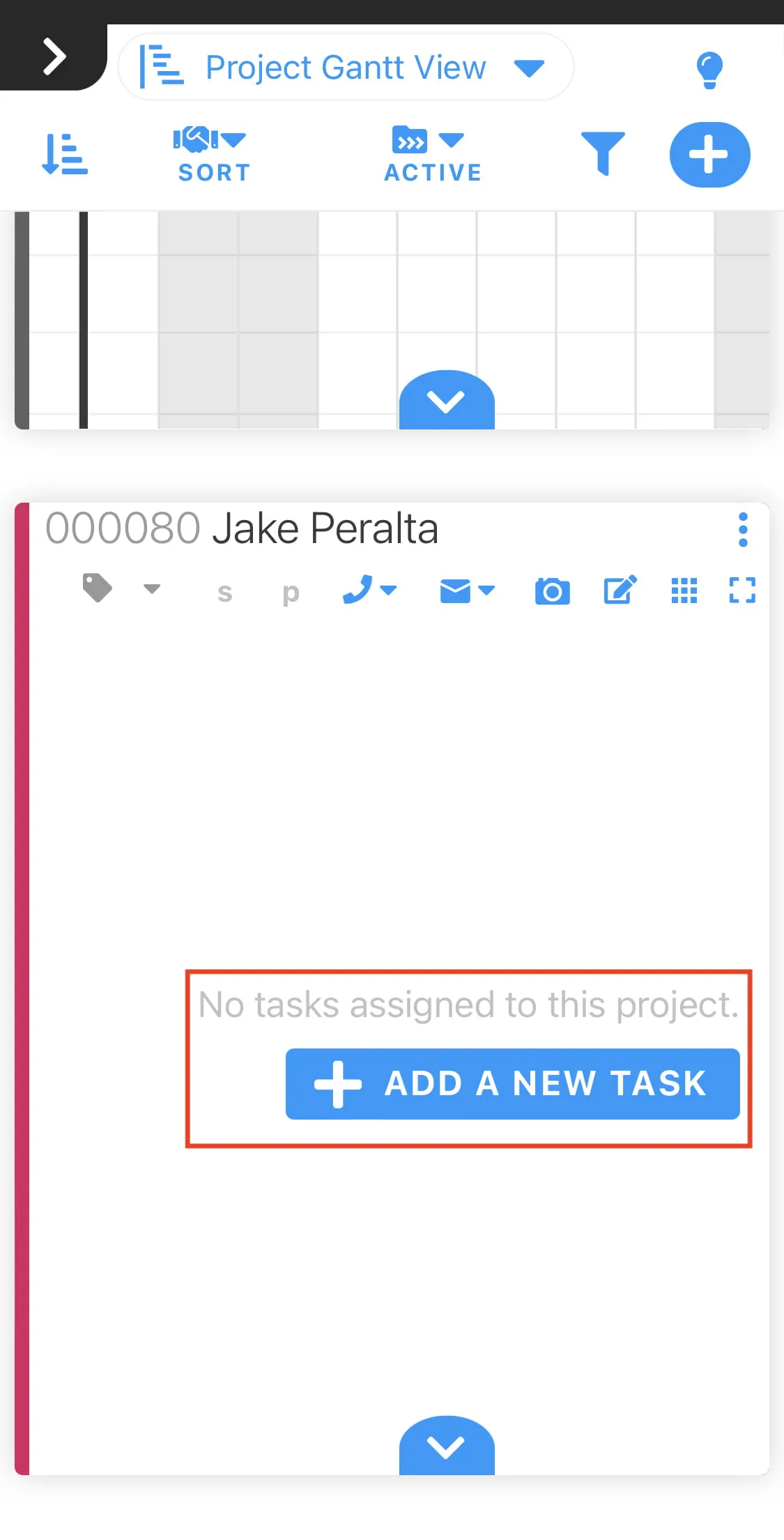
- An adjustment to the gantt view on the mobile app has been made. This allows you to see the “Add Task” button and create tasks easier from this project scheduling view.
Repaired:
- Emails in the “see emails sent by Projul” area within a document are displayed as expected.
- Syncing customers addresses to Quickbooks Online will update if the existing customer in Quickbooks didn’t have an address field entered.
- Tasks under the “show more” tab are displaying the correct date and time.
- PDF export of the budgeting page is formatted as expected.
- Comment count is now displayed on the projects page on the mobile app as expected.
Build Notes 1.3.4509
Posted on Friday, April 29th 2022
Additions:
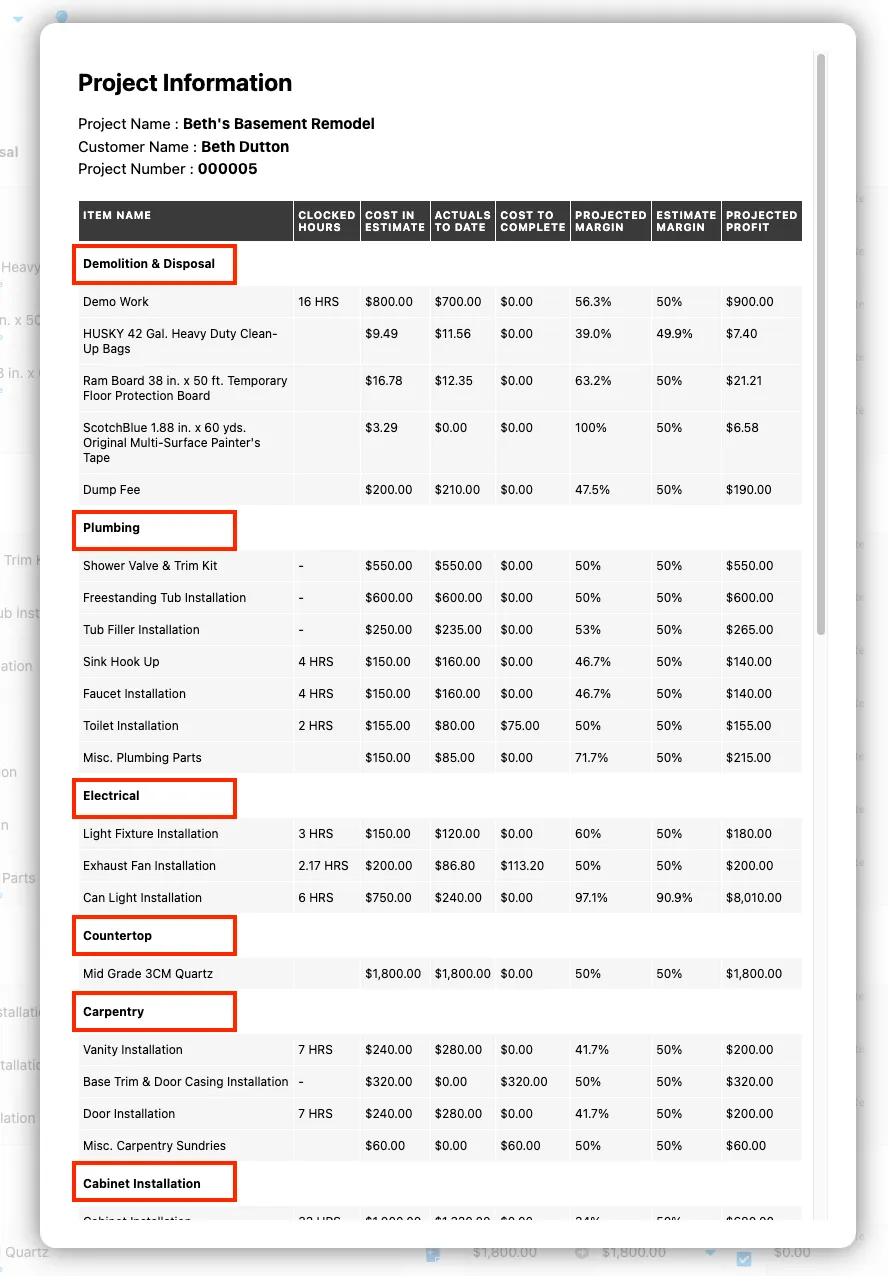
- The Printing capabilities on the project budgeting page have been updated! You can now print the budgeting page and this print will be formatting the same as you view it on the app. This will include section titles and names to help your printed budgets be more organized and easier to read.
Remodeled:
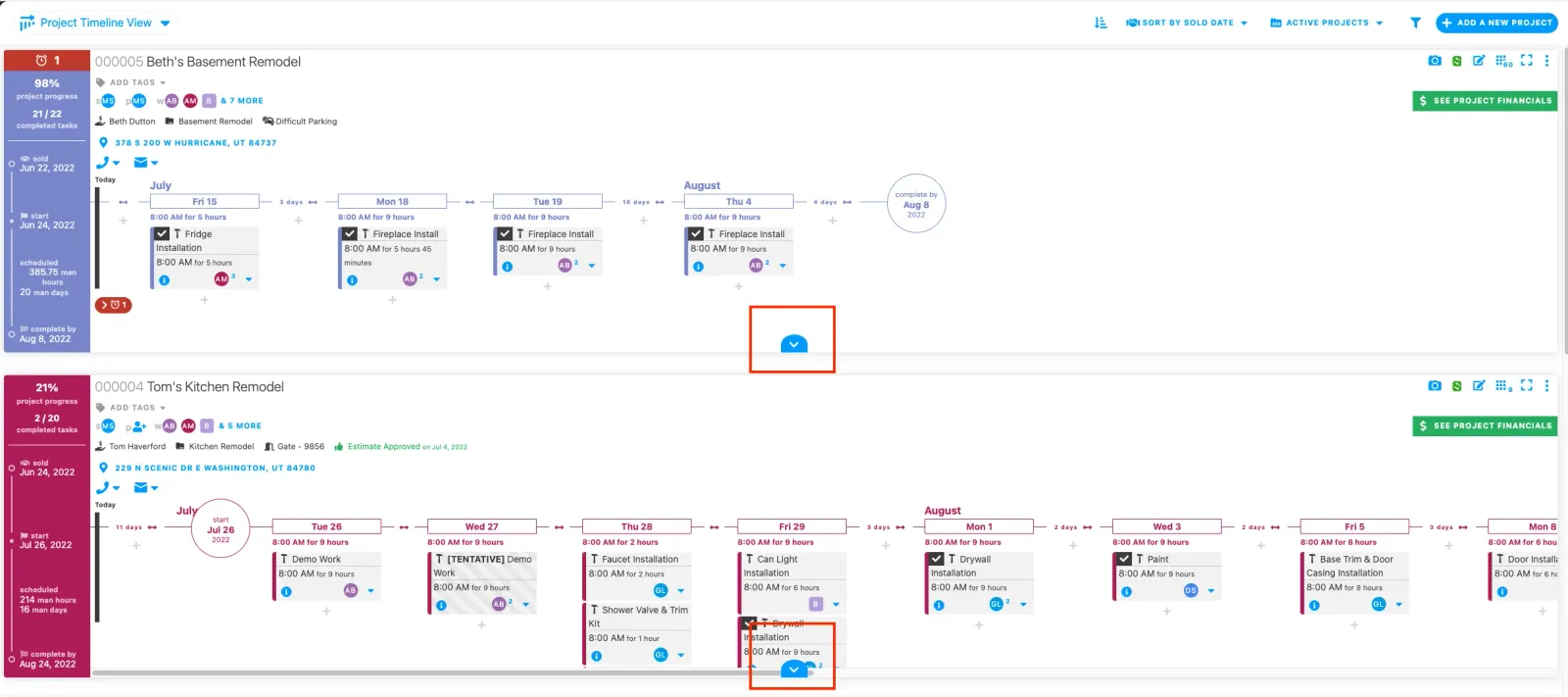
- You can now view the project drop down on each of your projects on the projects page to get more information about each project at a quick glance.
Repaired:
- Improvements to the performance of your lead capture forms on your website.
- When deleting photos, your place on the page will be saved.
- Customer information in the project editor is being correctly saved.
Build Notes 1.3.4006
Posted on Friday, April 22nd 2022
Additions:
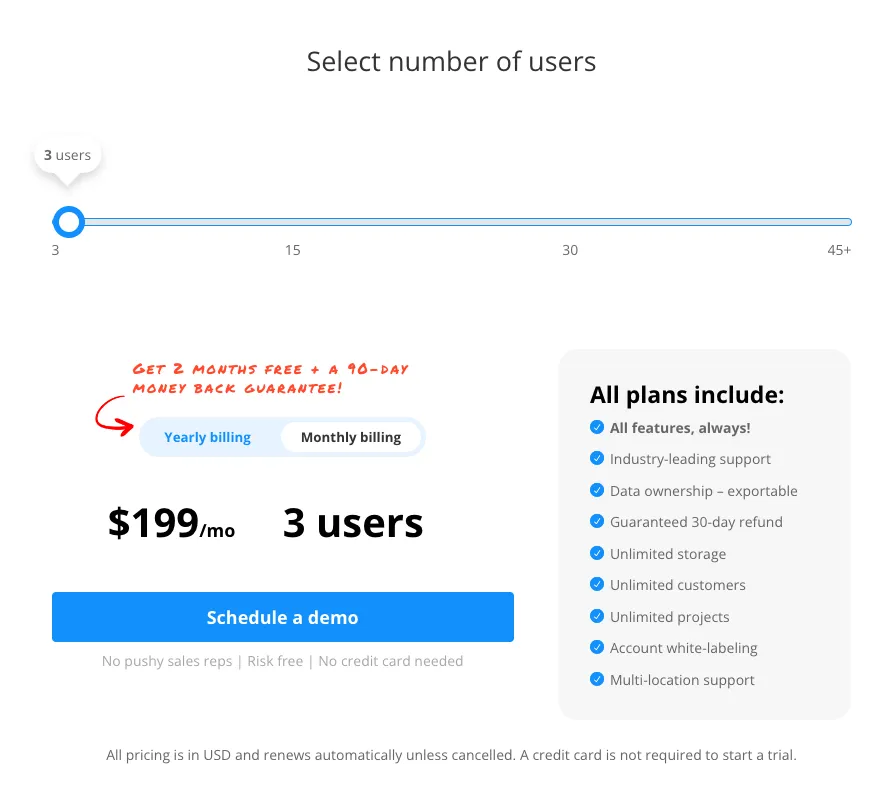
- A new pricing model has been released! Pricing is now on the individual user basis instead of the previously tiered pricing. You can now easily add one or two users without having to jump up an entire pricing tier. Additional users are only $25 per month!
Remodeled:
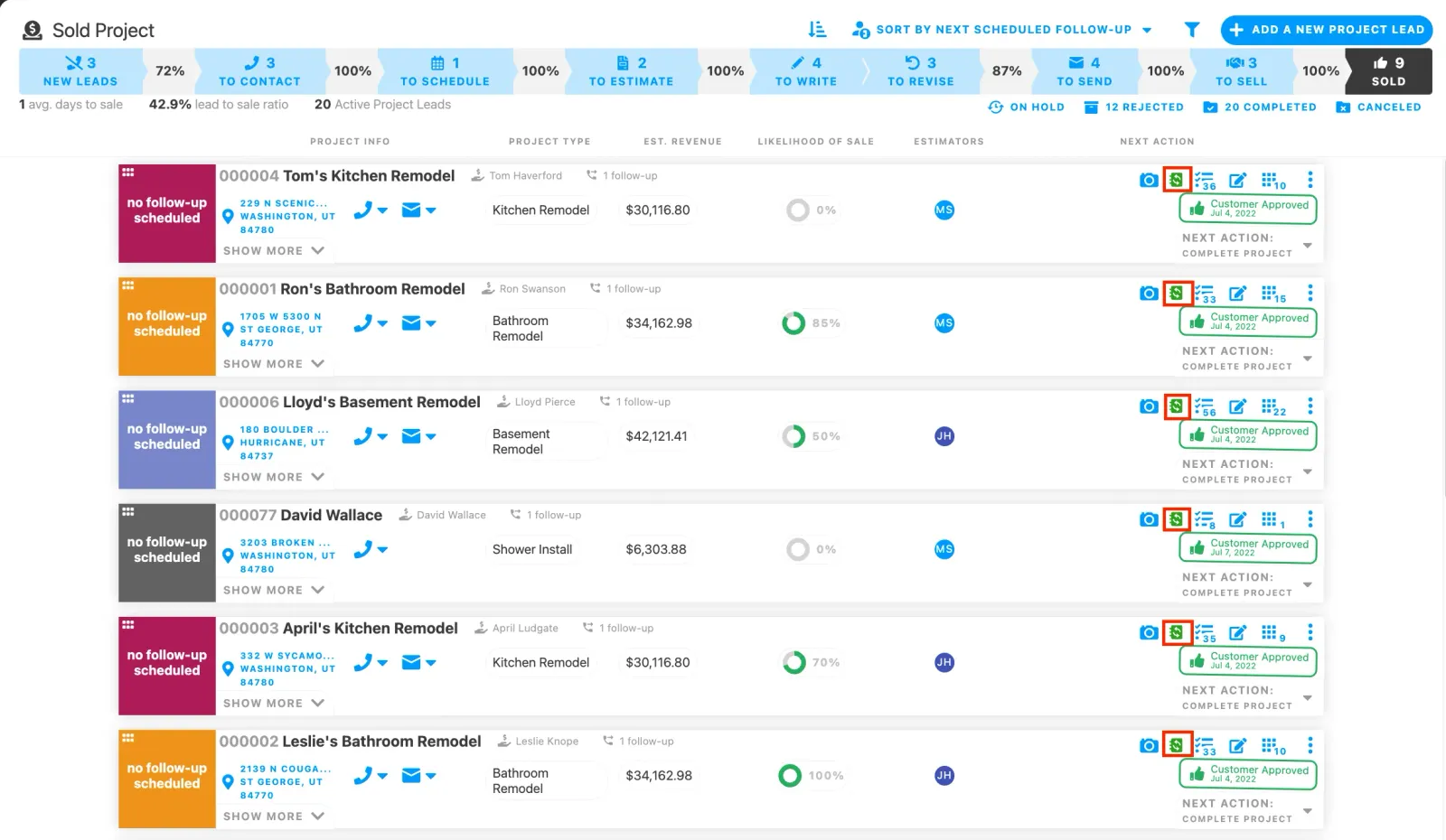
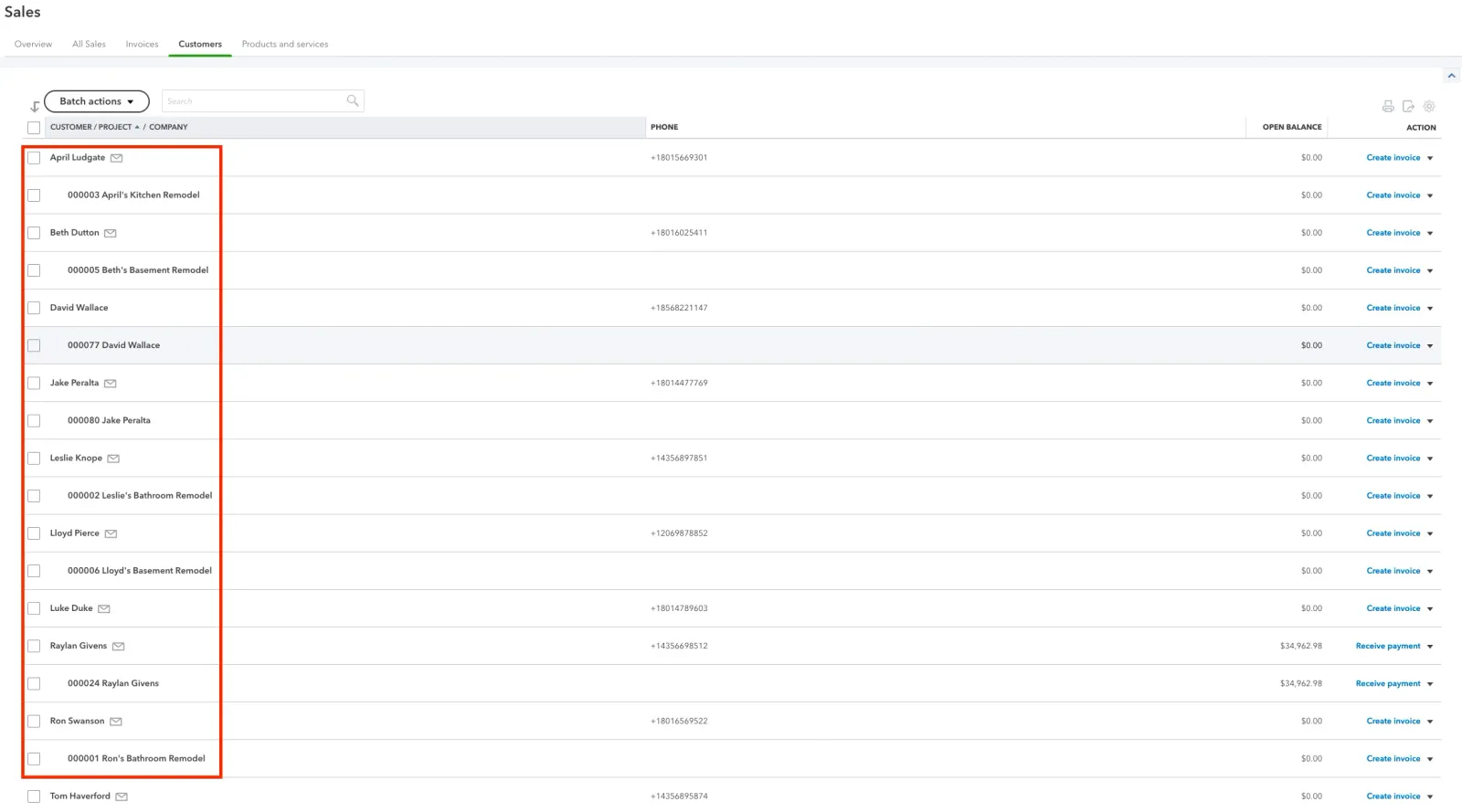
- An update to Quickbooks Syncing functionally has been made. Projects will now only autosync into Quickbooks Online when they reach the “sold” status of the lead pipeline. This will prevent clutter within your quickbooks account with non-sold jobs syncing over.
Repaired:
- Invoice register report now displays invoices that are not tied to a project.
- Subsection templates are now saving properly.
- Cost line templates save properly in all possible areas that you can save them in.
- Subsections will update the subtotal of a new section if they are dragged and dropped into another section.
- Rounding errors in invoicing have been corrected.
Build Notes 1.3.3985
Posted on Friday, April 15th 2022
Additions:
- An exciting new estimating feature has been released! You can now turn any estimate into an assembly style estimate. If you want to calculate your estimate by square foot, unit, or any other measurement, an assembly allows you to update the assembly and every subsequent line item quantity will be updated as well. This can be found in the 3 dot menu on the estimate editor.
Remodeled:
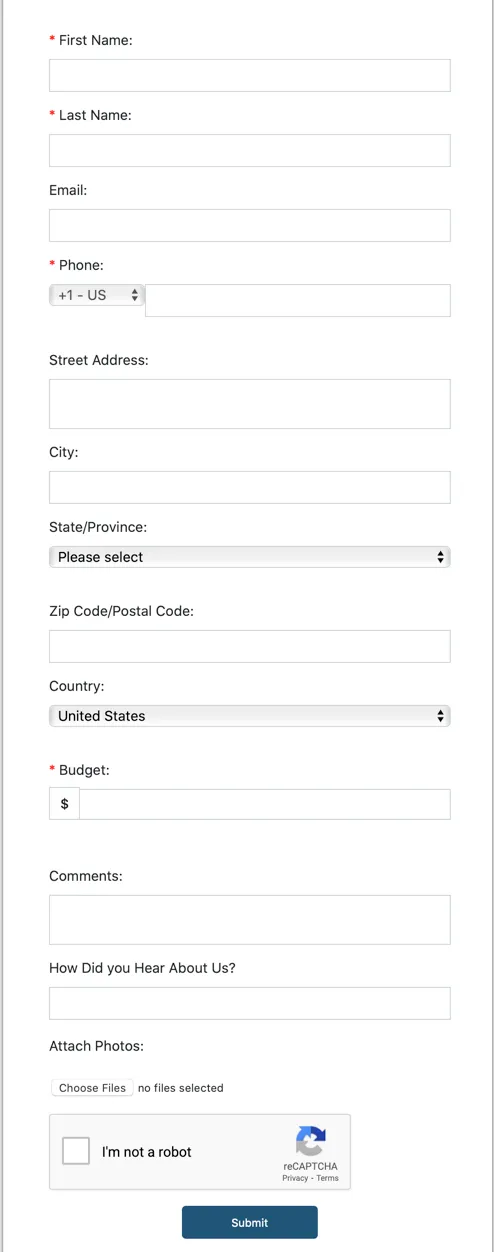
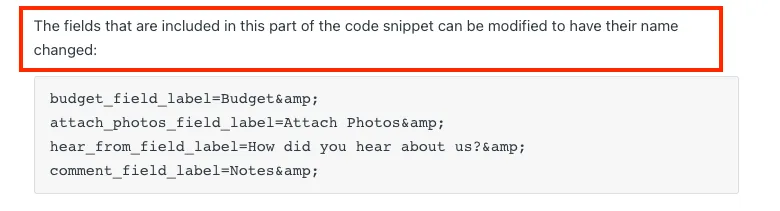
- To create more flexibility on your lead import form, the names of the entry fields can now be changed!
Repaired:
- Improvements to Projul’s support tools so we can better help you with any support questions you may have
- Leads in the “on hold” status of the lead pipeline are reappearing at the date they are expected to.
Build Notes 1.3.3852
Posted on Friday, April 8th 2022
Remodeled:
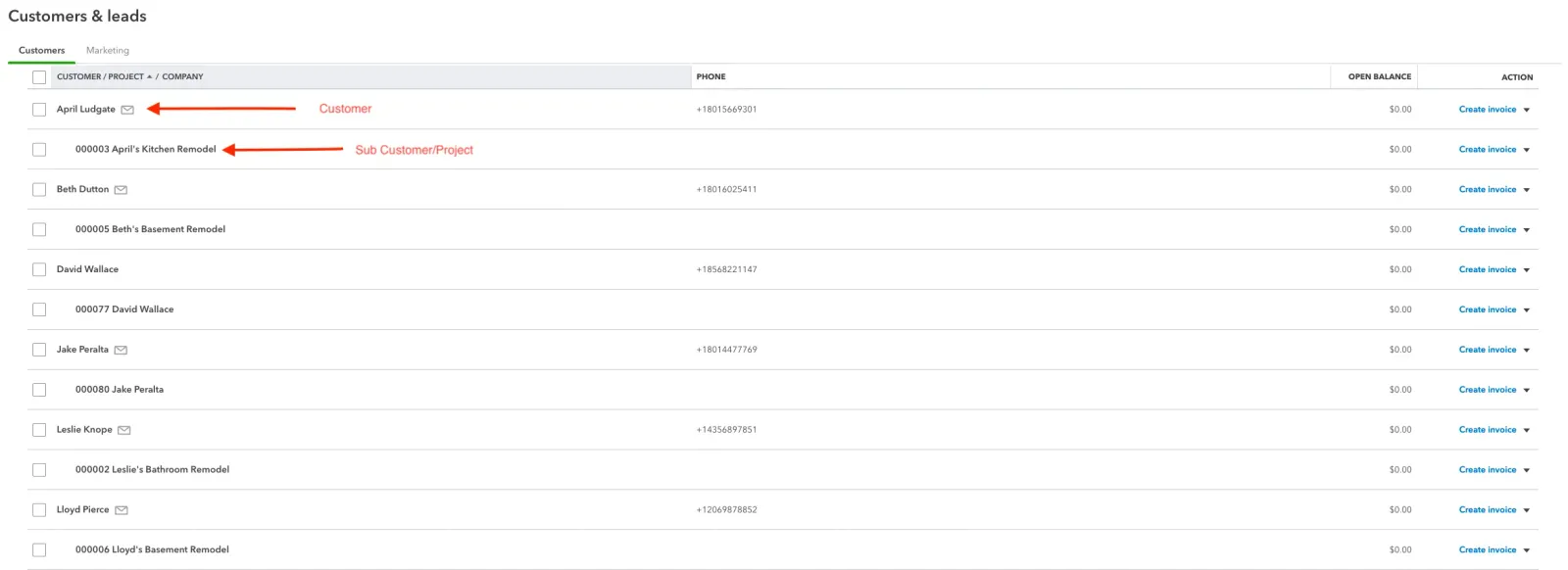
- An update to Quickbooks Online syncing functionality has been made. Customer and sub customers now sync between Quickbooks and Projul! This will allow you to organize your projects and connect them with the proper customer without having to re-enter that information.
Repaired:
- Quantities on an invoice can be changed and the tax rate will be calculated as expected.
- Taxable items in the subsection of an estimate will display as taxable on the invoices as well.
- When an additional item is added to an invoice, the tax rate will apply to that line item.
Build Notes 1.3.3659
Posted on Friday, April 1st 2022
Additions:
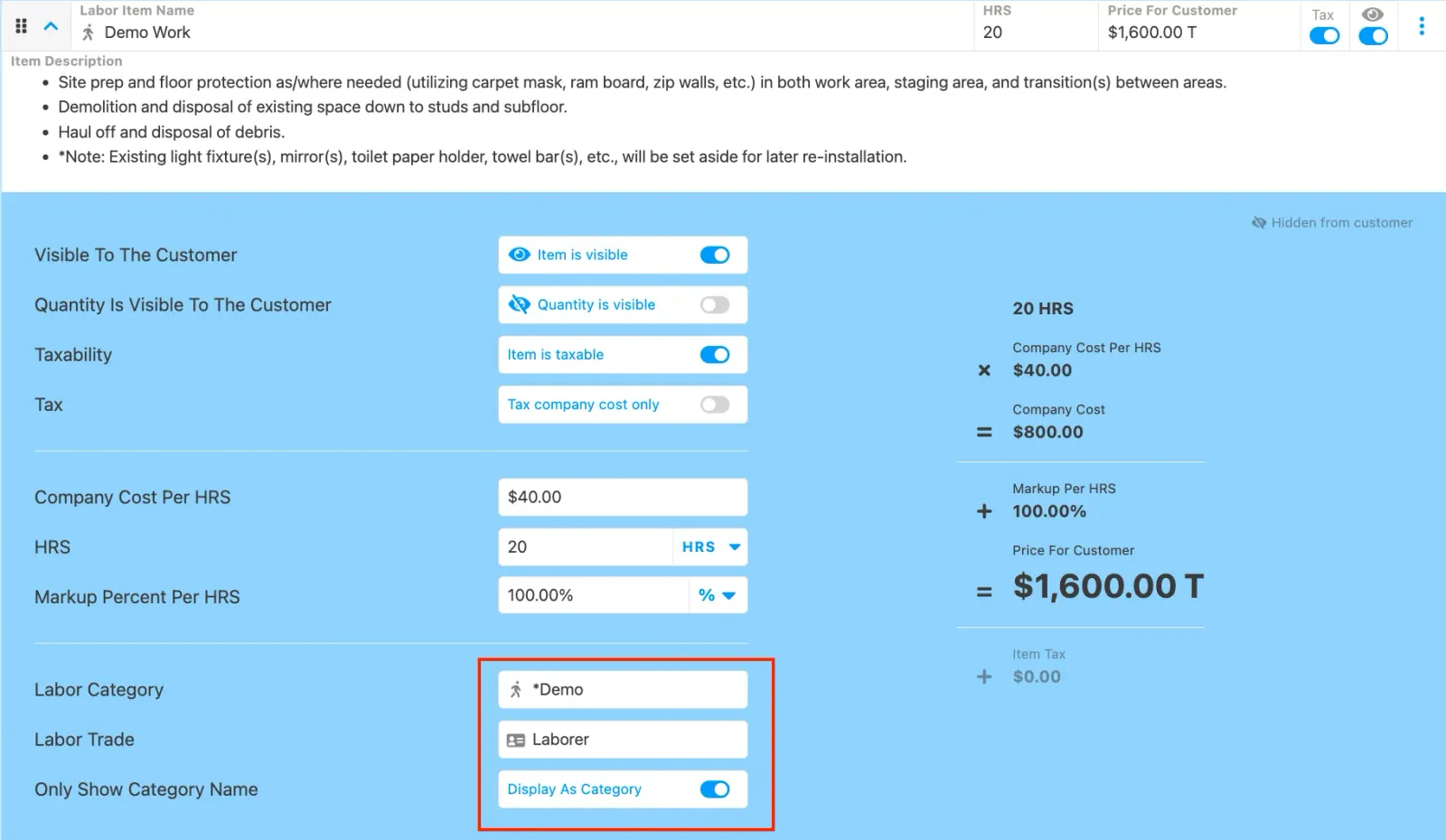
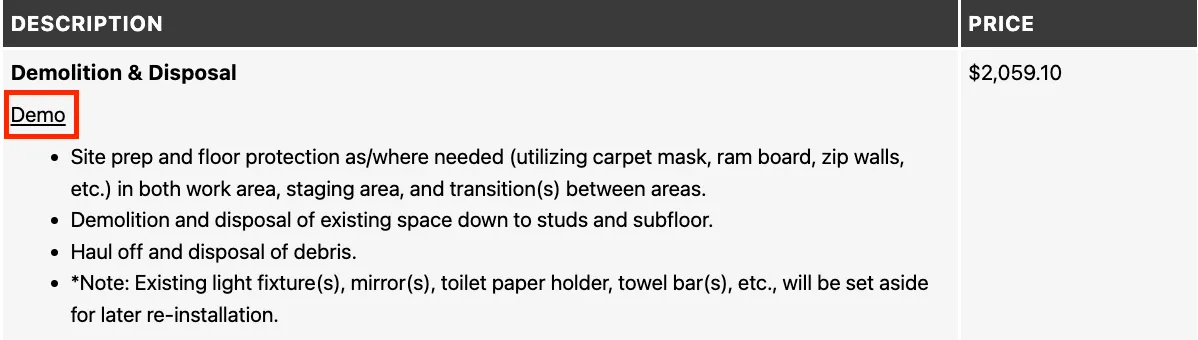
- On an estimate, you can now select a toggle to “only show category name” which will only show category names of items to a customer instead of the name of the cost line. This gives you more control over what the customer sees versus the information you want to track internally.
Remodeled:
- When creating invoices, the invoices will not be marked as paid, and locked if there is no dollar value added. If payments are accidentally recorded or removed, this will give you additional flexibility to edit your invoices.
- In any field that is being synced to Quickbooks Online, you will now receive an error. message if you have entered in more characters than Quickbooks allows in their system.
Repaired:
- Improvements to the process of upgrading your subscription within the app.
- Apple users will now experience smoother scrolling when a text field is open.
- Invoice fields are grayed out when expected.
- Unscheduled task sort view works as expected when looking at the task list.
- When creating tasks from a labor item, scheduled tasks will be moved out of the unscheduled field.
Build Notes 1.3.3390
Posted on Friday, March 25th 2022
Remodeled:
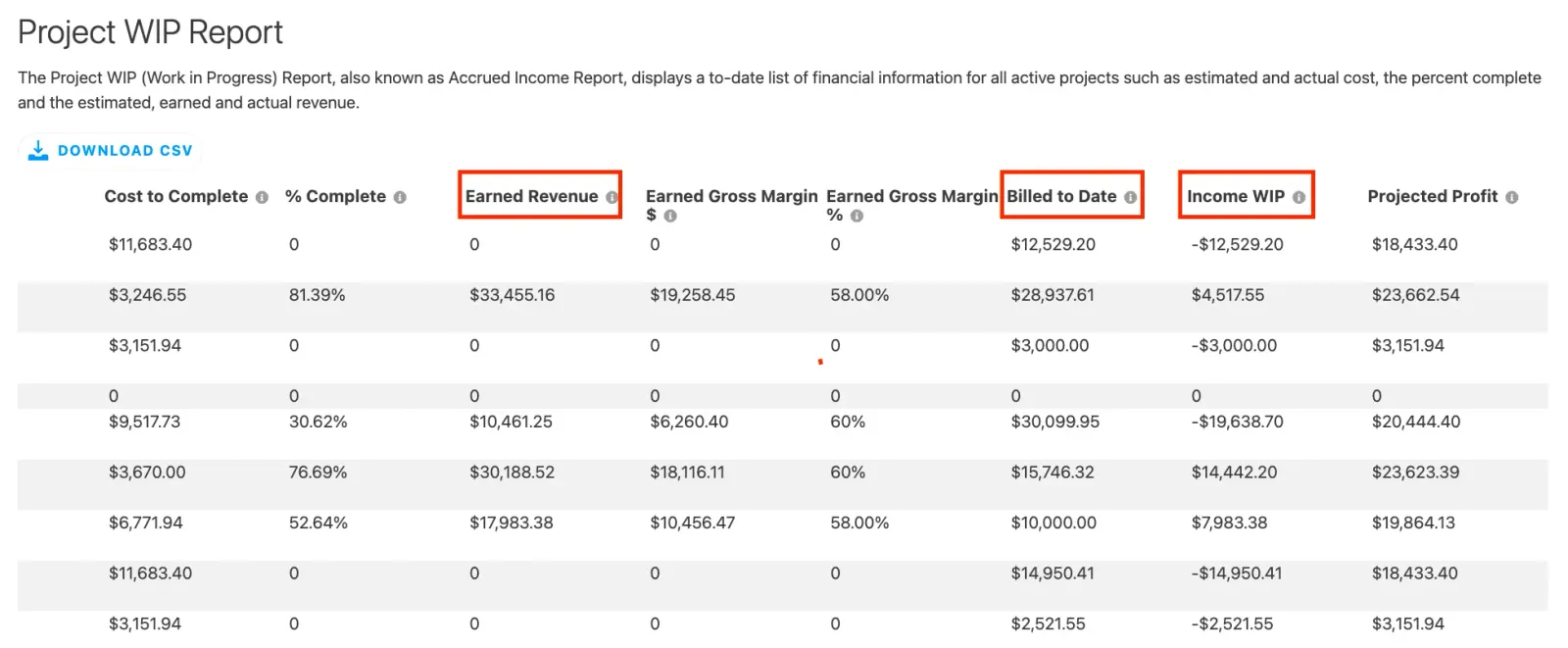
- An update to the Project WIP report has been released. The “Income WIP’ field is now being calculated by the “earned revenue” minus the “billed to date” field. This will make this report more accurate and actionable!
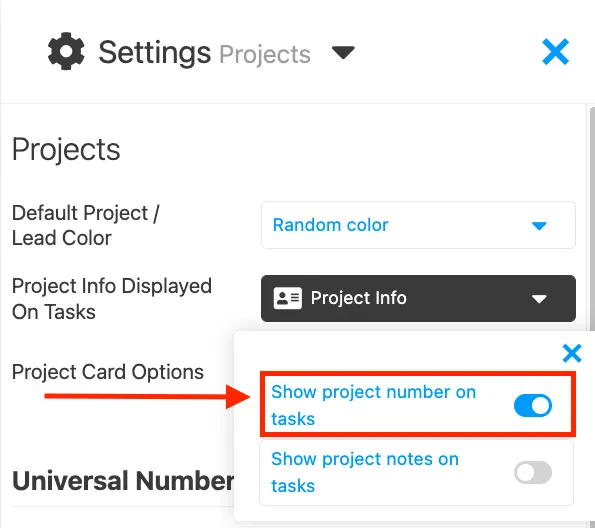
- Project numbers can now be added to tasks based on a setting. This can be helpful if you have multiple projects going on at the same time and want to quickly know what Project is associated with what task.
Repaired:
- Taxes on invoices and estimates match.
- Taxes will not be rounded down on invoices.
- Project and estimate meeting notes are being saved and stored as expected.
- “Continue using this filter until Projul is closed” option works as expected.
Build Notes 1.3.2996
Posted Friday March 18th 2022
Additions:
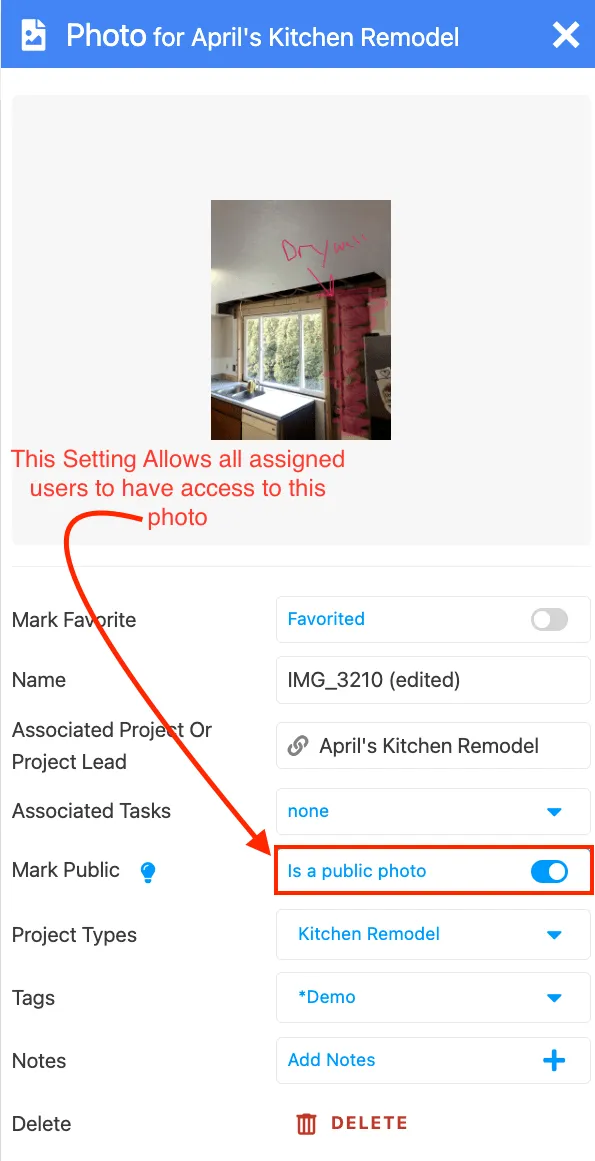
- A new setting has been added for photo and file management. You can now give a basic user permission to access photos, files, and comments on a Project Level and not just the task level. This can improve communications between ALL of your team members on a job and make more information available to selected employees.
Remodeled:
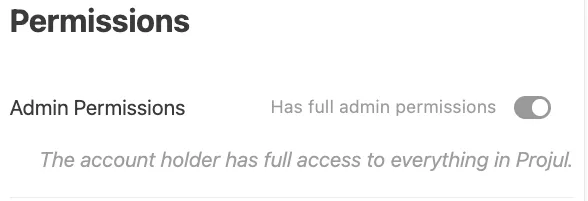
- Account admins will not be able to be removed as users in Projul. This will ensure your company’s data is even more secured and kept in your hands as an owner.
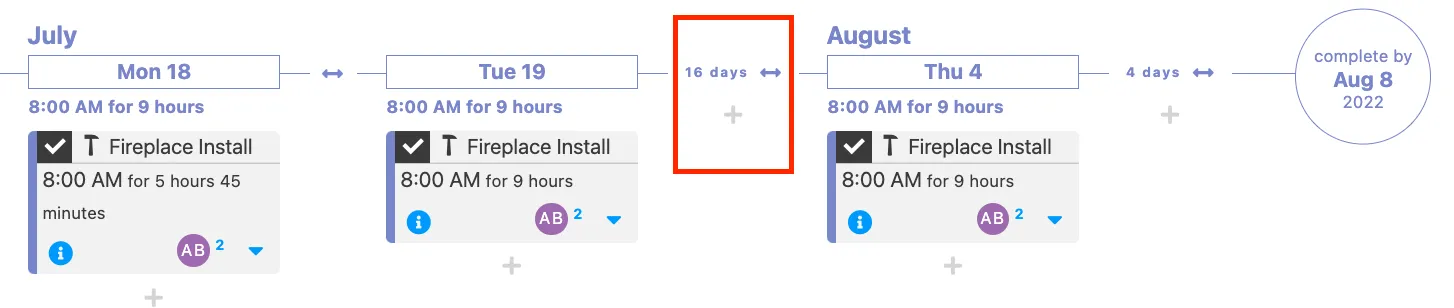
- Tasks for Days Off are no longer displayed on the project timeline. This will make the project schedule cleaner and easier to understand.
Repaired:
- Estimates syncing to Quickbooks as expected.
- Improvements to the speed of syncing items to Quickbooks.
- Multi Day and multi user tasks are now consistent across different browser types.
- Improved display on the mobile app’s lead pipeline, removing overlaps.
- All change order signatures are now displayed and stored as expected.
- When an estimate has received over 100% payment, it now displays in the “paid” estimate and invoice filter.
Build Notes 1.3.2906
Posted Friday March 11th 2022
Additions:
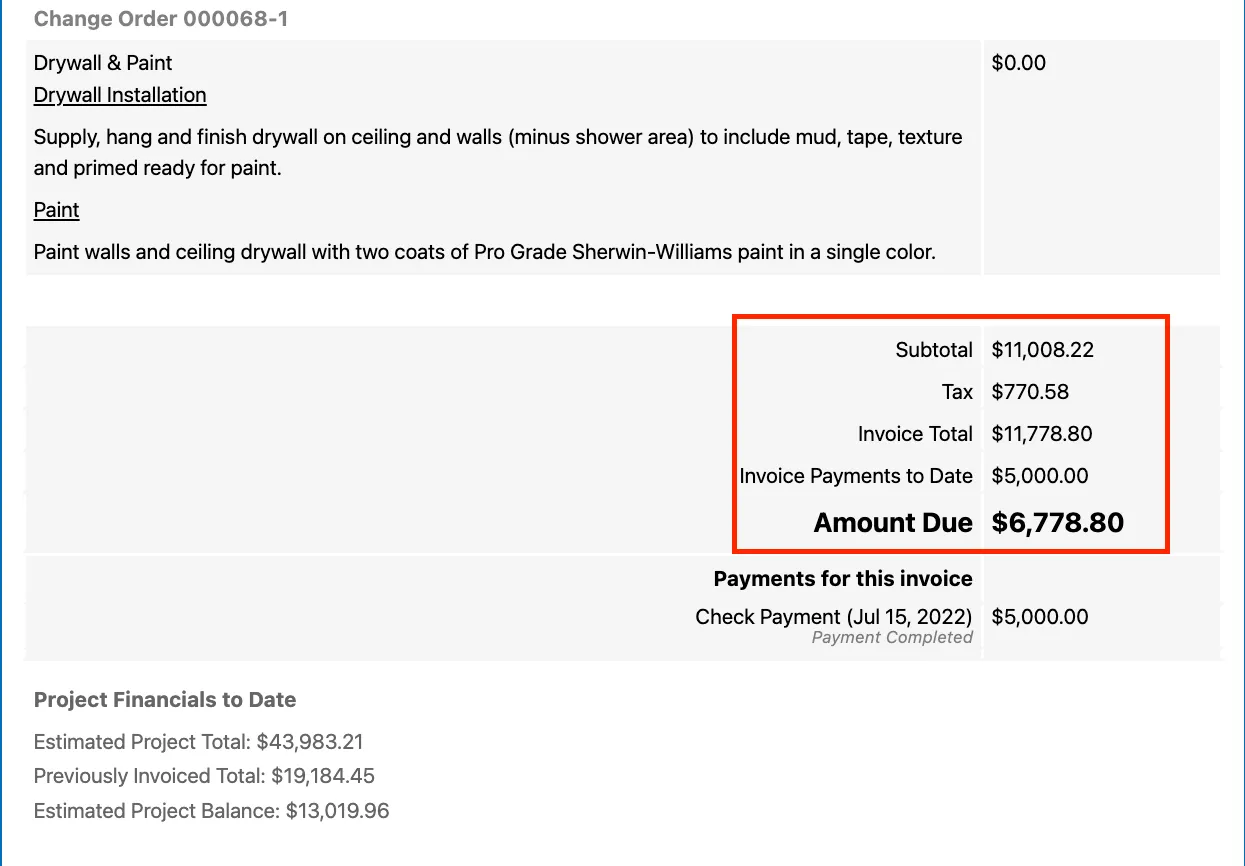
- When creating an invoice, the customer will see a subtotal as well as the total once tax has been applied. This will help you and your customers understand what you are charging them versus the taxes that need to be paid.
Remodeled:
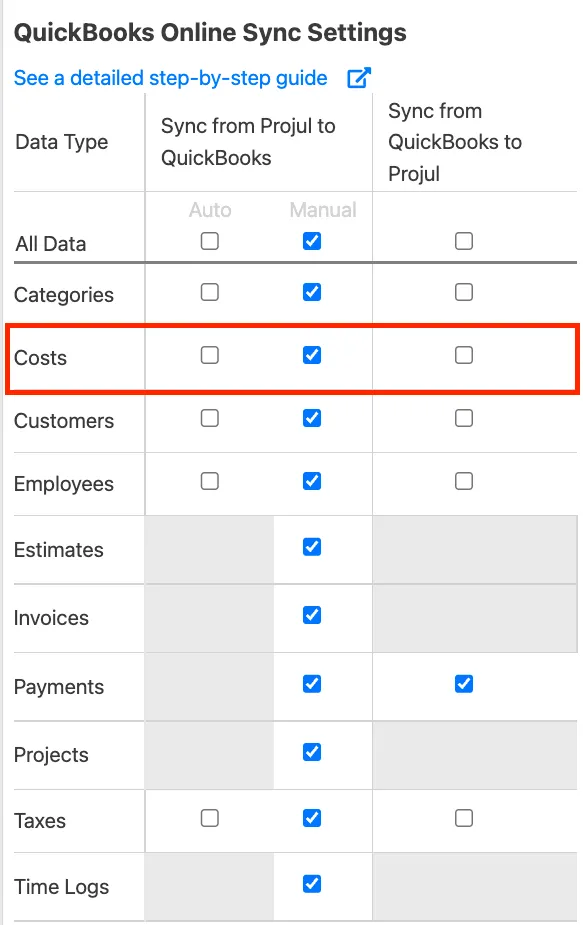
- A new setting allows you to determine if materials are being synced to Quickbooks online. This gives you more control over your syncing functionality!
Repaired:
- Improved experience when using the safari browser for scheduling.
- When in the scheduling month view, unassigned user and other task updates function as expected.
- Improved experience when using the “next action button of the lead pipeline.
- Time off tasks in the calendar view are displaying the correct hours schedule for your employees.
- When you remove an estimate section, it removes all associated fields, as expected.
- Downloading a photo or file with a ”#” in the name, works as expected.
Build Notes 1.3.2820
Posted on Friday, March 4th 2022
Remodeled:
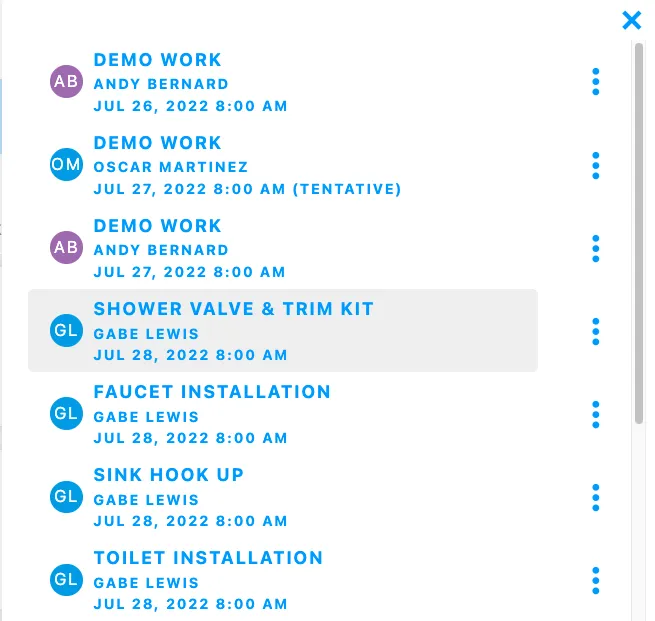
- In the lead pipeline, as a user viewing a lead’s task list, the information in the list has been remodeled so you can read and interpret the information quickly and accurately.
- An update to the overdue invoices report has been created! If an invoice is not connected to a project, it will still display in this report. Now all of your invoice data can be accessed from one location!
Repaired:
- Repeating tasks are being scheduled as expected and no longer booking as “next day tasks”.
- Improved performance when adding notes to a time log.
- Functionality of pay rates being displayed on the time log report has been improved.
Build Notes 1.3.2207
Posted on Friday, February 25th 2022
Additions:
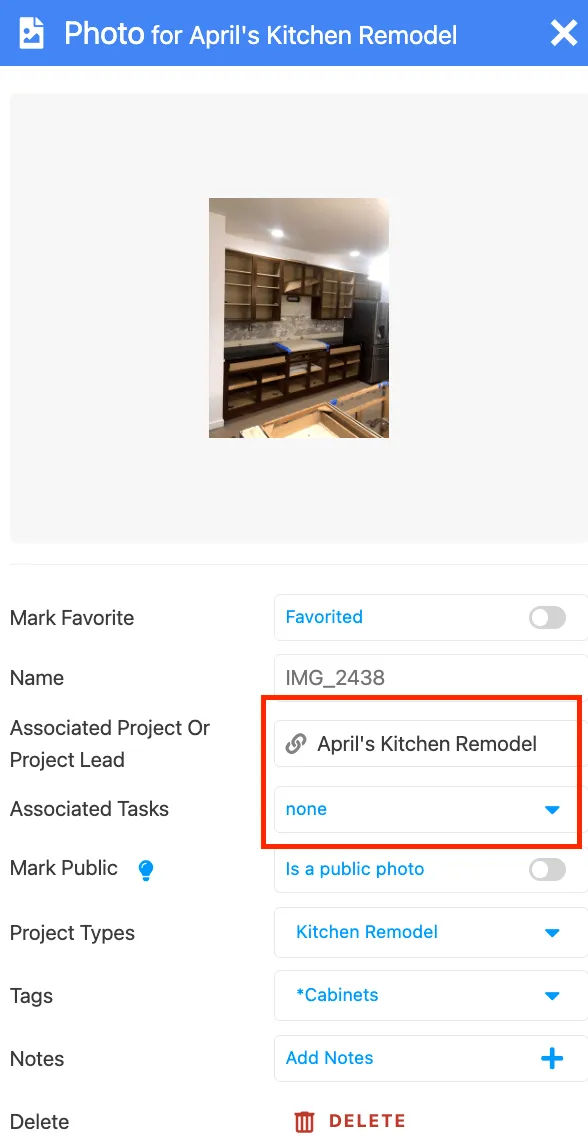
- Update to photo and file storage! You can now choose to manage photos and files on the project level. This setting can give access to all the photos and files on a job to your employees instead of just the tasks they are assigned to.
Remodeled:
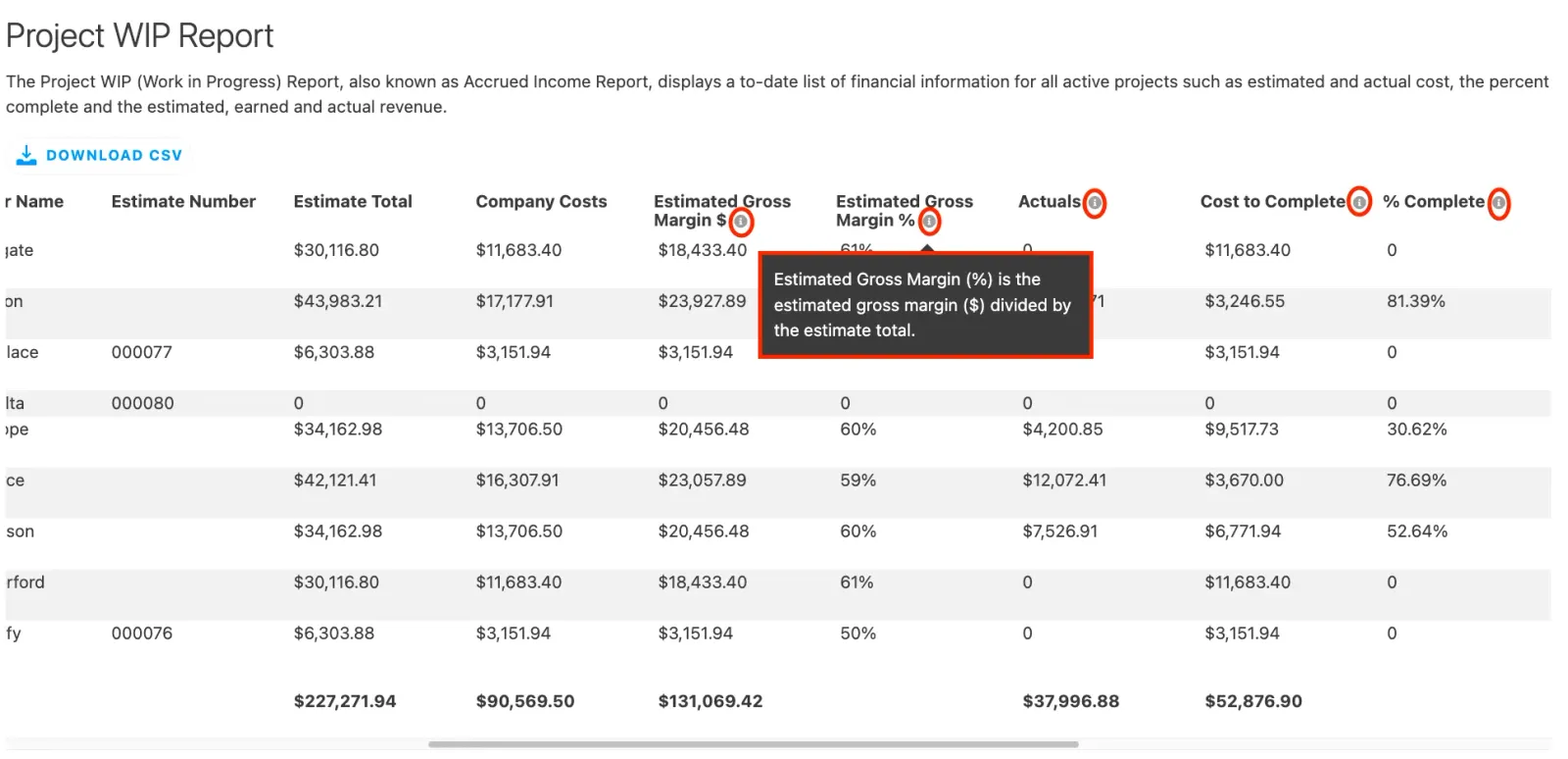
- The project WIP report has added descriptions and tool tips! This will give you a better understanding of what information is being displayed and fed into this report, and further display the progress of a job’s finances.
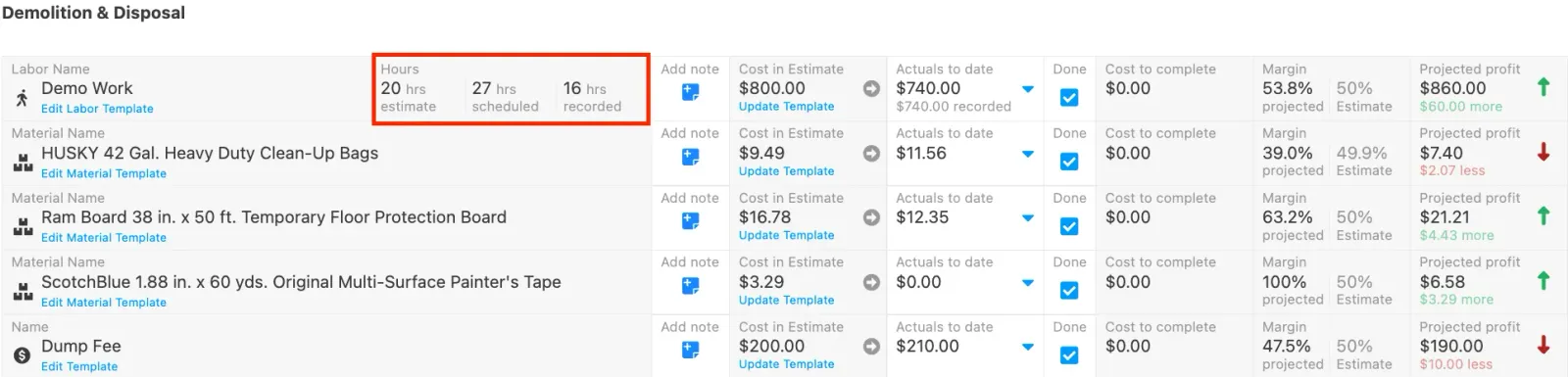
- On the project budgeting page, you will now be able to see “hours estimated” “hours scheduled” and “hours recorded” on the labor items you are estimating for. This will give you a clear understanding of your labor budgets in real time at any stage of the project!
Repaired:
- Improvements to invoice and estimates sending permissions, when you change parent settings, dependent settings will be updated as well.
- Multiple photos can be added to invoices, estimates, and change orders with the expected performance.
- When a change order has been created, lead cards will display this information properly.
Build Notes 1.3.1526
Posted on Friday February 18th 2022
Additions:
- A new report has been created! The project WIP report is now live. This report shows you a to-date list of financial information for a project in progress. This will display information such as actual and estimated cost, percentage complete, and earned and actual revenue!
Remodeled:
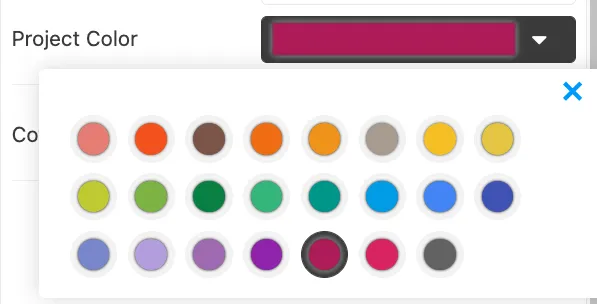
- You can now assign colors to new leads! This will allow you to organize and color code your potential jobs. You can make these edits in the project editor tab.
Repaired:
- Improved performance when hours tracked are applied to the job costing page.
- Taxes are functioning as expected when comparing estimates and invoices.
Build Notes 1.3.1029
Posted on Friday, February 11th 2022
Additions:
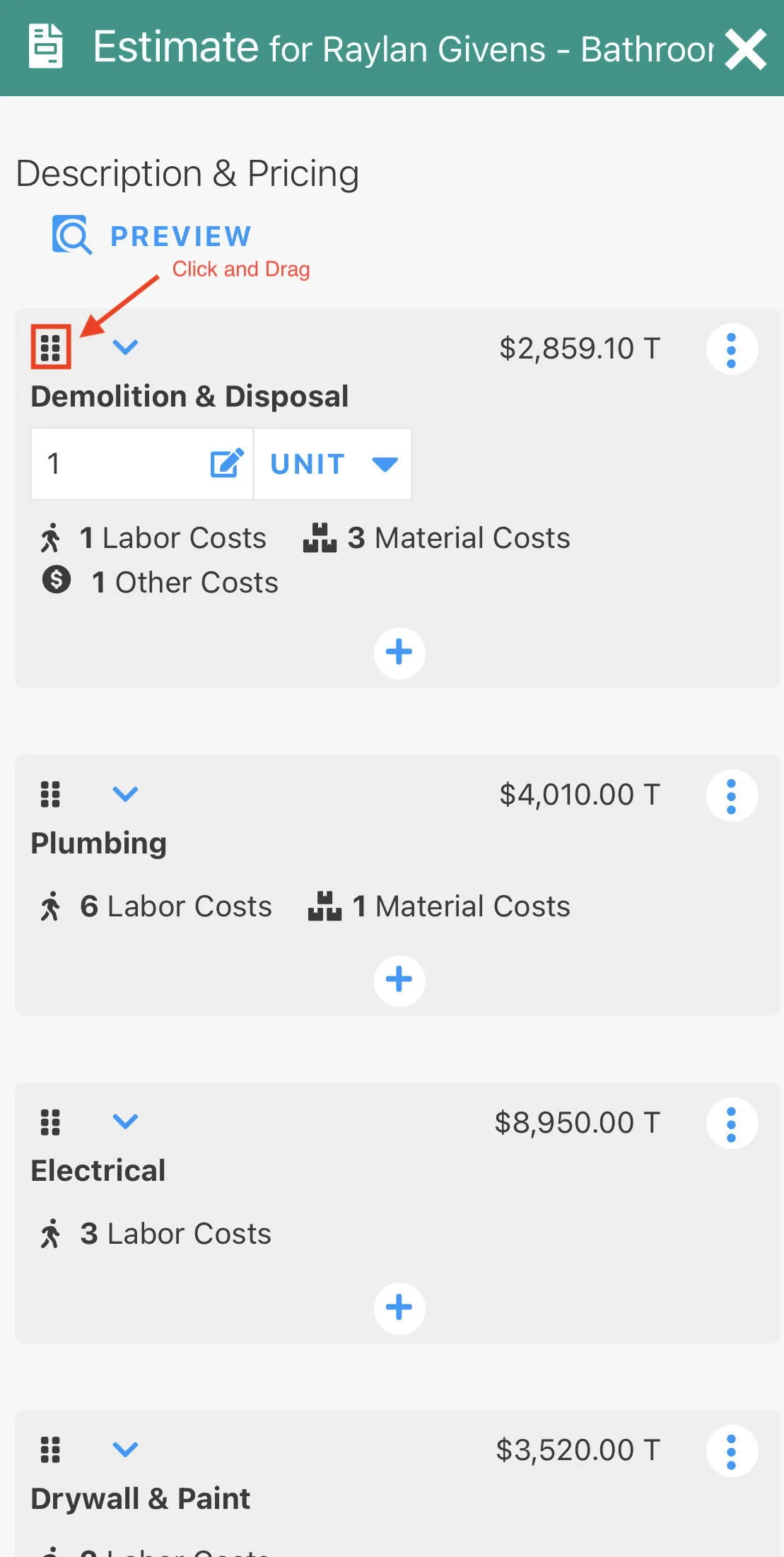
- We are excited for our new job costing and budgeting page! This will include improvements to tracking actual expenses and updates in real time to better understand the remaining budget, and projected profits in real time. You can access this budgeting page on the 9-dot menu of your projects tab, or within the estimate editor.
Remodeled:
- A new update to dragging and dropping estimated cost lines on mobile devices has been released. This will improve performance and functionality when moving cost lines via drag and drop.
Repaired:
- Previous payments are now displayed on the print preview of an Invoice.
- When payroll settings are set to the 1st and 15th of the month, time is added as expected and includes all days for the pay period.
- Multi day tasks can be marked as completed and now visually updates each of the previous days tasks.
- Improved display of the print preview on an estimate.
- When you remove a user after adding them multiple times, they only need to perform this action once.
- Improved performance when marking a task as complete.
- Live map views load quickly and as expected.
Build Notes 1.3.0833
Posted on Friday, February 4th 2022
Remodeled:
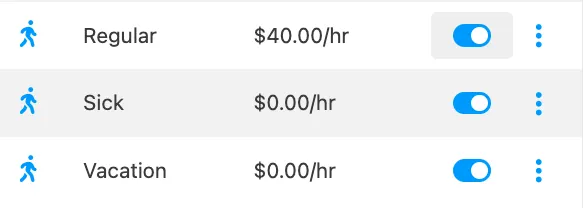
- When creating a new account, the default setting for pay rates will show regular, sick, and vacation time. This will allow you to easily add additional pay rates or select from the pre-created options above. You can set and add new pay rates from the employee and company settings.
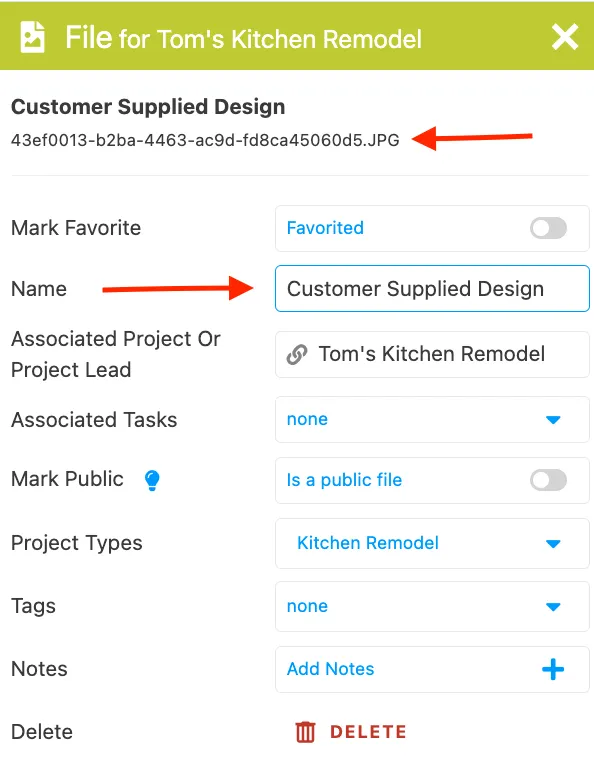
- When you change the name of a file in one location, it will now update automatically across other locations within the system. This will eliminate the need to enter changes into two places!
Repaired:
- Customers based in the USA can now accept payments from Canadian based customers.
- Hours tracked and dollar amounts applied are functioning as expected within the budgeting and job costing page.
- Line item prices on an estimate that display “price for customer” are now displayed properly.
- Improved experience when adding decimal points to a line item.
- Improved performance for Android mobile app, remembering the page you left, faster loading of data, and location settings all have been updated.
- Dragging a lead from “on hold” to “to revise” works as expected.
- Filtering and searching functionality has been improved and works as expected throughout the estimate section and lead pipeline.
Build Notes 1.3.0800
Posted on Friday, January 28th 2022
Remodeled:
- Time log settings and displays have been strengthened. Now a Basic user must have permission to edit time logs to update pay rates.
- A field for the wage value of a pay rate has been added and can be edited per time log.
- The time log rollup shows regular and overtime hours as well as pay rates.
- If you are a payroll user, you can set overtime rate modifiers for your pay items.
Repaired:
- Clock in functionality performance has been improved and prevents clocking into multiple tasks at the same time.
- When a WePay payment is recorded, the invoice is marked as paid.
- Exporting performance has been improved when exporting customers, leads and projects.
Build Notes 1.2.9982
Posted on Friday, January 21st 2022
Additions:
- We are excited to announce new functionality with pay rates! You can now set custom pay rate names, types and default rates on a company level, and specify on the user level as well. We have also added additional options with overtime rules that give you the ability to specify overtime multipliers per pay rate. When managing time logs and pay rates, you now have much more flexibility, and now Projul’s pay rates will match the pay rate format of Quickbooks, improving the syncing capabilities between the two systems.
Remodeled:
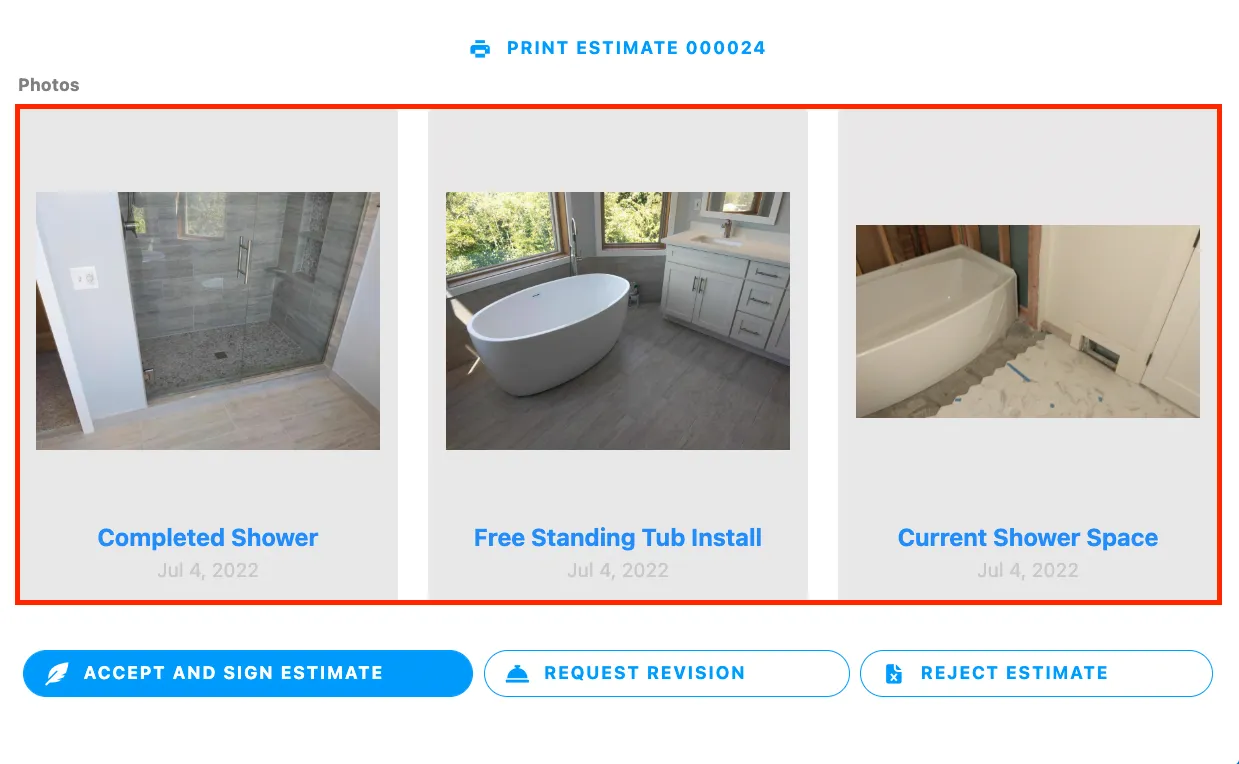
- When adding a photo to an estimate or invoice, the format has been remodeled. This will display the photos in a way that is easier for customers to see, and adds an extra level or professionalism to the photo’s appearance.
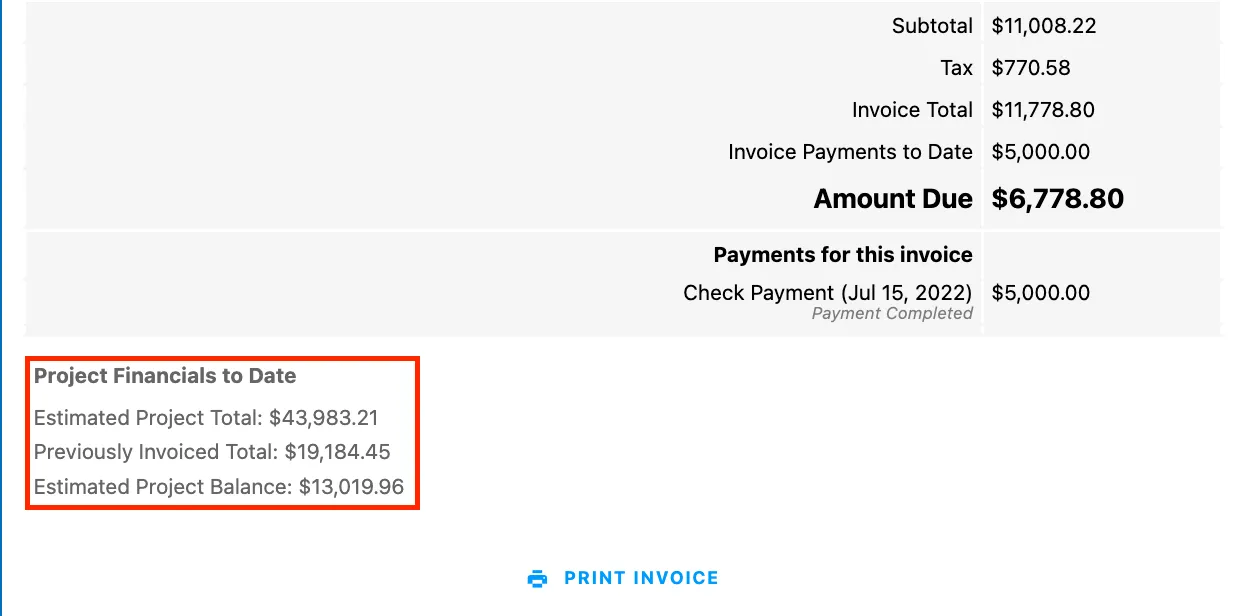
- A remodel of the invoice “overall estimate progress” section has been improved! This section at the bottom of your invoice is now titled “project financials to date”. This is a company setting that can be turned on or off, and will provide more clarity to what the financial information that your invoice is displaying.
Repaired:
- Consistent display for date headers in the schedule views.
- When a user edits someone else’s time log, and that user is clocked in, they will stay clocked in.
- When a lead is deleted, it is no longer included in the lead export page.
Build Notes 1.2.9982
Posted on Friday, January 14th 2022
Remodeled:
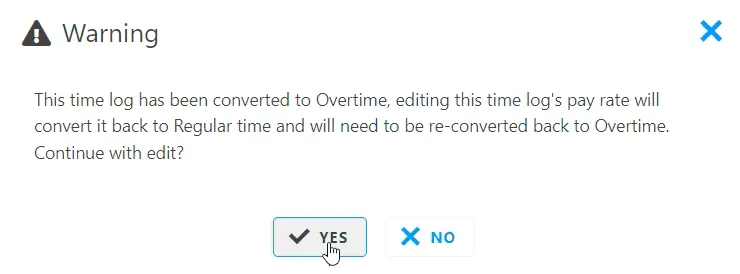
- When you change a pay rate on a time log that has been converted into overtime, you will now receive a prompt warning you about the change.
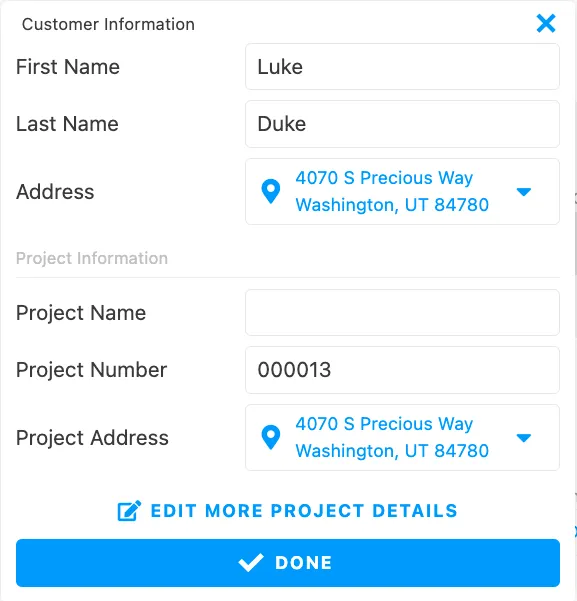
- A redesign of invoices now makes it more clear that you can edit the customer and company info in the header of an invoice. You can now make easy adjustments to any invoice you create.
Repaired:
- Improved performance when converting time to overtime on the time logs page.
- Searching and applying pay rates functions as expected. Selecting a payroll item populates the “pay item” field with the name of the item.
Build Notes 1.2.9905
Posted on Friday, January 7th 2022
Remodeled:
- A redesign of invoices now makes it more clear that you can edit the customer and company info in the header of an invoice. You can now make easy adjustments to any invoice you create.
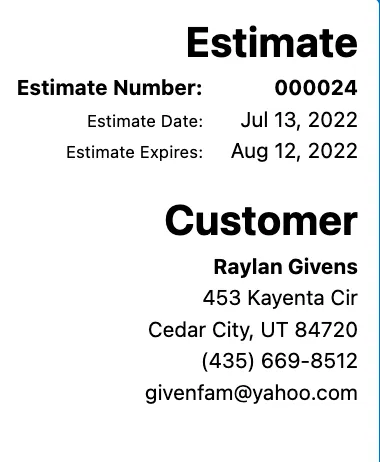
- When viewing a document through the portal link, you can now see the project name and address. This allows you to see more information at a quick glance when working in the documents section.
Repaired:
- Improved the performance of the estimate editor on google chrome, drag and drop has been improved.
- When a task is associated with the project after time has been tracked, the information on the time logs displays properly.
Build Notes 1.2.9890
Posted on Thursday, December 30th 2021
Additions:
- Added the ability to create negative line items in estimates and change orders on iOS devices.
Remodeled:
- Added the ability to filter by ‘teams’ or ‘groups’ on the daily time log page.
Repaired:
- Headers for print previews will display as expected.
- Total number of comments on a project lead or project will calculate and display as expected.
- Time logs recorded within the ‘Project Budget. Job Costing’ page will display as expected.
- Adding a project to a time log for a task after time has been recorded will display as expected.
- Cost breakdown PDF (found within an estimate) will now include associated change orders.
- Exporting labor items to tasks (from an estimate) will work as expected after changing a labor item’s name.
- Specific scenarios would cause a file to not upload to an estimate or change order. This has been fixed.
Build Notes 1.2.9548
Posted on Wednesday, December 22nd 2021
Remodeled:
- Project Number will be added as an additional column to Project Export and Project Lead Export sheets.
Repaired:
- Switching between text fields on mobile will display as expected.
- Entering decimals into line item fields will work as expected.
Build Notes 1.2.9366
Posted on Wednesday, December 15th 2021
New Additions:
- The ability to archive tasks is now live! Archive tasks will continue to appear in the ‘search’ page and on project schedules, but will be out of site and out of mind for task pages and filters.
- Customers synced with Quickbooks Desktop can now sync customers as Last Name, First Name, rather than only being able to sync as First Name, Last Name.
- The contact form integration now has the option of adding images as well!
Remodeled:
- Style changed to clocking in / clocking out that communicates when the time has successfully been logged.
- Downloading an image will no longer open a second tab in your browser, and will simply download the image instead.
Repaired:
- Project Lead cards found within the lead pipeline will now be formatted properly (certain device sizes were cutting off buttons previously).
- Taking a photo in the comment channel on mobile will now upload as expected.
- Line items that display a quantity to customers will display as expected in the customer’s portal view.
- Attached photos and files on invoices can be scrolled through while on a mobile device.
- Filtering for customers and projects on the schedule view (on mobile) will show corresponding tasks, as expected.
- Large document numbers will no longer prevent the creation of new projects and leads.
- When adding a contractor, the required fields will now display, as expected.
- All photos will now display in the main ‘photos & files” area, no longer being limited to the most recent 1,000.
- Fixed a rare rounding error with estimate line item markups.
Build Notes 1.2.8553
Posted on Friday, December 3rd 2021
We’ve been hard at work! Take a look at what we’ve been up to:
New Additions:
- It’s time to simplify Absent and Time-Off tasks! Within the settings, you can now specify whether or not you’d like these type of tasks to require being marked as complete or not.
- One size does not fit all: You can now create custom rejected reasons for both leads and projects.
- A printable PDF is now available for the “Project Budget. Job Costing” document.
- Invoices now have a net-45 option.
Remodeled:
- Basic users can now clock into projects that they have tasks associated with.
- Users who need estimate approval from an administrator prior to sending will still have access to the portal link after the estimate has been sent.
- Adding a new cost line will put the cursor inside the text box so you can begin typing immediately.
Repaired:
- Total file counts on projects and tasks will calculate and display as expected.
- When a task is associated to a project, any photos uploaded to that task will be associated as expected.
- Fixed a crash that could be experienced in a specific scenario when uploading photos to the comment channel.
- User icons on tasks and projects should remain static as expected.
- Marking unscheduled tasks completed will function as expected.
Build Notes 1.2.7476
Posted on Tuesday, November 16th 2021
We’ve been hard at work! Take a look at what we’ve been up to:
New Additions:
- Two new revenue reports! Quickly understand revenue received by estimator or project type on a month to month basis.
- Behind the 9-dot (or dial pad) menu in the Project Timeline view, there is now quick access to invoices, change orders and the project budget. A “Project Financial” overview has been added to the Project Timeline view. Quickly understand a project’s current value, and how that compares to the number and value of invoices and payments received.
Remodeled:
- Invoices are no longer dependent on having an estimate! This is a major step toward a simpler, project-focused experience. “Estimates” and “Invoices” have been split into two distinct areas of the app, each with their own individual filters.
Repaired:
- Flag icons in phone number fields have been repaired.
- In certain scenarios, YahooMail would not hyperlink estimates received from Projul. This has been resolved and will now function as expected.
Build Notes 1.2.5927
Posted on Friday, October 15th 2021
We’ve been hard at work! Take a look at what we’ve been up to:
Additions:
- Added an optional address field on the import lead form.
Remodeled:
- Both margin and markup will display at the bottom of an estimate.
- When adding a new line item template (labor, material or other cost), a user can now create and apply the line item (“Done & Apply”) or simply save the item as a template (“Done).
Repaired:
- Android users will no longer be intermittently prompted to update the mobile app while already in the latest version.
- Lead import button prompt on Android phones will display as expected.
- Print preview will display as expected when all estimates and change orders are collapsed inside an editor.
- The “Removed from previous estimate” text will display as expected on a fully paid invoice.
- Wide photos that are attached to estimates and invoices will display as expected in the customer’s portal.
- Invoice totals will wrap text as expected on smaller sized screens.
Build Notes 1.2.5854
Posted on Friday, October 8th 2021
We’ve been hard at work! Take a look at what we’ve been up to:
Added:
- Added a new hyperlink tool in the rich text editor that allows you to create a “clickable” link.
Remodeled:
- Increased size of description boxes for line items on tablet devices.
Repaired:
- Removing users from a follow up task will work as expected.
- Clicking on other phases in the lead pipeline while filtered for a lead in the “on-hold” status will work as expected.
- Projul default project types will display on time log reports as expected.
- When adding a time log at 12:00 am on the first day of the pay period, the time log will display as expected.
Build Notes 1.2.5526
Posted on Monday, October 4th 2021
We’ve been hard at work! Take a look at what we’ve been up to:
Remodeled:
- When adding a new project lead to an existing customer, the button to add that project lead has been moved to the top of the editor.
Repaired:
- User permissions for managing time logs will no longer give other permissions as expected.
- There were some instances in which the number of total leads represented in the individual statuses within the Lead Pipeline would not immediately update. These instances were identified and resolved, and should update as expected.
- The visibility toggle for a line item on certain mobile devices will be correctly positioned when creating an estimate.
- Employee name in the filter on the project page will display the correct name as expected.
- The button for seeing task steps and notes will match on the schedule and project timeline views.
- Changing the sold date on a project will update as expected.
Build Notes 1.2.4970
Posted on Friday, September 17th 2021
We’ve been hard at work! Take a look at what we’ve been up to:
Addition:
- Change order overhaul! You can now create multiple change orders at one time.
- Rename email types similar to phone types for greater personalization.
Remodeled:
- Change order names will now display in the invoice portal.
Repaired:
- Line items in an itemized estimate will display and hide quantity in the preview as expected.
- Completed projects will display start and end dates on calendar view.
- Filtering for a task on the calendar view will take you to the corresponding month the task is scheduled for.
- Archived users associated to a team or group will be properly removed from scheduled tasks.
- Sending change orders via email will now mark the change order sent.
- Filtering for a lead that is in the on-hold status will now display as expected.
Build Notes 1.2.4246
Posted on Monday, September 13th 2021
We’ve been hard at work! Take a look at what we’ve been up to:
Addition:
- Scheduling multiple users for a single task and want to know who checked off individual steps? Wonder no longer! We have added a tool tip beside every task that’s marked as completed that will display who marked the step complete and when.
Remodeled:
- Added a notes section to each line item in the project budget page.
Repaired:
- When adding a new trade, there will no longer be a delay in being displayed in a filter.
- Change history for tasks show step completions as expected.
Build Notes 1.2.3988
Posted on Friday, September 3rd 2021
We’ve been hard at work! Take a look at what we’ve been up to:
Remodeled:
- Added the ability to edit invoice number.
- Added project tags to the project gantt view and project month view.
Repaired:
- Using FireFox browser version 65 will let you scroll on project gantt view as expected.
- Custom invoice titles will display properly on the estimate and invoice card when there are more than 3 invoices.
- Recorded follow-ups that are marked outbound and successful will display text correctly.
- Scrolling on mobile filter on project page will show results as expected.
- Rejected estimates won’t effect the “Waiting” total on the estimates and invoices page.
- Basic users can now edit tasks they create.
- Print preview for estimates will display longer section descriptions as expected.
- Copying a multi user task to another day will maintain assigned users as expected.
- Print preview in customer portal will have same format as print preview in estimate editor.
Build Notes 1.2.3833
Posted on Monday, August 30th 2021
We’ve been hard at work! Take a look at what we’ve been up to:
Repaired:
- Deleted task steps will reconcile on other devices as expected.
- Lead import prompt in the lead editor will display as expected on mobile.
- Line items that are dragged to a new estimate section will update the ‘preview as customer’ view as expected.
- Sending a change order through Projul email will mark the change order as sent.
- Tax value for a line item will show in the expanded view as expected.
- Time off tasks will no longer allow a user to use ‘clock in’ button.
- Overdue recursive tasks will function as expected when marked complete.
- Recursive task scheduling has been improved.
- Dragging tasks on the calendar view has been improved.
- Adding users to a task on mobile will not be blocked by the keyboard.
Build Notes 1.2.3754
Posted on Monday, August 23rd 2021
We’ve been hard at work! Take a look at what we’ve been up to:
Additions:
- Growing across time zones? We’ve added a time zone option in the “schedule” settings that will determine notification times respective of your selected time zone.
- No longer will deleting an estimate require deleting a project lead! We have added a ‘delete estimate’ button. This will also delete associated invoices under certain, expected conditions.
Repaired:
- Material Breakdown PDF will display as expected when company website information is missing.
- Description text boxes for line items will stay open.
- The “Preview as customer” button on estimate templates will view the portal as expected.
- Filtering by project types on the estimate page will display as expected.
- Marking a task complete from the project timeline will now function as expected.
- Toggling tax on/off for cost line defaults will display that change on the estimate.
- Changing markup type between dollar amounts and percentages will display correctly on Firefox web browser.
Build Notes 1.2.3356
Posted on Monday, August 16th 2021
We’ve been hard at work! Take a look at what we’ve been up to:
Remodeled:
- All invoice reports now include a “project number” column for easier reference.
Repaired:
- Opening the estimate editor from within an invoice and exporting labor items to tasks, will display as expected on the schedule page.
- The “Customer Ledger” report will now bold the proper row after changing the “sort” direction.
- The “Material Cost Breakdown” PDF will now pull totals from cost lines that have not been saved in the same manner as cost lines that have been saved.
- Syncing invoices to QBO that have edited change order line items will sync as expected.
- Increased the maximum number of photos and files that will display in the main photo and file galleries.
Build Notes 1.2.3033
Posted on Tuesday, August 10th 2021
We’ve been hard at work! Take a look at what we’ve been up to:
Remodeled:
- We have included an “On Hold” reason that can be specified in the project editor.
- Project tags have been added to the lead pipeline.
- In the event a Quickbooks account becomes disconnected for any reason, a button will now appear to prompt for a reconnect on estimates and invoices.
Repaired:
- Rejected leads that have been restored to active will properly have the ‘rejected’ stamp removed from the estimate and project lead card.
- Estimate line item descriptions will display as expected when a line item is expanded.
- Deleting an invoice that had a deleted payment associated to it will function as expected.
Build Notes 1.2.2756
Posted on Sunday, August 1st 2021
We’ve been hard at work! Take a look at what we’ve been up to:
New Additions:
- We’re pleased to announce our Lead Importer is now live! Talk with a member of our team to learn how Projul can automatically import your prospective customers from a contact form on your website. We can either send you instructions on how to add this into your website, or we would be happy to schedule a meeting to implement this for you, at no charge!
Remodeled:
- Adding users in Projul after upgrading your subscription will now be immediately available.
Repaired:
- Functionality improvements for the “On Hold” status in the lead pipeline.
- Overtime calculations upgrade.
- Data export improvements.
Build Notes 1.2.1688
Posted on Friday, July 16th 2021
We’ve been hard at work! Take a look at what we’ve been up to:
New Additions:
- Ability to sort project photos by date taken or uploaded.
Remodeled:
- Adjusted scroll bar displays for laptops and similarly-sized devices.
- Added an ability to mark estimates and invoices as sent when sending them from Projul.
Repaired:
- Embedded videos inside of an estimate or invoice can be viewed in the customer portal as expected when using Internet Explorer.
- The ability to filter for leads in the “On Hold” status now filters as expected.
- Character limits are hidden when an account is not synced to a Quickbooks Online or Quickbooks Desktop account.
Build Notes 1.2.1350
Posted on Friday, July 9th 2021
We’ve been hard at work! Take a look at what we’ve been up to:
New Additions:
- Project leads can now be placed on hold! Drag and drop into the “On Hold” status, or select the on hold option from the top right drop down menu on the project lead card itself. Specify whether you’d like that lead to be placed on hold for a specific day or indefinitely.
- We have added a permission that allows you to specify an individual user’s ability to access reports; financial, sales & leads, or both.
Repaired:
- Creating and applying project templates will display tasks as expected.
Build Notes 1.2.1079
Posted on Friday, July 2nd 2021
We’ve been hard at work! Take a look at what we’ve been up to:
New Additions:
- Projul now supports emailing estimates, change orders and invoices from within the app! Complete with a history of what was sent and when, we’re bringing major transparency to document communications within Projul.
- Looking for a more personal way to deliver an estimate to a customer? Projul now supports embedded Youtube and Vimeo videos with the ‘introduction’ area of an estimate!
- We have broken out comment permissions to be configurable on a user-level. You can configure users to not be able to see comments at all (hide), have the ability to only view the comments, or have the ability to view and add comments.
- Project tags! Every project now has the ability to have one or multiple project tages. Project tags are filterable and are most commonly used as project statuses. This is an incredibly powerful tool for any sized company that can take project organization to the next level.
Remodeled:
- Added ability to filter by trades and group names on the time log page.
- Added ability to give estimates custom names that will display in print preview as well as within the customer portal.
- Added the ability for descriptions on the cost breakdown pdf to be toggled on/off.
- Added the ability to mark events as ‘tentative’ within the editor.
Repaired:
- While already being filtered by a lead, filtering by an additional lead will now function as expected.
- When deleting a change order, the ‘parent’ estimate total will now display the total as expected.
- The ‘Unpaid Due Invoices’ report will no longer display deleted project invoices.
Build Notes 1.2.0229
Posted on Monday, June 14th 2021
We’ve been hard at work! Take a look at what we’ve been up to:
New Additions:
- We have added the ability to set a default tax rate on estimates. You can add this by going to your estimate settings, handling to “default tax rate” and specifying that percentage.
- Significant authentication upgrade! With this upgrade comes the option for users to either use a code accessible from their email to login or to stay with a standard password.
- We have added an indicator on your user initials that, when displayed, lets you know there are no release notes available for your review.
Remodeled:
- We have added an optional ‘category’ tag to labor items. This allows labor items to be displayed as category names, if preferred.
- The Lead Pipeline and Projects pages now support a “project number” sort option.
- An option setting has been created for users to disable payment syncing from Quickbooks Online.
- We have added character counts for text fields that sync to Quickbooks that are subject to Quickbooks-specific character count limitations.
- When a single worker is assigned to a task, their entire name is displayed on the task card.
- Photos and files can now be saved as part of an estimate template.
Repaired:
- The email that is generating when sending an estimate to a customer will no longer have trailing spaces in the subject line.
- Completed task steps will show correct percentages in Gantt View.
- Users with no access to estimates will no longer see estimates for leads they created.
- Users who have time tracking hidden will no longer see time log buttons on projects and leads.
- Deleting change orders will correctly disable a customer’s link to see that change order.
- Sales Representatives will now get notifications from sold leads in addition to estimators.
- Improvement in syncing custom fields to Quickbooks Online.
Build Notes 1.1.9061
Posted on Sunday, May 30th 2021
We’ve been hard at work! Take a look at what we’ve been up to:
New Additions:
- Photos and files now have “note” sections! Quickly taking a picture on-site and then recording a note for later reference has never been easier!
- Change order specific “stamps” are now live! Quickly look through your list of active projects from the Lead Pipeline or Estimates & Invoices areas of Projul and visually understand in seconds what the status of your customer-specific change orders are.
- Have more control over the behavior of emailing your estimates, invoices and change orders to your customers. Specify whether you would like Projul to open your email with a template ready to send to your customer, open your email with a blank email ready for you to customize a message to your customer, or don’t open your email at all.
- We’ve added more user-requested payment types for accurately recording payments.
- Have you branded your account yet? We’ve simplified this process by adding a quick edit link to the default Projul Hammer on the top left of your screen (top of the menu).
- After you’ve created an invoice, quickly add another invoice from the bottom of the original invoice. Scheduling a draw or progress payment schedule has never been easier!
Remodeled:
- Quickly remove all users associated with a task, defaulting the task to an unassigned state.
- Applied some visual tweaks to the menu to prepare for additional features and sections within Projul.
Not sure if Projul is the right fit? Hear from contractors who use it every day.
Repaired:
- Employee’s hourly rate will display correctly on the Time Log Report.
- Users without an email will prompt for you to add an email prior to sending an invite to Projul.
- The filter on the photos & files page will properly be removed when going to the download page.
- Deleting photos, files, and downloads from inside of the editor will correctly delete them.
- When deleting a parent task, the child task will no longer display the parent task.
- Backdating payments on invoices will display correctly when filtered for on Cash Receipts Journal.
Build Notes 1.1.8521
Posted on Friday, May 21st 2021
We’ve been hard at work! Take a look at what we’ve been up to:
New Additions:
- The “Search” feature now includes a column specific to Project Leads.
- Name your photos! We’ve implemented the ability to name your photos in addition to our current tagging functionality. Users are also able to filter by their photo names.
- Expert status in Projul? We’ve added the ability to turn off the hover-over tool tips from the menu.
- In addition to assigning a default estimator to a specific customer, you can now assign a default project manager.
Remodeled:
- The name of the month will always display when scrolling on the project timeline.
- Percentages for hard costs will display on estimates.
Repaired:
- iPad will display the “Who’s Working” page correctly when viewed in portrait mode.
- Exporting labor to tasks will display users names on the schedule correctly on tablet devices.
- When previewing an estimate as a customer, the confirmation pop up will be centered and display correctly.
- Creating an estimate from the drop down editor of a new lead will correctly show the content of the estimate.
- Filter categories will wrap text correctly when the filter is showing results.
- Meeting events will display on the project timeline view.
Build Notes 1.1.8337
Posted on Thursday, May 13th 2021
We’ve been hard at work! Take a look at what we’ve been up to:
New Additions:
- Added a new task type called “Event” which can be scheduled for long periods of time.
- Added new settings that will let you customize how project, estimate, and invoice numbers are generated. Includes adding prefixes and suffixes.
- Added a setting that sets a default for when estimates will become overdue.
- Added toggles to hide estimates and invoices from customer view in the portal.
Repaired:
- Manual payments on an invoice will now display correctly in the Cash Receipts Journal.
- Companies with a blank name will correctly display the side bar and icons.
Mobile App:
- iOS version 2.8.048 has been released to the Apple Store.
- Android version 2.8.054 has been released to the Google Play Store.
- Be sure to update to the latest versions of the app for the best performance and latest features.
Build Notes 1.1.8021
Posted on Monday, May 10th 2021
We’ve been hard at work! Take a look at what we’ve been up to:
New Additions:
- Added a copy button for emails next to where they display in Projul.
- Added team/group scheduling for tasks. They will show up in the task editor when you click on the user field to schedule.
Remodeled:
- Job costing page will show a warning if a user is missing a pay rate when they have time tracked to a labor work item.
- Template permissions settings for users has been broken out to be more specific.
- Description names of material items will be displayed in the material breakdown pdf.
- Project templates will retain Gantt dependencies for tasks.
- Added an option to include section names and subsection names to labor items in an estimate when exporting the labors as tasks.
Repaired:
- When expanding on a project timeline, the view will correctly keep its position in the timeline.
- Can toggle days off in the mobile calendar view.
- Invoicing line items from an itemized estimate where there’s a line item with tax and another without tax will display correctly.
- Can correctly edit task names and project names on time logs that are in the past.
- Search function for task icons will show correct results on mobile.
- Removed line items will correctly display in the invoice and they can be invoiced as negative amounts.
- SKU names that are long will wrap the text in the material breakdown pdf.
- Opening an editor on the Welcome Page in Safari will display correctly.
- Syncing estimates to Quickbooks Online from the invoice editor will sync correctly.
Build Notes 1.1.7101
Posted on Friday, April 23rd 2021
We’ve been hard at work! Take a look at what we’ve been up to:
New Additions:
- New setting in scheduling that requires users to mark all task steps complete to fully mark off a task. Can be toggled on or off.
Remodeled:
- Comment Channel scroll has been updated to improve performance.
- Added a column in the Unpaid Due Invoices Report for upcoming invoices that are pending payment but not overdue.
- Project Templates are now accessible from the Template settings.
- Changed text in Lead Pipeline when clicking to edit a lead.
- Project Details will now display as Project Notes.
- Filter has been added to the Time Logs Page when in payroll mode.
Repaired:
- When a project is in expanded view, changing the view on the page will display correctly.
- Recursive tasks in Calendar View can be successfully marked complete.
- Task comments will display correctly when in the “All” section of the Comments Channel.
- Signing out after your account has expired on mobile devices will work correctly.
Build Notes 1.1.6756
Posted on Tuesday, April 20th 2021
We’ve been hard at work! Take a look at what we’ve been up to:
New Additions:
- Team/ Group name has been added as a field in the employee and contractor editor. Can filter for this field in the schedule page.
- Added a copy button next to phone numbers that are displayed in Projul.
Remodeled:
- New user email is more concise with information on the login process.
- Calendar view will show more information on task cards as well as being able to add or remove users from the task card quickly.
- Switching to itemized view in an invoice will automatically show the invoice as itemized in the portal and print previews.
- Invoice will carry over the company contact info from the estimate unless specified differently in the invoice settings.
Repaired:
- Can split time logs that users are currently clocked into.
- Tax is being calculated correctly when the setting for requiring tax on all line items is turned on.
- The “update template” button is displaying correctly in the Job Costing page.
- Email template will display company name correctly if there was an ”&” in the name of the company.
- Scroll bar is in correct place when using the project scheduler slide out.
- Calendar view will display correctly when turning off visibility for certain items.
- Meeting notes will wrap text correctly on mobile devices.
- Lead Source Details will show correctly in the project editors.
- When closing an editor on the Calendar view, the page will correctly resize.
- Notes entered on time logs will display correctly.
- Invoicing a $0.00 line item will display correctly.
Build Notes 1.1.6097
Posted on Friday, March 26th 2021
We’ve been hard at work! Take a look at what we’ve been up to:
Repaired:
- The edit button for the Lic. # being displayed correctly.
- Exporting labor to tasks will display the right amount of tasks.
- Important details for projects and leads to show correctly.
- Deleted files and photos that were attached to estimates and invoices to be removed in the customer portal correctly.
- The warning text when archiving a user or contractor to display correctly.
Build Notes 1.1.5886
Posted on Friday, March 19th 2021
We’ve been hard at work! Take a look at what we’ve been up to:
Remodeled:
- Comment channels now include search functionality, along with buttons to manage searched results.
- New estimate setting option to choose how you sync estimates to your accounting service.
- Lead cards that have a rejected stamp will now display the rejected reason when mousing over the stamp.
Repaired:
- The “add task” button to display correctly on iPad devices.
- The pay periods to display the correct amount of days.
- Rejected leads to correctly show in the estimate filter.
Build Notes 1.1.5675
Posted on Thursday, March 11th 2021
Here’s what’s new:
- Added the ability to customize the estimate/invoice email template that is sent to customers. This can be found in the settings for estimates and invoices.
- Tax amount will display on the estimate card when the estimate is in “draft” status.
- Hid financial information in the editor of projects/leads for users who don’t have access to the estimate.
- Fixed an issue with project photos not formatting correctly inside of estimates.
- Progress bar for uploading photos on mobile will display in front of pop up editors instead of being hid behind them.
Build Notes 1.1.5542
Posted on Monday, March 8th 2021
Here’s what’s new:
- License number can be set in the estimate and invoice settings. This will display in your company info at the top of estimates and invoices.
- Added a button to the kebab drop down for leads and projects that takes you to the associated invoices.
- Made style and improvement changes to the communication channels.
- Invoice drafts will no longer count towards the percentage invoiced when previewing the portal as a customer.
- Fixed an issue with the schedule page showing squished time off blocks on tablet devices.
Build Notes 1.1.5193
Posted on Friday, February 26th 2021
Here’s what’s new:
- Added the ability to hide days off on the schedule and project pages.
- Sliding a project now has the option to skip days off.
- Unscheduled tasks with no assigned users now show in the lead card task list.
- Added a setting to hide icons on the project card.
- Line item descriptions can now be imported into invoice descriptions.
- Minor bug fixes.
Build Notes 1.1.4848
Posted on Thursday, February 18th 2021
Here’s what’s new:
- Added an option in the estimate to hide options for accepting, requesting revision, and rejecting the estimate from the portal.
- Added a button on the estimate card to easily mark an estimate as paid. There is an option inside of the invoice editor as well to mark the invoice as paid.
- Time log report added to the reports page.
- When clicking on hyperlinks in Projul, another tab will open instead of the current tab.
- The permission to edit templates will control who can apply templates to project leads as well.
- Photos and files from the gallery can be attached to tasks through the task editor.
- Fixed an issue on Android where the “x” to close out of an editor wasn’t displaying on some devices.
- Fixed an issue with long project types on leads.
Build Notes 1.1.4610
Posted on Friday, February 12th 2021
Here’s what’s new:
- Tax on invoices can be added separately from estimates.
- More editing options when changing an estimate section template.
- Search functionality has been added to material category names, SKU numbers, labor trades, and vendor names inside of an estimate.
- Added a sort to the schedule page for company names.
- Task list icon always shows on lead cards.
- Project details on templates now get applied when applying a project template.
- Can add project leads to clocked in time.
- Added view history for invoice portal.
- Basic users who have access to their own projects and leads can see them without being assigned to them.
- General bug fixes and quality improvements.
Build Notes 1.1.4274
Posted on Thursday, January 28th 2021
Here’s what’s new:
- Style changes to the Reports page to support new financial reports.
- Added four financial reports: Invoice Register, Unpaid Due Invoices, Cash Receipts Journal, and Customer Ledger.
- Revenue Projections on Estimate and Invoice page now shows a red bar for total overdue invoices.
- Project templates now apply the Project Type that was set on the template.
- Added the estimate tax to the invoice editor, print previews, and invoice portal link.
- Can show subsection totals inside the estimate portal link.
- Fixed an issue with not being able to add a line item with the same name as a deleted line item.
- Bug fix for estimate header images showing in the estimate portal as attachments.
- Other minor bug fixes.
Build Notes 1.1.4216
Posted on Friday, January 22nd 2021
Here’s what’s new:
- Added an unassigned user to the schedule page that will keep track of unassigned tasks.
- Added a notes section to the task card of estimate meetings that will also be displayed in estimates.
- Customer contact info is displayed in all PDF’s and portal links.
- Added a button to all task cards that will mark the task complete. Can be toggled in settings.
- Added a sort to the export labor to tasks slide out that will sort unscheduled tasks by units, order in estimate, and alphabetically.
- Added a text box warning when deleting a payment in Projul.
- Fixed an issue with pressing the Lead Pipeline home screen button and not working through to the lead pipeline.
- Fixed some issues for project managers with “view and comment only” permissions.
Build Notes 1.1.4013
Posted on Saturday, January 16th 2021
Here’s what’s new:
- Invoices made in Projul can now be synced to Quickbooks Online.
- Recorded payments in Quickbooks Online will be synced to Projul when enabled in Projul invoice settings.
- When syncing change orders to Quickbooks Online, they will appear individually and separated from the original estimate.
- Follow up task names can now be changed.
- Can record more notes on the project timeline when expanding the view for a project.
- Tasks viewed from the Lead Pipeline can now be marked complete and not complete.
- Added a sort to the estimate page for when it was approved.
- Fixed an issue with long task steps being cutoff on mobile.
- General bug fixes and quality improvements.
Build Notes 1.1.3639
Posted on Friday, January 8th 2021
Here’s what’s new:
- Added an option to upload photos on mobile inside the task editor.
- Fixed an issue where customer email wouldn’t sync to Quickbooks Online.
- Fixed an issue where bullet points wouldn’t sync and display correctly in Quickbooks Online.
- Bug fix for icon options disappearing when backspacing in the search.
- Added a tool tip to the Job Costing Page that shows who logged time for each line item.
- Increased the size window for the Calendar View.
- Addresses now show for clocked in tasks that are not assigned to a project on the Map Page.
Build Notes 1.1.3513
Posted on Friday, January 1st 2021
Here’s what’s new:
- Changes to authentication requiring users to log out and back in
- Displaying more verbose errors if there is an issue syncing to QuickBooks
- Fixed an issue with deleting taxes in some instances
- Displaying gross total paid per employee in time log page based off of employee wage set
- Fixed issue with calendar getting cut off on Android in some instances
- Fixed an issue with cost breakdown being cut off on mobile in some instances
- Fixed an issue with adding lead sources from mobile
- Added ability to print PDF from customer portal
- Fixed an issue with project budget page not being in the same order as the estimate
- Added ability to delete expenses from project budget page
- Fixed an issue with showing total on project budget page before entering actual costs
- Fixed an issue with not being able to change line item names when syncing to QuickBooks
- Added the Estimated Hours total on project budget page
- Added the ability to upload photos from the editor of a task
- Changed sort on project page to Sold Date by default
- Added ability to mark a project lead as sold from lead card
- Changed project icon in communication channel
- Fixed wording in pop up when tagging a file
- Fixed an issue with copying tasks on the mobile schedule
- Fixed an issue with tasks on the mobile schedule not showing tentative
- Fixed an issue with Add Task button being cut off on mobile in some instances
- Fixed an issue with sorting by Overdue Payment on estimates and invoices page
Build Notes 1.1.3383
Posted on Wednesday, December 23rd 2020
Here’s what’s new:
- Budgeting and Job Costing is now available on the estimate page.
- Minor bug fixes on schedule and estimate page.
Build Notes 1.1.3114
Posted on Wednesday, December 16th 2020
Here’s what’s new:
- Invoices can now be added through approved estimates.
- The estimate page has been stylized to reflect invoicing changes.
- Can print estimates and invoices from the customer portal.
- Bug fix for typing dates as fractions.
- Minor bug fix for rich text tools.
- Fixed an issue with recursive tasks.
Build Notes 1.1.2872
Posted on Monday, December 7th 2020
Here’s what’s new:
- Added previous and next arrows for each employee/contractor on the schedule page.
- Added the ability to create new estimate templates from the template settings page.
- Bug fixes for syncing estimates with QuickBooks Online and QuickBooks Desktop.
- Minor bug fixes on the schedule page.
Build Notes 1.1.2621
Posted on Thursday, November 26th 2020
Here’s what’s new:
- Added the ability to have estimates reviewed for approval before being sent.
- Project sold dates can now be changed.
- Estimates will now show the view history of site visits to the estimate portal.
- Added tutorial videos throughout the app.
- Minor bug fixes for change orders.
- Fixed a minor display issue on lead cards.
Build Notes 1.1.2119
Posted on Saturday, November 21st 2020
Here’s what’s new:
- Can now sort leads by “Approved” estimates.
- Added the ability to change the color of tasks separate from the project color.
- Added the ability to drag a task from “Export Labor to Tasks” in the calendar view.
- Added ability to see tax amount per cost line in an estimate.
- Added the ability to only charge tax for material hard costs.
- Added ability to set a minimum markup on an estimate.
- Added the ability to set independent tax rate for each cost line in an estimate.
- The quantity and cost on itemized estimates can now be hidden.
- Added the ability to add a 0% tax template.
- A blue notification pop-up will appear when adding an item in Projul.
- Multi-day tasks now copy “Entire Work Day” to each following work day when selected.
- General bug fixes and quality improvements.
Build Notes 1.1.1969
Posted on Sunday, November 15th 2020
Here’s what’s new:
- Added a line item preview to estimates for quick editing/adding of cost lines.
- Added the ability to hide quantities of cost lines in an “Itemized” estimate.
- Improved communication channel look and feel, including the ability to add formatting to comments.
- Added the ability to choose a default color when creating project leads/projects in the setting page.
- Minor projects page bug fixes.
- Minor estimate bug fixes.
- Minor multiday task bug fixes.
Build Notes 1.1.1530
Posted on Saturday, November 7th 2020
Here’s what’s new:
- Added the ability to filter and tag photos inside the gallery’s of tasks, projects, and leads.
- Added a notification reminder to clock into tasks 5 minutes before their start time.
- When adding a task, events and tasks are split up for clarity.
- Estimate cards will show the status of where the lead is in the pipeline.
- Added the ability to change company info in the Account page.
- Added the ability to brand account with company logo and company name in Settings.
- General bug fixes and quality improvements.
Build Notes 1.1.1411
Posted on Friday, October 30th 2020
Here’s what’s new:
- Added customer and employee buttons to the Welcome Page.
- Added buttons to the Welcome Page that quickly let you add tasks, projects, estimates, users, clock in/out, etc…
- Added the ability to have multiple editors open at the same time.
- Added a user setting to let users add and edit contractors.
- When adding a task, the time will be set based off of your current work schedule set in the Settings Page.
- Added a drop down in the editor of project leads to quickly move the lead to another phase.
- Changed the Sales Pipeline Page to Lead Pipeline Page.
- Improvements to search prioritization.
- General bug fixes and quality improvements.
Build Notes 1.1.1253
Posted on Friday, October 23rd 2020
Here’s what’s new:
- Added the ability to view PDF versions of estimates on mobile and tablet devices.
- Added the ability to automatically convert time logs to overtime based off of payroll settings.
- Added a payroll period report on the time log page.
- Tax names now show on estimates.
- Can now upgrade your subscription manually from the User Account editor.
- Added the ability to change workers and project managers from the project card.
- Can add multiple addresses to customers.
- General bug fixes and quality improvements.
Build Notes 1.1.0939
Posted on Friday, October 16th 2020
Here’s what’s new:
- Overhaul of the UI in Projul for a better user experience.
- Added a quick access button to tasks, project leads, and project cards.
- Updated the options when recording a follow up to inbound and outbound to reflect how contact was made.
- Added the ability to split time logs into separate payroll accounts.
- Added payroll mode in time logs to set how you run payroll and when overtime is accounted for.
- Added a Sales Pipeline button to the Welcome Page.
- Made important details text selectable on tasks, leads, and project cards.
- General bug fixes and quality improvements.
Build Notes 1.1.0605
Posted on Tuesday, October 6th 2020
Here’s what’s new:
- Added the ability to print a material list with SKU’s and vendors from an estimate.
- Added the ability to add notes to employees, contractors, and customers.
- Estimates will be “soft locked” when moved to the “To Sell” phase in the pipeline, can be unlocked inside the estimate or through revision.
- New interface for creating estimates on the Estimate Page.
- Time log bug fixes.
- Minor comment channel bug fixes.
- Minor estimate bug fixes.
Build Notes 1.1.0469
Posted on Wednesday, September 30th 2020
Here’s what’s new:
- Added a link to download the mobile app when using Projul in a mobile browser.
- Gallery page bug fixes.
- Estimating bug fixes.
- QuickBooks Online cost line description sync bug fixes.
- Minor settings bug fixes.
Build Notes 1.1.0354
Posted on Wednesday, September 24th 2020
Here’s what’s new:
- Updated look and feel of estimates to improve simplicity.
- Improved filtering by task type in the schedule page.
- Updated Projul invite email when creating new users.
- Minor recursive task bug fixes.
- Minor estimate bug fixes.
- Minor time tracking bug fixes.
Build Notes 1.1.0293
Posted on Tuesday, September 22nd 2020
Here’s what’s new:
- Added the ability to give non admins full access to the time logs section through a user setting.
- Added the ability to give non admins access to creating customers from the people page through a user setting.
- Added the ability to add tasks on the project card in gantt view.
- Added start & end dates to projects showing on the gantt view.
- Mobile & tablet project gantt view updates.
- Minor schedule page bug fixes.
- Minor Customer editor bug fixes.
Build Notes 1.1.0219
Posted on Saturday, September 19th 2020
Here’s what’s new:
- Added the ability to add custom work schedules for specific users through a setting in the employee editor or company wide in the settings page.
- Added an indicator message on employees when they have been synced to QuickBooks Online.
- Mobile performance updates.
- Minor file upload bug fixes.
- Minor estimate email template bug fixes.
- Minor mobile bug fixes.
Build Notes 1.1.0065
Posted on Tuesday, September 17th 2020
Here’s what’s new:
- Added a user permission setting for whether or not a user can edit clock in/out times of time logs.
- Added step completion numbers to the task cards.
- Updated the look of time off events in the schedule page to easily distinguish between regular tasks in the scheduler.
- Performance updates.
- Minor sales pipeline bug fixes.
- Minor estimate bug fixes.
- Minor gantt view bug fixes.
Build Notes 1.0.9896
Posted on Saturday, September 12th 2020
Here’s what’s new:
- Added an easier way to get to the time tracking map on the left sidebar.
- Added the ability to show project locations on the time tracking map.
- Added the Satellite View to the time tracking map.
- Added the ability to show or hide customer info in the search for your basic users based off of a user permission.
- Minor task card bug fixes.
- Minor permissions bug fixes.
- Minor mobile bug fixes.
Build Notes 1.0.9720
Posted on Thursday, September 3rd 2020
Here’s what’s new:
- Added the ability to bulk download your photos & files into a .zip file inside Projul.
- Added the ability to interact with projects in gantt view on the mobile app.
- Added the ability to check time logs for projects on the month and gantt view of the project page.
- Project timeline task card sizing fixes.
- Filtering bug fixes.
Build Notes 1.0.9682
Posted on Tuesday, September 1st 2020
Here’s what’s new:
- Added the project gantt view beta.
- Added the ability to see a preview of what the customer will see when they open the link to their estimate that was sent to them.
- Added more tooltips when hovering over icons in Projul for more clarification of the functionality.
- Added “Contracts” to the list of names you can change your estimates to in Projul.
- Added the ability to delete a customer’s leads/projects when deleting the customer from Projul.
- Search results improvements.
- Notification redirect improvements.
- Minor project template bug fixes.
- Minor task copying bug fixes.
- Minor photo gallery thumbnail fixes.
Build Notes 1.0.9653
Posted on Tuesday, August 31st 2020
Here’s what’s new:
- Added the ability to add custom fields to your estimates from the settings and the ability to sync them to your QuickBooks Online estimates.
- Communications channel performance updates.
- Minor time tracking bug fixes.
- Minor Android app fixes.
Build Notes 1.0.9499
Posted on Tuesday, August 25th 2020
Here’s what’s new:
- When a customer approves an estimate using their digital signature, it will now show the signature on the print preview of your estimate.
- Added the ability to hide the tax on estimates if there is none.
- Added an easier way to remove photos & files from estimates.
- Minor project fixes.
- Minor mobile sizing fixes.
Build Notes 1.0.9318
Posted on Thursday, August 20th 2020
Here’s what’s new:
- Added the ability to change the name of your “Estimates” in Projul to Bids, Proposals or Quotes.
- Added the ability to assign one or more sales representatives to your customers and project leads.
- Added a new field in the project editor to have phone numbers on a project level separate from the customer’s phone numbers.
- Added the ability to see your customer’s estimates, photos and files from the customer editor.
- Minor estimate section bug fixes.
- Minor mobile bug fixes.
- Minor notification bug fixes.
Build Notes 1.0.9151
Posted on Tuesday, August 18th 2020
- Added notifications for Project Managers whenever their projects are completed.
- Added the ability to save or print a cost breakdown of your estimates.
- Added a user permission to be able to edit estimate templates/defaults.
- Minor estimate bug fixes.
- Minor filtering bug fixes.
Build Notes 1.0.9043
Posted on Tuesday, August 11th 2020
- Added notifications for Project Managers whenever their projects, or a task associated to their projects, is commented on.
- Added the ability to hide accounting sync functions as a per user setting.
- Added the ability to sync Projul time logs to QuickBooks Online.
- Performance updates throughout Projul.
- Project cloning & template bug fixes
- Bug fix for project cover photos.
- Minor photo gallery bug fixes.
Build Notes 1.0.8711
Posted on Thursday, July 30th 2020
- Added a new user permission setting for Estimates. Easily manage who can see your Estimates.
- Added the ability to hide information on task cards as a per user setting.
- Updated the Photo Gallery page to give more context to each photo shown.
- Minor Scheduling bug fixes
Build Notes 1.0.8607
Posted on Friday, July 24th 2020
- Added the ability to attach photos & files to your estimates. Your customers can see and download them from the estimate eSignature link.
- Introduced more in-depth tooltips to the main menu to provide context about the purpose of each page.
- Separated the Estimates page into its own section instead of being part of the Sales Pipeline to provide easier access to your estimates.
- Minor Sales Pipeline bug fixes.
Build Notes 1.0.6895
Posted on Tuesday, June 2nd 2020
Here’s what’s new:
- Slight updates to the Description & Pricing interface within Estimates to make creating an Estimate even easier in Projul.
- Minor sales pipeline bug fixes.
- Minor estimate view bug fix.
Build Notes 1.0.6533
Posted on Thursday, May 21st 2020
Here’s what’s new:
- Reworked the completion percentage on projects to be set off of man hours completed instead of tasks completed.
- Updated verbiage and process to sending Projul invite/password reset email from the user editor.
- Minor project timeline bug fixes.
- Minor project card bug fix on mobile.
Build Notes 1.0.6435
Posted on Saturday, May 16th 2020
Here’s what’s new:
- Our Dev team pulled a couple all nighters to release the “Project Timeline Month View” (an awesome request by one of our newest customers, Xecutive Pools). This new view gives you the ability to drag & drop tasks between days, slide project tasks and see a broader scope of all your projects with ease!
- Added the ability to drag & drop tasks in the “Week View” of the scheduler.
- Minor sales pipeline bug fixes.
Build Notes 1.0.6292
Posted on Thursday, May 14th 2020
Here’s what’s new:
- Improved sales pipeline usability (Including the ability to drag & drop leads between phases)
- Added ability to quickly take multiple photos from mobile app
- Added a notification when uploading photos letting you know when they have all been uploaded
- Minor filter & comment bug fixes
Build Notes 1.0.6211
Posted on Tuesday, May 5th 2020
Here’s what’s new:
- Added the ability to edit estimate templates in the settings page
- Added an automatic check to help prevent accidentally adding duplicate project leads
- Added the ability to start a project from the “approved by customer” button on lead cards in the sales pipeline
- Minor estimate & sales pipeline bug fixes
Build Notes 1.0.6168
Posted on Thursday, April 30th 2020
Here’s what’s new:
- Fixed an issue with blank projects being created
- Fixed an issue with addresses in the photo gallery
- Added confirmation when starting a project from a lead
- Added ability to clone leads
- Added change orders to estimating
- Added ability for customer to approve estimates
- Fixed an issue with estimate templates
- Fixed an issue with mobile layout
- Added ability to set automatic write estimate task start time
- Added ability to easily check for duplicate customers
Build Notes 1.0.5710
Posted on Friday, April 17th 2020
Here’s what’s new:
- Fixed an issue with deleting costs in estimates
- Fixed an issue with downloading photos
- Fixed an issue with the sales pipeline
- Fixed an issue with non-itemized estimates
- Fixed an issue with multi-day tasks
- Added ability to collapse estimate groups
- Improved estimate creator layout and usability
- Added ability to group costs in estimates
- Added unit types in estimates
Build Notes 1.0.5478
Posted on Wednesday, April 8th 2020
Here’s what’s new:
- Added new estimating feature
- Added ability to sync estimates with QuickBooks Online
Build Notes 1.0.5217
Posted on Wednesday, April 1st 2020
Here’s what’s new:
- Performance improvements for the projects page
- Fixed an issue with gallery not displaying certain images
- Fixed an issue with displaying some addresses on projects
- Fixed an issue with search page
Build Notes 1.0.5105
Posted on Wednesday, March 26 2020
Here’s what’s new:
- Added ability to set specific sales pipeline permissions
- Added ability to see next scheduled follow up with lead task
- Fixed an issue with scheduling follow up with lead tasks
- Fixed an issue with image tags in the photo gallery
- Fixed an issue with sorting in the photo gallery
Build Notes 1.0.4921
Posted on Friday, March 13th 2020
Here’s what’s new:
- Fixed an issue with photo processing
Build Notes 1.0.4909
Posted on Tuesday, March 10th 2020
Here’s what’s new:
- Added ability to sort by projects and tasks
- Fixed an issue with file upload
- Added ability to see project photos from task photos gallery
- Added ability to see image tags from photo viewer
Build Notes 1.0.4836
Posted on Thursday, March 5th 2020
Here’s what’s new:
- Added ability to shift+click when selecting photos in the gallery
- Fixed an issue with reloading Projul occasionally
- Fixed an issue with removing estimators from leads
- Added more details to tasks when searching
- Fixed an issue with opening the project editor after cloning projects
- Fixed an issue with slow image uploading
Build Notes 1.0.4792
Posted on Wednesday, March 4th 2020
Here’s what’s new:
- Added ability to upload files to tasks
- Added ability to access leads when searching for customers
- Fixed an issue with scrolling in the photo gallery
- Fixed an issue with cloning projects
- Added ability to select multiple photos then edit the project type
Build Notes 1.0.4771
Posted on Tuesday, March 3rd 2020
Here’s what’s new:
- Added a progress bar when uploading photos
- Added functionality to the search page
- Fixed as issue with project templates
- Added a sort by upload date in photo gallery
- Added ability to change estimator on project when scheduling estimate meetings
Build Notes 1.0.4752
Posted on Monday, March 2nd 2020
Here’s what’s new:
- Added ability upload documents
- Added ability to clone a project
- Added ability to slide a project schedule
- Added ability to create project templates
- Added the ability to quickly add tasks to a project from any point in the timeline
- Added the ability to view unscheduled tasks associated to
- Fixed an issue with image orientation
Build Notes 1.0.4649
Posted on Tuesday, February 25th 2020
Here’s what’s new:
- Added ability to annotate photos
- Added sort options in photo gallery
- Fixed an issue with favoriting photos
- Fixed an issue with repeating tasks displaying on project timelines
- Added ability to set project color separately from customer color
- Fixed an issue with getting stuck in the add task side panel
- Fixed an issue with photo processing
Build Notes 1.0.4587
Posted on Thursday, February 20th 2020
Here’s what’s new:
- Added ability to tag photos and filter by tags
- Fixed an issue with opening address from a project card
- Fixed an issue with merging lead sources
- Usability improvements for photos within tasks
Build Notes 1.0.4548
Posted on Wednesday, February 19th 2020
Here’s what’s new:
- Usability improvements for photo gallery
- Added ability to favorite photos
- Added ability to filter and sort photo
Build Notes 1.0.4471
Posted on Tuesday, February 18th 2020
Here’s what’s new:
- Added ability to upload photos from iOS
- Usability improvements for photos in comments
Build Notes 1.0.4440
Posted on Monday, February 17th 2020
Here’s what’s new:
- Added Photos feature
- Fixed an issue with syncing data
- Fixed an app crash
- Added a progress bar when logging in for the first time
- Fixed an issue with Project Managers filtering by My Projects
Build Notes 1.0.4266
Posted on Thursday, February 6th 2020
Here’s what’s new:
- Mobile usability improvements
- Search improvements
- Ability to see schedule from people page
- Project timeline improvements
- Fixed an issue with showing duplicate tasks
- Improved search by phone number
Build Notes 1.0.4220
Posted on Tuesday, February 4th 2020
Here’s what’s new:
- Improved keyword search in filter and search
- Fixed an issue with data syncing
- Added ability to go to employee schedule from people page
Build Notes 1.0.4179
Posted on Monday, February 3rd 2020
Here’s what’s new:
- Increased performance with syncing data
- Fix for project lead status in sales pipeline
- Fix for estimate meeting tasks being created too often
- Crash fixes
Build Notes 1.0.411
Posted on Friday, January 31 2020
Here’s what’s new:
- Usability improvements to the tasks page on mobile devices
- Usability improvements to the schedule page on mobile devices
- Added a “Resend invite” button to employees
- Added ability to see “Man hours” and “Man days” on project timelines
- Fixed an issue with moving leads to “To Be Estimated” in sales pipeline
- Fixed an issue with tasks that had no worker associated
- Fixed an issue with “Follow up with Lead” tasks
- Fixed an issue with quick report for “To Be Estimated” in sales pipeline
Build Notes 1.0.481
Posted on Thursday, January 30th 2020
Here’s what’s new:
- New task editor
- Ability to create employees without an email address
- Fixed an issue with moving projects leads in the sales pipeline
- Fixed an issue with sorting projects with repeating tasks
- Fixed an issue with the comments channel
Build Notes 1.0.4010
Posted on Monday, January 27th 2020
Here’s what’s new:
Ready to stop guessing and start managing? Schedule a demo to see Projul in action.
- Fixed an issue with employee permissions
- Fixed an issue with automatically adding Write Estimate tasks
- Updated task page header to reflect what is being filtered
- Fixed an issue with project timelines showing some tasks
- Performance improvements