
Scheduling & Project Management Software For Roofing Contractors | Projul

Software That Works the Way Roofers Need It To
Projul is rated 9.8/10 on G2 because it does what roofing contractors actually need, without the bloat. You work on pitches. This pitch will get your business balanced.
Roofing contractors need software that:
- Is simple to learn. Projul’s interface makes sense from day one
- Stores documents, schedules, tasks, customer info, invoicing, and photos all in one platform
- Keeps your team organized so you stop fielding daily questions about where to go or what to do
Before Projul
- Your project management is scattered across too many different softwares, spreadsheets, and calendars. There’s no centralized place for everything your business needs.
- New customer leads aren’t nurtured properly. They only become a priority when business is slow.
- Team scheduling, invoicing, job details, and project overviews overwhelm you but you never have time for them.
After Projul
- Projul’s drag-and-drop scheduling means organized crews, instant notifications for schedule changes, and project timelines stored inside your scheduler. Over 5,000 contractors already use it.
- Keep track of your leads and keep your clients on a smooth, repeatable customer journey. Projul’s lead management tools let you view your sales pipeline and prepare for future scheduling needs.
- Be the pro of project management. Bids, invoices, project details, photos, client comments, time-tracking, and 26+ features ensure your project stays organized and on track.
Name your assignment. Describe your assignment. Tag assignments to customer projects, connect photos, estimations, and more.
Managing all your roofing contractor tasks is insanely easy with Projul. Create a task, instantly convert estimates to assigned tasks, copy tasks, include project photos, send instant notifications for new tasks to assignees, and more, right from Projul.
- Your projects stay on schedule, define projected fulfillment dates for your roofing labor jobs and for your administrative duties.
- Convert finished estimates into tasks and automatically schedule and notify team members of new task assignments.
- Send automatic alerts and notifications to crew members when job changes occur.
The Scheduling Problems Roofing Contractors Actually Deal With
Most scheduling software is built for office workers managing meetings and deadlines. Roofing contractors have completely different problems.
Your schedule changes every single week. Rain pushes a tear-off to Thursday. The material delivery for the Smith job gets delayed, so you need to move that crew to a different site on Tuesday. Meanwhile, a new emergency repair comes in and needs to be squeezed in between existing jobs.
When you’re running this off group texts and a whiteboard, things fall apart fast. Crew members show up to the wrong site. Materials get delivered to a job that isn’t starting until next week. You spend your morning making phone calls instead of managing work.
Real scheduling software solves this because changes happen in one place and everyone sees them instantly. When you drag a job to a new date, every crew member assigned to that job gets a notification on their phone. No calls. No texts. No confusion.
And then there’s the visibility problem. When scheduling lives in your head or on a whiteboard, nobody else can see the full picture. Your office manager doesn’t know which crews are available next week. Your estimator doesn’t know when there’s an opening for new work. A centralized scheduling system gives everyone the same view, which means better coordination across your entire company.
See Your Roofing Project from Beginning to End
Schedule Your Crew
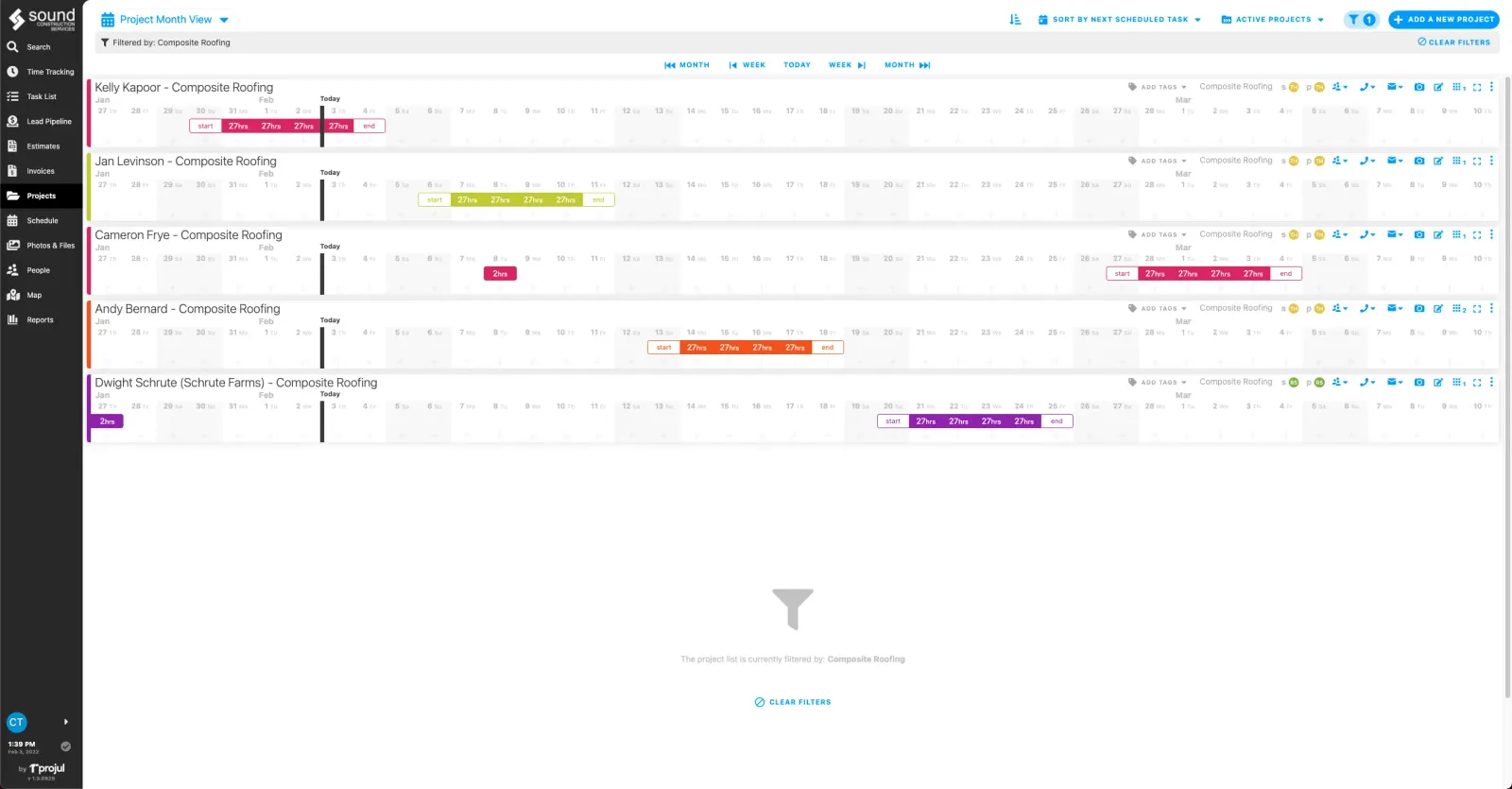
Projul lets you view the big picture for the month, week, or day for your work crew, saving 2+ hours daily on scheduling tasks.
Choose from multiple schedule views and interact easily with your project scheduling, even when the project gets complex.
- Your employee’s schedules are automatically created when you assign tasks.
- Team members stay up to date with instant notifications for task additions or changes.
- Easily template a project schedule with options such as automatically assigning tasks to original crew members or assigning new crew members to a repeating project.
Be savvy with scheduling. Create and assign schedules for your entire crew in advance.
Choose your desired calendar view to clearly see all organized projects, tasks, and milestones in one location.
- Drag and drop scheduling options in multiple scheduling views make scheduling your team easier than ever.
- Include photos, notes, and files with scheduled tasks.
- Use saved templates to create a new schedule or project.
- Clone a previous project schedule and instantly create and notify team members for an entire project.
Managing Multiple Roofing Crews at Once
Once you grow beyond a single crew, scheduling complexity increases dramatically. You might have two or three crews running at the same time, each at a different job site, each needing different materials and equipment.
The challenge isn’t just knowing where each crew goes. It’s knowing what each crew needs and when. Crew A needs the dumpster dropped off at 7 AM. Crew B needs the material delivery by noon. Crew C is finishing up today and needs their next assignment tomorrow morning.
Without a central scheduling system, you become the human switchboard. Every question runs through you. “Where are we going tomorrow?” “Is the material there yet?” “Are we still doing the Johnson job this week?” Your phone rings nonstop.
Projul’s scheduling tools put all of this in one view. Each crew member opens the app and sees exactly where they’re going, what they’re doing, and what’s expected. When something changes, the update goes out automatically. You stop being the answering machine and start being the business owner.
For contractors managing multiple crews, having the right tools is part of a bigger strategy. If you’re in growth mode, check out our guide on how to scale a construction business for more on building systems that support multiple teams.
Why It Works
Templatize Your Projects, Tasks and Estimate
Projul’s templates save contractors $4,788/year in admin time by reusing previous projects and estimates.
Build a task, bid, or project calendar and use the same process repeatedly for new projects. You save time while speeding up your project process.
-
Roofers only use so many materials. Enter them once and voila! Save common roofing materials and labor line items to your template library to use for any future estimates.
-
You don’t roof in July to have your margins cut into. Projul safeguards your profit margins by telling you all your costs and then calculating a gross profit for every estimate.
-
Your time is valuable. Use previous project templates to build an entirely new roofing project with assigned tasks and subtasks, automated notifications to your crew, and a defined schedule, all in less than a minute.
Templates are where roofing contractors see the biggest time savings. Think about it: most residential re-roof jobs follow the same basic pattern. Tear-off on day one, install underlayment and flashing, then shingle on day two or three. The tasks are the same. The materials are mostly the same. The crew assignments follow the same structure.
With templates, you set this up once. Every new re-roof project starts from that template. You adjust the dates, swap in the specific shingle color and quantity, and assign the crew. The entire project is ready in minutes, not hours.
Effortlessly Reschedule Individual Tasks or Entire Projects
Projul’s drag-and-drop scheduling makes rescheduling an individual task or an entire project accurate and simple, with no per-user fees as your team grows.
Concerns can arise. Clients ask for project modifications. Mistakes happen. Sometimes, project schedules need to be changed, but that shouldn’t disrupt your project planning and overall organization. With Projul, move an entire project schedule or an individual task on your project calendar.
- See your entire schedule across multiple roofing projects in the Schedule tab. View clear space on your schedules when the needs arise for rescheduling projects or tasks.
- When you make a change, your crew is instantly notified. That’s a time saver!
- Slide technology allows you to move an entire project to a new date.
Need to make changes to the schedule? Drag and drop scheduling means making changes to an individual task or to an entire project is accurate and simple.
Concerns can arise. Clients ask for project modifications. Mistakes happen. Sometimes, project schedules need to be changed, but that shouldn’t disrupt your project planning and overall organization. With Projul, move an entire project schedule or an individual task on your project calendar.
- See your entire schedule across multiple roofing projects in the Schedule tab. View clear space on your schedules when the needs arise for rescheduling projects or tasks.
- When you make a change, your crew is instantly notified. That’s a time saver!
- Slide technology allows you to move an entire project to a new date.
Track Project Progress with Images and Updates
Projul keeps task lists organized and up to date so crew members can easily pick up where another left off. Over 5,000 contractors use Projul’s photo and note features to stay on the same page.
Thousands of contractors have made the switch. See what they have to say.
Keep your team in sync, organized, and up to date with ongoing projects. Snap photos on the job site to be included right inside individual tasks. Use the image markup feature to create detailed notes. Upload images directly into Projul. Every photo is safely and instantly stored in the Projul cloud.
- Images and notes created in a roofing project are automatically labeled with project information, project type, and the customer’s info, manage all images and keep them readily available.
- Label photos with “Before” and “After” to easily locate photos for your team or customers.
- Using the markup component allows your team to create renderings or take notes directly on an image. The image is linked to the project for future reference and project clarification.
For roofing work specifically, photos serve a dual purpose. They document the condition of the roof before and after the work, which is critical for insurance claims and warranty documentation. And they communicate between crews. If Crew A tears off the old roof and finds damage, they snap a photo and add a note. Crew B, coming in the next morning to install, sees exactly what they’re dealing with before they arrive on site.
Remain Profitable by Creating Estimating and Change Orders
Projul’s estimating tools help roofers see a 32% profit increase by creating accurate, template-based estimates fast.
Build estimates from a template or create a new estimate. Gather digital authorization signatures, win the bid, and immediately add your new job to the calendar.
- Effortlessly customize a new estimation using Projul’s built-in templates or templates you’ve created from your previous estimates.
- Save time on data entry. Input and save expenses into Projul for labor, materials, prices with your specified markup, and your actual costs.
- Sync Projul with your spreadsheets or Quickbooks to input line-items already created and keep your costs consistent.
- Maintain your profit margins and keep your estimates consistent by constructing accurate estimates using your saved templates and automation features.
- Ensure your customer sees only what you want them to see. When you use the toggle on/off button, you can show a full itemized estimate or you can roll up labor and materials costs for a customer view.
- Customers can authorize and add their signature to estimates right from their personal electronic devices.
Change Orders
Protect your profits when changes are made. Conveniently add updated material or labor costs to an existing or final invoice.
Requests for changes can pop-up during roofing projects. Shield your profits and effortlessly add new automated and accurate material and labor costs using built-in change orders.
- Use existing templates in the Projul app to build change orders when the need arises.
- Keep your customers notified of change orders and electronically gather their authorization signatures right in Projul.
- Integration with QuickBooks confirms accurate exports to your accounting procedures.
Send Invoices and Collect Payment Right In Projul
Projul’s invoicing with no per-user fees lets you view current, past due, and upcoming invoices for all your roofing projects, with no per-user fees.
Keep your invoicing process straightforward, precise, and managed when using the Projul software. In just a few minutes, send branded invoices produced directly from estimations and change orders directly to your customers.
- Uncomplicated, powerful, branded invoices confirm your professionalism and trustworthiness.
- Produce precise invoices directly from estimations and change orders.
- Create profit margins using manual calculations, or choose to invoice using a set percentage rate.
- Automatically sync invoices with Quickbooks. Keep your books accurate!
- Customers can easily settle invoices electronically. Digitally track the status of all your open invoices and get paid fast!
Weather, Seasons, and Scheduling: What Roofers Need to Plan For
Roofing is one of the most weather-dependent trades in construction. A scheduling tool for roofers has to account for the reality that your calendar will shift constantly based on conditions outside your control.
During peak season (typically late spring through fall), most roofing companies are booked weeks or months out. The scheduling challenge is fitting in as many jobs as possible without overbooking and creating a domino effect when one job gets rained out.
Here’s how experienced roofers use scheduling software during busy season:
Buffer days. Build one or two buffer days into your schedule each week. When a rain day pushes a job, you have built-in flexibility instead of a cascading disaster.
Weather watch integration. Check the forecast regularly and tentatively flag jobs that might need to move. When you can see the full schedule and weather side by side, you can proactively reach out to homeowners about potential delays instead of scrambling the morning of.
Off-season planning. The slow months are when you prepare for the rush. Set up your templates, clean up your pricing, and build standard project schedules. Contractors who invest in setup during the off-season hit the ground running when the phone starts ringing in spring.
Roofing is hard enough without fighting your tools. The right scheduling and project management software removes the chaos so you can focus on what you’re good at: putting roofs on houses.
How the Right Software Changes Your Daily Routine
Here’s what a typical day looks like for a roofing contractor without scheduling software versus with it.
Without software: You wake up at 5:30 AM and start texting crew members about where they’re going today. Two guys don’t respond. You call them. One asks about the material list. You drive to the first job site to make sure everything’s set up, then drive to the second site to check on the other crew. You get a call from a homeowner asking when you’re starting her job. You check your notebook, can’t find the date, and tell her you’ll call back. By 9 AM, you’ve done zero productive work.
With software: You wake up at 5:30 AM. Every crew member already has their assignment on their phone with the address, task list, and materials needed. You check the app and see both crews have confirmed they’re on the way. A homeowner texts asking about her start date. You open the app, see it’s scheduled for next Thursday, and respond in 30 seconds. By 7 AM, you’re doing an inspection for a new lead. By 9 AM, you’ve already sent two estimates.
That difference in daily routine is why over 5,000 contractors have switched to Projul. The time savings compound every single day, and over the course of a year, it’s the difference between a roofing business that runs you and a roofing business you actually run.
Try a live demo and see how Projul simplifies this for your team.
DISCLAIMERWe make no warranty of accuracy, timeliness, and completeness of the information presented on this website. Posts are subject to change without notice and cannot be considered financial advice.
Frequently Asked Questions
What scheduling software do roofing contractors use?
How do I schedule multiple roofing crews across different job sites?
Can roofing scheduling software handle weather delays?
Does Projul work for both residential and commercial roofing?
Related Articles

Construction Cost Tracking Software
There is nothing worse than reaching the end of the project and realizing you're over budget and made half of what you...
Read More →
Estimating Software For Roofing Contractors
Remember everything frustrating about building bids and estimates for roofing jobs? Stop worrying about forgetting line...
Read More →