
Estimates Converted to Tasks!

Schedule a Demo
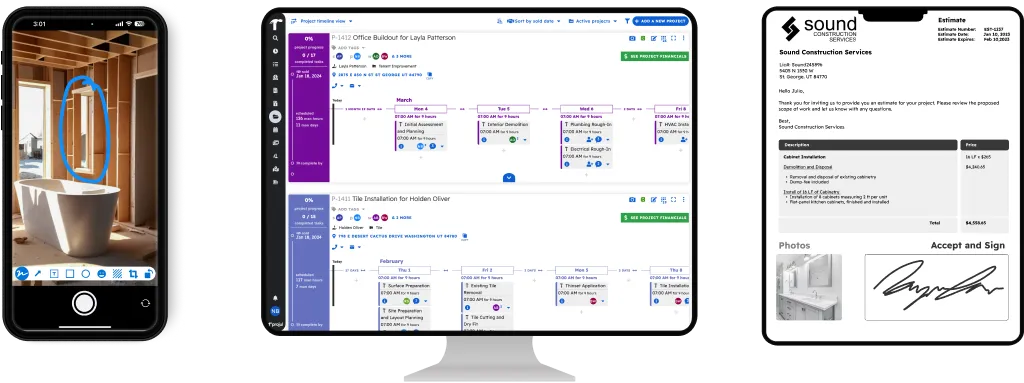
Convert Estimates to Tasks screenshot in Projul construction management software

Convert Estimates to Tasks in Clicks

Projul’s Export Labor to Tasks button converts all estimate labor items directly to unscheduled tasks after an estimate is approved. No retyping. Projul users save 2+ hours daily by eliminating this kind of double entry.

Drag-and-Drop Scheduling

Projul makes assigning and scheduling converted tasks dead simple. Drag and drop unscheduled tasks onto the worker and day you want. Move a task or slide an entire schedule with a couple of clicks. Over 5,000 contractors use Projul’s scheduling tools to keep crews on track without spreadsheets.

Real-Time Project Progress

Projul automatically notifies workers when tasks are scheduled and assigned. As workers mark tasks or steps complete, Projul gives you real-time progress and overall project completion status. With 26+ features connected, Projul brings the job status to you in the office or on the go, no chasing anyone down for updates.

From Approved Estimate to Scheduled Project

Your approved estimates turn into tasks that land right on your schedule. Drag them onto your crew’s calendar and the job is planned. No spreadsheet, no retyping.

Full Visibility in Project Management

Converted tasks feed into project management so you can track progress, assign workers, and see completion status all in one place.

Frequently Asked Questions

How does converting estimates to tasks work in Projul?
After a client approves an estimate, you click the Export Labor to Tasks button. Projul takes every labor line item from the estimate and creates unscheduled tasks for the project. From there, you drag and drop them onto your schedule. No retyping, no double entry.
Does it convert materials or just labor items?
The Export Labor to Tasks feature converts labor line items into tasks, since those are the items that become scheduled work. Materials stay on the estimate for job costing and ordering. This keeps your task list clean and focused on what your crew actually needs to do.
Can I edit the tasks after they're created from the estimate?
Yes. Once tasks are created, you can edit them just like any other task in Projul. Add steps, assign workers, change durations, or reorder them. The conversion gives you a starting point so you're not building the schedule from scratch.
How much time does estimate-to-task conversion save?
Contractors using Projul save 2+ hours daily by eliminating double entry like this. On a typical job with 15-20 labor items, you go from approved estimate to a fully scheduled project in under a minute instead of manually recreating every task.
Does the conversion work with change orders?
When a change order is approved, you can convert its labor items to tasks the same way. Projul adds the new tasks to your existing project schedule so nothing falls through the cracks. Your crew sees the updated work immediately through mobile notifications.
No pushy sales reps Risk free No credit card needed