iOS, Android, Windows & Mac
Manage your company like a Pro in the office or on the go. Projul was designed with both the office desktop and mobile-first attitude to make you and your team more productive anytime and everywhere.
Schedule a Demo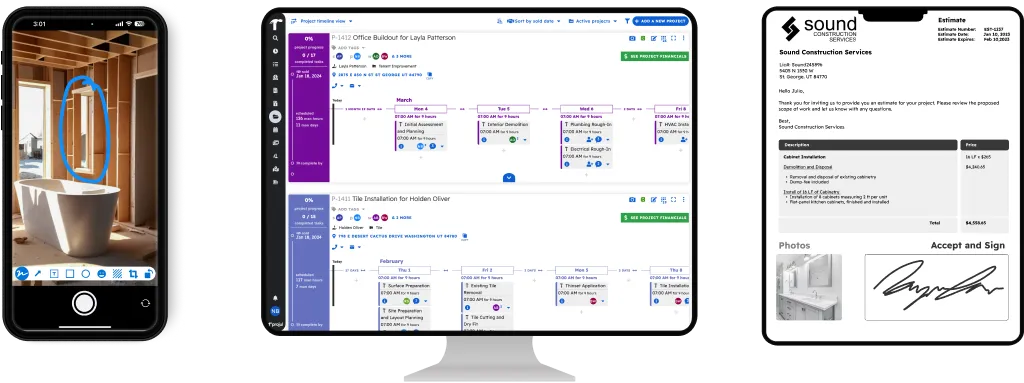
Designed to Be Powerful on the Go or in the Office
Projul’s mobile apps were built to be just as powerful in the field as they are in the office. Over 5,000 contractors use Projul on their phones, tablets, and desktops every day to manage schedules, track time, send estimates, and communicate with their crews.
Projul was designed from the ground up using the latest cloud, app, and browser technologies. You get optimized displays and performance on Android, iOS, tablets, laptops, and desktops, all from a single platform.
Available on iPhone, iPad & Android Devices
Projul’s native apps are available in both the Apple App Store and Google Play Store. Download it, sign in, and your entire business is in your pocket, projects, contacts, schedules, documents, and photos. With a 9.8 out of 10 G2 rating for ease of use, your crew will be up and running fast.
For the best experience with all of Projul’s features, use the dedicated apps or run Projul in Google Chrome on any device.
Browser Support on Any Device
Projul supports all secure modern browsers including Chrome, Edge, Safari, and Firefox on Windows, Mac, Linux, iOS, and Android. With no per-user fees on any plan, your estimator on a MacBook, office manager on a Windows desktop, and foreman on a Samsung tablet all use Projul without extra cost.
For the absolute best performance, use Projul’s native apps or run Projul in a Chrome-based browser on any device.
How Projul’s Cross-Platform Access Works
Projul shows the same projects, documents, and schedules on your phone at the job site as your office team sees on their desktops. Updates sync across all devices in real time. A daily log your crew submits from an Android phone shows up immediately for your project manager on a Mac.
Projul includes no per-user fees, unlimited projects, and no per-device or per-platform charges. Plans start at $4,788/year, and your field guys, estimators, and office staff all work from the same system without extra licensing headaches.
Why a Real App Matters
Not all “mobile apps” are created equal. Some construction platforms use Progressive Web Apps (PWAs) instead of native apps. A PWA is basically your web browser pretending to be an app. You open your browser, save a bookmark to your home screen, and it looks like an app icon. But under the hood, it’s still a web page.
Here’s why that matters for contractors:
Geofencing requires native GPS access. Geofencing sets a virtual boundary around your job site and automatically verifies that crew members are on-site when they clock in. This requires direct access to your phone’s GPS hardware, which only a native app can provide. Browser-based solutions can request location once, but they cannot run persistent background location tracking needed for reliable geofencing.
Offline time tracking requires native storage. When your crew is at a rural site with no signal, a native app stores clock-in data on the device and syncs it when service returns. Browser-based apps depend on cache, which can be cleared by the phone’s operating system at any time. If the cache clears, your crew loses their time entries.
Photo documentation requires native camera access. Native apps connect directly to your phone’s camera for fast photo capture, automatic project tagging, and background uploads that don’t fill up your crew’s personal photo storage. Browser-based apps use a file picker, which adds extra steps and doesn’t support background uploads.
Push notifications are reliable only on native apps. Schedule changes, task assignments, and time reminders need to reach your crew immediately. Native push notifications on iOS and Android are consistent and reliable. Browser-based notifications on iOS are limited and frequently missed.
App store distribution means easy setup. Your crew opens the App Store or Google Play, searches for Projul, taps Install, and they’re set. No walking someone through “open Safari, tap the share button, scroll down, tap Add to Home Screen.”
Projul’s native apps for iOS and Android are built specifically for each platform. They’re available in the Apple App Store and Google Play Store, and they give your field crew the same tools your office team uses on a desktop.
Cross-Platform Access vs. the Old Way
Before Projul, most contractors ran separate systems, desktop software at the office, a different app on the phone, and paper in the field. Information got lost between the gaps. Your foreman would text photos that ended up buried in someone’s camera roll. Job notes lived in a notebook in someone’s truck.
Projul eliminates that disconnect. One platform on every device. Contractors report saving 2+ hours daily just by having their entire business accessible from wherever they are.
Stay Connected With Your Crew in the Field
Real cross-platform access means mobile notifications actually reach your crew on whatever device they’re carrying. Pair that with construction communications and your team stays coordinated without constant phone calls, whether they’re on an iPhone at the job site or a Windows desktop in the office.
Track Time and Documents From Any Device
Your field workers can clock in with geo-fenced time tracking right from their phones, and snap job site photos that upload automatically to the project. It all syncs instantly, so your office team sees everything in real time on their desktops.