Slide Project Schedules
Problems occur, customer scope creep happens, and tradesmen get sick. Projul timeline and schedule slide technology will change your life! It's never been easier to make lots of changes to a project schedule.
Schedule a Demo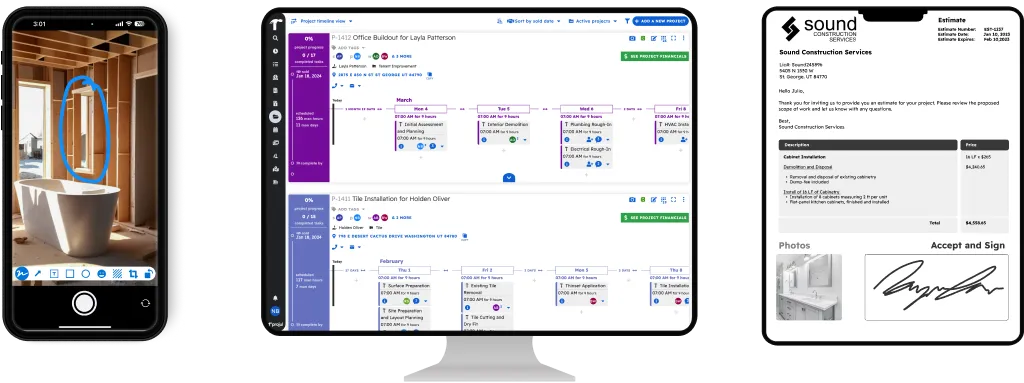
Absolutely Painless Re-Scheduling
Projul’s innovative scheduling timeline view allows you to easily slide, move, or adjust all tasks at once, in just a couple of clicks. Over 5,000 contractors use Projul’s slide feature to handle the schedule disruptions that happen on every job.
It’s never been easier to manage the schedule of your entire crew and all of your projects. Projul gives you the power to quickly deal with changes that occur on a job site. Powerful yet simple.
Innovative Timeline
Projul’s project timeline gives you a visual overview of every active job in one view, over 5,000 contractors use it as their daily command center. Drag and drop tasks to reschedule, click into any project for details, and see crew assignments across all your jobs at a glance.
With 26+ feature areas connected to the timeline, you can shift schedules, add tasks, clone projects, send estimates, and communicate with your crew, all without leaving the timeline view. Rated 9.8 out of 10 on G2 for ease of use, Projul’s timeline is built for contractors who manage multiple jobs at once and need to see the big picture fast.
Pull or Push Your Schedules
Projul’s built-in slide technology lets you push or pull an entire schedule, or any group of tasks, up and down your project timeline in seconds. Rated 9.8 out of 10 on G2 for ease of use, the drag-and-drop interface makes rescheduling painless.
Select the tasks you want to move, drag them to the new dates, and done. The whole sequence shifts together, no recalculating every task date one at a time.
Automatic Worker Notifications
Projul automatically notifies every assigned worker when a schedule changes, no group texts, no phone trees. with no per-user fees and unlimited projects, every crew member stays in the loop at no extra cost.
Slide an entire project schedule out with all of its tasks and every assigned worker will automatically be notified. No hoping everyone got the message. Projul handles the communication so you can focus on running the job.
Project Sliding vs. Manual Rescheduling
Without Projul, rescheduling means opening a spreadsheet, adjusting every date by hand, and then calling or texting every affected worker. A rain delay on Monday turns into an hour of administrative work just to move everything out a day.
Projul’s slide feature turns that into a 30-second task. Drag the schedule to the new dates and your crew gets notified automatically. Contractors who use Projul’s scheduling tools report saving 2+ hours daily on schedule management across their active projects.
See the Slide on Your Gantt
After you slide a schedule, the interactive Gantt view updates instantly. Every task, dependency, and deadline shifts together so you can see the full picture at a glance.
Sliding Works With Your Whole Schedule
Project sliding ties into scheduling and project management so the dates your crew sees on their phones match the timeline you just adjusted. One change, everyone’s updated.