Construction Daily Logs Your Crew Will Actually Fill Out
Projul Daily Logs record what happened on every job, every day. Weather and crew hours fill in for you, so your crew confirms the day instead of writing it from scratch.
- Weather fills in from the job site address, and crew hours come from the time clock
- Sign and lock each log, with every later correction on the record
- Send clients a clean PDF that leaves out crew names, hours, and safety entries
Every Job, Every Day, on the Record
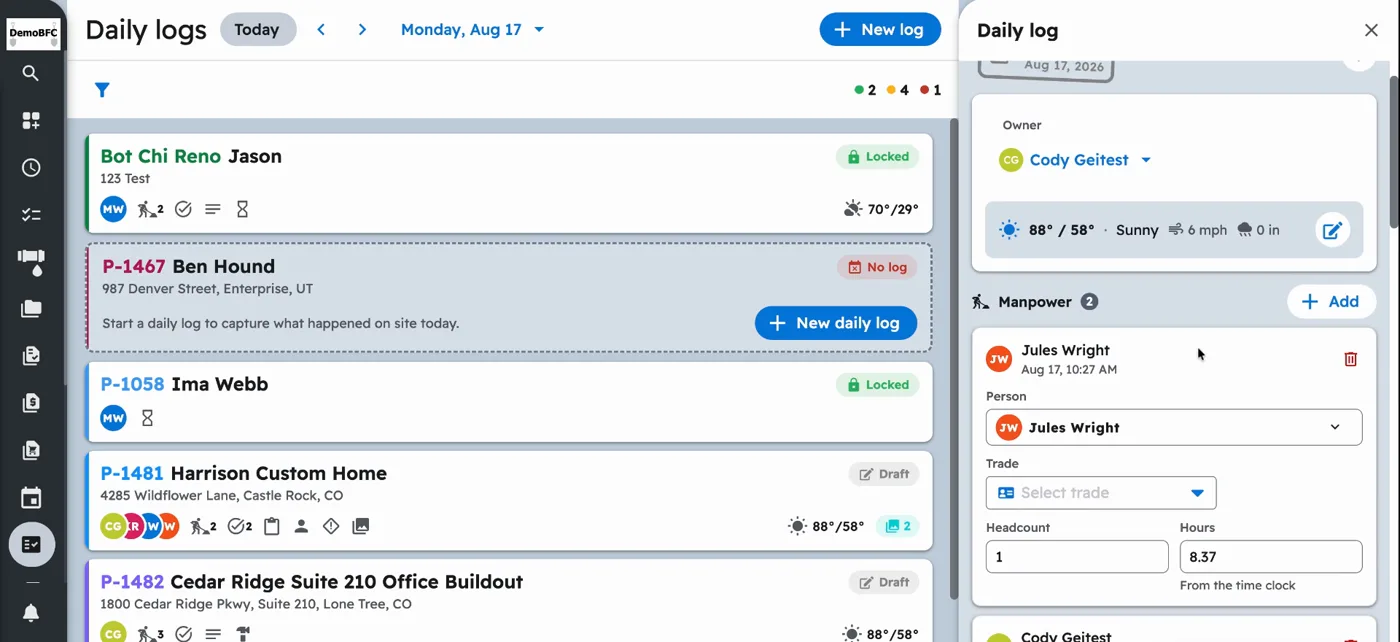
Projul Daily Logs give each project one record per day: the weather, who was on site and for how long, what got done, what was delivered, who stopped by, what slowed the job down, and photos of all of it. Your crew fills it out from their phone in a few minutes, and the office sees it as it’s filed.
Because the weather and crew hours fill in on their own, the log doesn’t depend on someone remembering to write everything down at the end of a long day.
Tasks plan the work. Daily logs record what happened. Tasks and to-dos tell your crew what to do next. The daily log is the record of what actually got done, who was there, and what got in the way. Both live on the same project, and the log can suggest entries from the tasks your crew finished that day.
See a Day Logged, Start to Finish
This two-minute video walks through a full day:
- Weather fills in on its own
- Entries are suggested from completed tasks
- A crew member adds photos from their phone
- Hours come in from the time clock
- The log is signed, locked, and emailed to the client
What Goes in a Daily Log
Crew and work
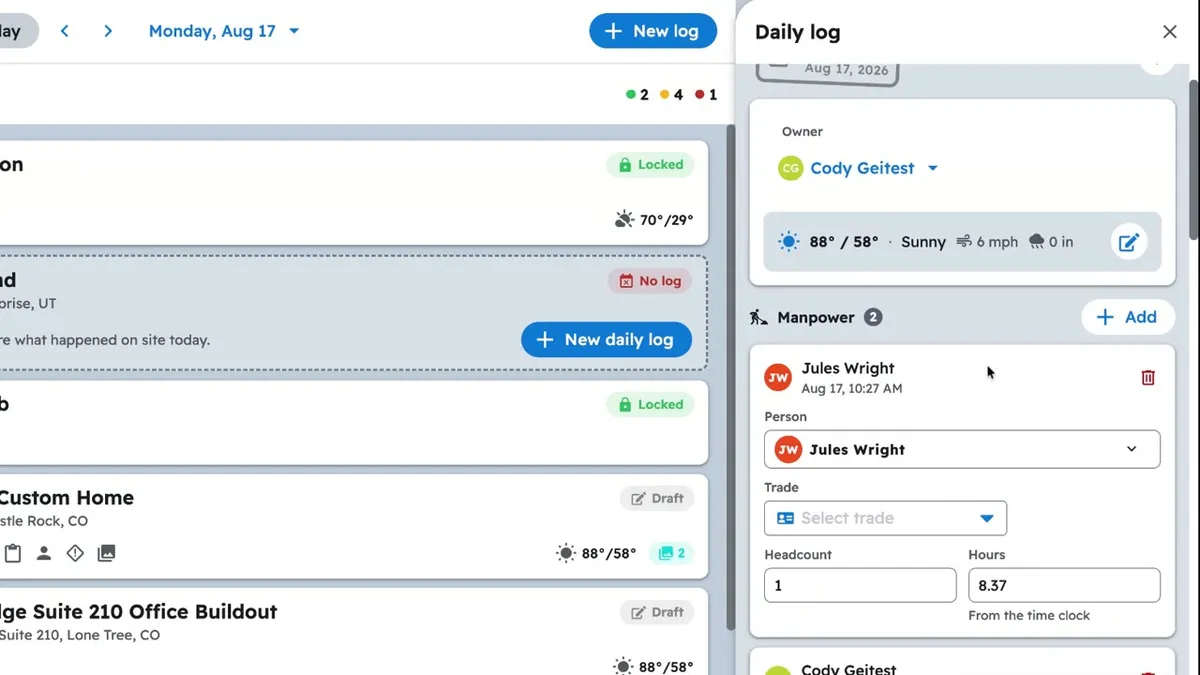
- Manpower: each person, their trade and company, headcount, and hours
- Work performed: what got done, in your crew’s words
- Notes: anything that doesn’t fit anywhere else
Site conditions
- Weather: high and low, conditions, wind, and precipitation
- Delays: weather, material, labor, or inspection, with the hours lost
- Safety: what happened, how severe, and whether it’s reportable
Materials and visitors
- Deliveries: vendor, what arrived, quantity, and who received it
- Equipment: what ran, and how many hours it worked or sat idle
- Visitors: inspectors, clients, and engineers, with time in and time out
Photos
- Take photos on site or pick them from the project’s gallery
- Add photos your crew already took on that day’s tasks
- Markups from the photo editor carry into the log
Add only the entries that happened that day. A quiet day might be crew hours, a line of work performed, and two photos.
Less Typing for Your Crew
- Weather is automatic. Projul looks up the weather for the project’s address when the log is started. If your crew changes it, the log shows it was entered by hand.
- Crew hours come from the time clock. Add someone to Manpower and the hours they clocked on that project that day fill in for you.
- Suggestions from the day’s work. Projul suggests entries from the tasks your crew completed and the time they clocked.
- Copy a previous day. Pick an earlier log and bring forward the entries you need, like the same crew or equipment.
- Saved text. Keep reusable wording for work performed and notes, so common updates take a tap.
A Record You Can Stand Behind
When the day is done, finish and lock the log with a typed or drawn signature. Once it’s locked, the log is read-only.
If something needs fixing later, it’s added as an amendment that shows the old value, the new value, who changed it, when, and why. The original content stays sealed, so anyone reading the log months later can see exactly what was recorded on the day and what changed after.
Your company can also require certain sections before a log can be signed, so logs don’t get locked half done.
Share the Day With Your Client
Send a daily log to your client by email with a PDF attached. The client-facing copy shows the work performed, notes, photos, weather, and crew totals by trade. It leaves out individual names and hours, deliveries, equipment, visitors, delays, safety entries, and amendments. Your team keeps a full internal copy with everything.
Clients see steady progress without extra phone calls, and nobody has to clean up a log by hand before sending it.
Never Miss a Day
Turn on daily log reminders and Projul checks every active project at the time you choose. If someone clocked in or a task was scheduled but no log was started, the project team gets a reminder that day and again the next day.
The Daily logs list shows which days are logged, which are still drafts, and which are missing, so gaps are easy to spot and fill.
Built for the Field
- Works offline. Projul’s mobile app is a real app from the App Store and Google Play, so entries and photos save on the phone and upload when the signal comes back.
- One log per project per day. If two people start the same day’s log, their entries land in the same log.
- Subcontractors can add their own entries. Subs assigned to the project add and edit their own entries. Signing and locking stay with your team.
- Set it up your way. Add custom header fields, set a company default template, and give specific projects their own template.
- Right there when you need it. Open today’s log from the project, from a task, or from the time clock screen.
- In English and Spanish. Daily logs work in the Spanish version of Projul too.